These notes tour the parts of Rust a newcomer meets first. Ownership, immutability and lifetimes let the compiler reject unsafe code before it runs. Traits describe behavior that different types share. Option, Result and custom error types handle failure without nulls or exceptions.
1Safety by design
Mozilla intended to use Rust as a platform for prototyping experimental browser architectures. The hope was a browser that is more amenable to safe and parallel code than the existing ones, while being less prone to common C++ coding errors.
1.1Ownership
- Each value in Rust has a variable called its owner. There can only be one owner at a time.
- When the owner goes out of scope, the value is dropped.
- Variable scope is the range within a program for which an item is valid.
Take this example:
let x = String::from("hello");

let y = x;
This creates variable x on the stack with length 5, capacity 5 and a pointer to the heap, where the content lives. When you assign y = x, Rust invalidates x (it is no longer usable) and y takes over the pointer to the same heap data.
Now take another example:
let x = 5;

let y = x;
Here x is still usable after the assignment. An integer lives entirely on the stack, and its type implements the Copy trait. Copying a stack value is much cheaper than copying a heap type such as String.
So Rust lets a type implement Copy when its values live on the stack: integer types, booleans, floating-point types, characters, and tuples that only contain those types. Types that allocate memory on the heap implement Drop instead. A variable of such a type is dropped when it goes out of scope. If you try to implement Copy for it, you get a compile-time error.
1.2Immutability by default
Variables in Rust are immutable by default and cannot change throughout their lifetime. This is how Rust handles a large class of safety problems. When everything is immutable unless declared otherwise, the compiler can easily pick up side effects and mutation at compile time and guarantee that the application behaves correctly.
1.3Declaring variables
In Go, a declaration gets a zero value:
var x int // x = 0, a.k.a. zero value
In Rust, a declaration without a value cannot be used until you assign one:
let x: i64 // x is an unassigned value, it cannot be used until x = somevalue
1.4Expressions instead of statements
Rust is primarily an expression language. Most forms of value-producing or effect-causing evaluation are directed by the uniform syntax category of expressions. Each kind of expression can typically nest within each other kind, and the rules for evaluating an expression specify both the value it produces and the order in which its sub-expressions are evaluated.
Statements in Rust serve mostly to contain and explicitly sequence expression evaluation.
That lets you write code like this:
let y = if x == 5 {
    10 // y = 10
 } else {
    15 // y = 15
}
1.5Lifetimes
Lifetimes come from borrowing. They are how the compiler checks whether you use a variable that someone else has borrowed. Rust will compile this:
fn main() {
    let x;
    {
        let y = 5;
        x= &y
    }
    println!("{}",x)
}
into something like this:
fn main() {
   'a: {
        let x;
        'b: {
            let y = 5;// y have an amount of 'b lifetime(let say: 10 energy)
            x= &y// so y will be no longer valid when it out of energy
        }// when y go here, it runs out of energy <=> energy = 0
// therefore, Rust compiler can know that, oh, y is no longer exist
// and then x trying to borrow it
// x is now borrowing from the deallocated memory
    println!("{}",x)
   }
}
So whatever you do with borrowing, Rust must know the lifetime of the borrowed value. If you do not provide it, the compiler stops you with the error missing lifetime specifier.
For example, you hit this error when a function takes parameters by borrow and returns a borrowed value, or borrows a parameter inside the function. Rust needs to know how long the reference lives:
fn largest(x: &i64,y: &i64) -> &i64 {
    if x > y {
        x
    } else {
        y
    }
}

fn main() {
        let x;
        {
            let y = 5;
            x = &y;
            println!("{}", largest(&x, &y))
        }
}
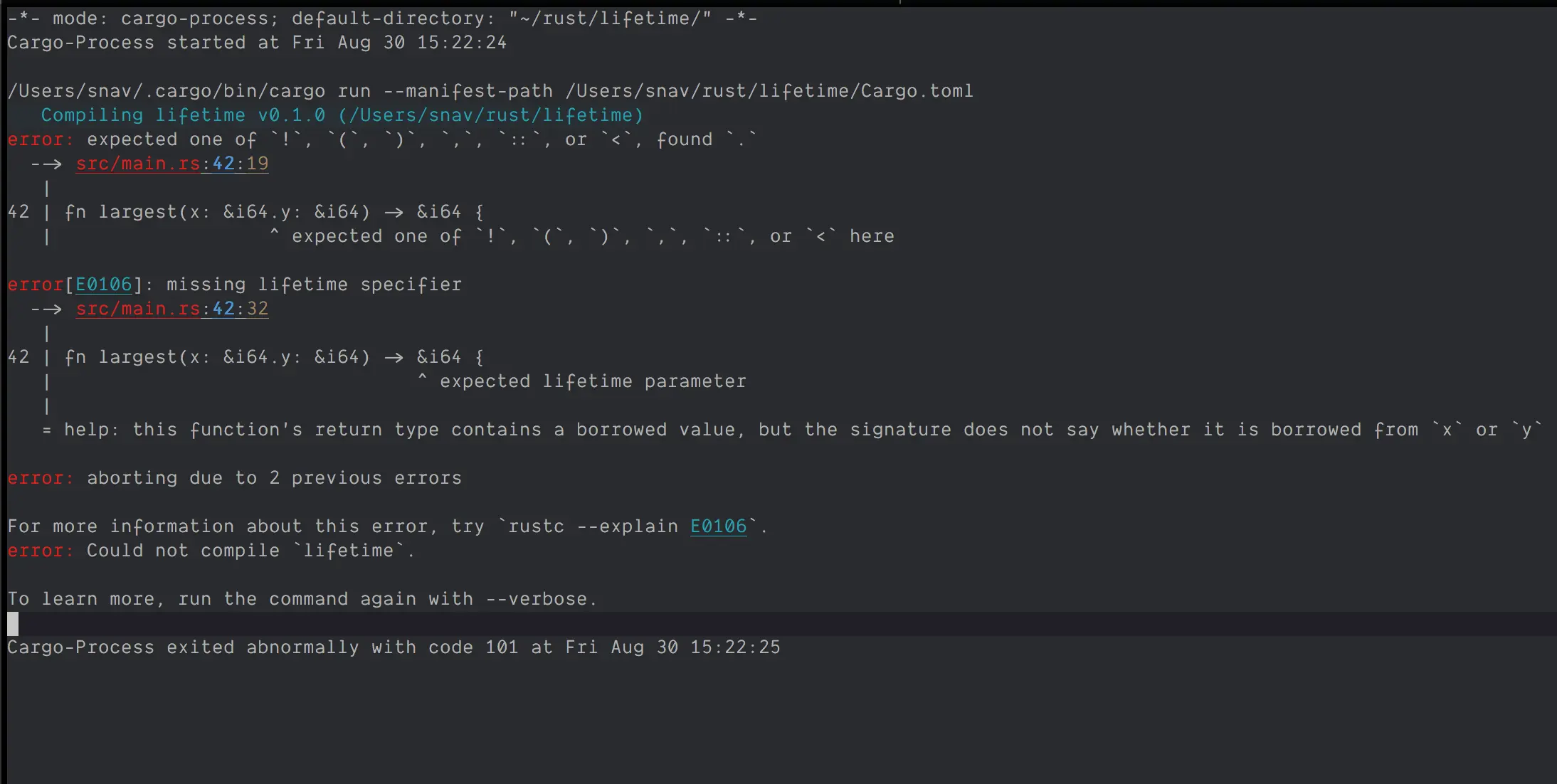
To correct the function, put the lifetime on the parameters and the return type:
fn largest<'a>(x: &'a i64, y: &'a i64) -> &'a i64 {
   if x > y {
       x
   } else {
       y
   }
}
2Traits
A trait is a collection of methods that types can implement to define shared behavior. Think of traits as a way to express what abilities a type should have, without dictating its internal structure. That promotes abstraction and allows code that is more generic and adaptable. Traits are similar to a feature often called interfaces in other languages, though with some differences.
2.1Defining a trait
trait Shape {
    fn area(&self) -> f64;
}
This defines a trait named Shape with a single method, area. Various types can implement the trait and provide their own area.
2.2Implementing a trait
To use a trait, a type implements it by providing its own implementation for each of the trait's methods. This is done with the impl keyword.
struct Circle {
    radius: f64,
}

impl Shape for Circle {
    fn area(&self) -> f64 {
        std::f64::consts::PI * self.radius * self.radius
    }
}
Instances of Circle can now use the functionality the Shape trait provides.
2.3Default implementations
A trait can provide a default implementation for its methods. Implementing types can override the default if they need to. Here the Shape trait gains a default perimeter method:
trait Shape {
    fn area(&self) -> f64;

    fn perimeter(&self) -> f64 {
        0.0 // Default implementation for perimeter
    }
}

struct Circle {
    radius: f64,
}

impl Shape for Circle {
    fn area(&self) -> f64 {
        std::f64::consts::PI * self.radius * self.radius
    }
}
Any type implementing Shape now has a perimeter method, and it can supply its own version.
2.4Traits as parameters
Traits can be function parameters, which gives you polymorphism and more flexible code. This function calculates and prints the area of any type that implements Shape:
fn print_area(shape: impl Shape) {
    println!("Area: {}", shape.area());
}

fn main() {
    let circle = Circle { radius: 3.0 };
    print_area(circle);
}
print_area takes any type that implements the Shape trait, so you can use it with different shapes without changing its code.
2.5Trait bounds
A trait bound states that a generic type must implement a certain trait:
fn print_area<T: Shape>(shape: T) {
    println!("Area: {}", shape.area());
}

fn main() {
    let circle = Circle { radius: 3.0 };
    print_area(circle);
}
print_area now accepts any type T, as long as T implements Shape. With implementations, default behavior, trait parameters and trait bounds, you can write modular code that promotes reuse and adds polymorphism.
3Error handling
Rust sorts errors into two kinds: unrecoverable and recoverable. The split lets you manage errors deliberately and keeps code reliable.
3.1Unrecoverable errors with panic
An unrecoverable error occurs when something goes fundamentally wrong and the program cannot safely proceed. For example, a file the program needs in order to run may be missing or corrupted. The program can then panic and show an appropriate error message. Rust handles this with the panic! macro. When a panic! occurs, the program stops, unwinds the stack and prints a clear panic message.
fn main() {
    let divisor = 0;

    if divisor == 0 {
        panic!("Division by zero error occurred!");
    }

    let result = 10 / divisor;
    println!("Result: {}", result);
}
Panicking is not the answer to every error. It is a strong way to signal critical issues and to stop the program from continuing in an undefined state.
3.2Recoverable errors
A recoverable error is a situation the program can handle gracefully before it carries on. Rust gives you two types for this: Option and Result.
3.3Option for missing values
Option is for a computation that might return a value or nothing. It removes the need for null or undefined values, which makes code safer.
fn find_element(arr: &[i32], target: i32) -> Option<usize> {
    for (i, &elem) in arr.iter().enumerate() {
        if elem == target {
            return Some(i);
        }
    }
    None
}

fn main() {
    let arr = [1, 2, 3, 4, 5];
    let target = 3;

    match find_element(&arr, target) {
        Some(index) => println!("Element found at index: {}", index),
        None => println!("Element not found"),
    }
}
3.4Result for operations that can fail
Result is similar to Option but has an Err variant that holds information about the error. That makes it the fit for functions that may fail.
use std::fs::File;

fn open_file(file_path: &str) -> Result<File, std::io::Error> {
    File::open(file_path)
}

fn main() {
    let file_path = "example.txt";
    match open_file(&file_path) {
        Ok(file) => {
            // File opened successfully, continue with further operations
            println!("File opened successfully!");
            // ...
        }
        Err(error) => {
            // Error occurred while opening the file, handle it appropriately
            println!("Error opening file: {}", error);
            // ...
        }
    }
}
3.5Using unwrap and expect
unwrap and expect are convenient but need care. They extract the value from an Option or Result and panic if it is None or Err. They can simplify code, but heavy use leads to unexpected panics.
use std::fs::File;

fn open_file(file_path: &str) -> Result<File, std::io::Error> {
    File::open(file_path)
}

fn main() {
    let file_path = "example.txt";
    let file = open_file(&file_path).unwrap();

    println!("File opened successfully!");
}
3.6Early return with the question mark operator
The ? operator propagates errors early in a function. You can use it with functions that return Result or Option. It unwraps the value, or returns early when there is an error.
use std::fs::File;
use std::io::{self, Read};

// A function that reads a file and returns the content as a String
fn read_file_content(file_path: &str) -> Result<String, io::Error> {
    // Attempt to open the file
    let mut file = File::open(file_path)?;

    // Read the content of the file into a String
    let mut content = String::new();

    // Use the ? operator to handle the Result returned by read_to_string
    // If an error occurs, it is returned immediately.
    file.read_to_string(&mut content)?;

    // Return the content
    Ok(content)
}

fn main() {
    // Specify the file path
    let file_path = "example.txt";

    // Attempt to read the file and handle the result
    match read_file_content(file_path) {
        Ok(content) => {
            println!("File content:\n{}", content);
        }
        Err(error) => {
            eprintln!("Error reading the file: {}", error);
            // Handle the error as needed
        }
    }
}
3.7Handling multiple errors with custom error types
So far each example handled a single error. A function may return several kinds of error, and you may want the caller to identify and handle each one. For that, Rust lets you implement your own error type.
#[derive(Debug)]
enum MyError {
    Io(std::io::Error),
    Parse(std::num::ParseIntError),
}

fn read_and_parse(path: &str) -> Result<i32, MyError> {
    let file_content = std::fs::read_to_string(path);

    match file_content {
        Ok(file_content) => match file_content.trim().parse::<i32>() {
            Ok(num) => Ok(num),
            Err(err) => Err(MyError::Parse(err)),
        },
        Err(err) => Err(MyError::Io(err)),
    }
}

fn main() {
    let file_path = "example.txt";

    match read_and_parse(file_path) {
        Ok(parsed_value) => {
            println!("File content parsed successfully: {}", parsed_value);
        }
        Err(my_error) => {
            eprintln!("Error: {:?}", my_error);

            // You can also perform specific error handling based on the error variant
            match my_error {
                MyError::Io(io_error) => {
                    eprintln!("IO Error Details: {}", io_error);
                    // Additional IO error handling logic can be added here
                }
                MyError::Parse(parse_error) => {
                    eprintln!("Parse Error Details: {}", parse_error);
                    // Additional parse error handling logic can be added here
                }
            }
        }
    }
}
You cannot use ? on std::fs::read_to_string(path) here. If an error occurs, ? tries to convert the error (std::io::Error or std::num::ParseIntError) into MyError, and it does not know how. To fix this, implement the From trait on the custom error.
impl From<std::io::Error> for MyError {
    fn from(err: std::io::Error) -> MyError {
        MyError::Io(err)
    }
}

impl From<std::num::ParseIntError> for MyError {
    fn from(err: std::num::ParseIntError) -> MyError {
        MyError::Parse(err)
    }
}

// We can finally rewrite read_and_parse
fn read_and_parse(path: &str) -> Result<i32, MyError> {
    let file_content = std::fs::read_to_string(path)?;
    let num = file_content.trim().parse::<i32>()?;
    Ok(num)
}
3.8Making your error composable
The custom error works, but experienced developers recommend implementing the std::error::Error trait for custom errors. Then your error composes easily with the rest of the program, and users can get a string representation of it. This needs implementations of both fmt::Debug and fmt::Display.
#[derive(Debug)]
enum MyError {
    Io(std::io::Error),
    Parse(std::num::ParseIntError),
}

impl std::error::Error for MyError {
    fn source(&self) -> Option<&(dyn std::error::Error + 'static)> {
        match self {
            MyError::Io(err) => Some(err),
            MyError::Parse(err) => Some(err),
        }
    }
}

impl std::fmt::Display for MyError {
    fn fmt(&self, f: &mut std::fmt::Formatter<'_>) -> std::fmt::Result {
        match self {
            MyError::Io(err) => write!(f, "IO error: {}", err),
            MyError::Parse(err) => write!(f, "Parse error: {}", err),
        }
    }
}