Go pushes composition over inheritance, so the unit you build with is different from other languages. In Go, packages serve as the basic building blocks for creating modular, reusable and maintainable software, and the language encourages you to organize code in a package-oriented way.
This playbook collects five notes from October 2024 into one page. It starts with the package as the unit, then follows the package outward: how its import path works, how to extend what it exposes, how its errors travel, and how generics keep it type safe.
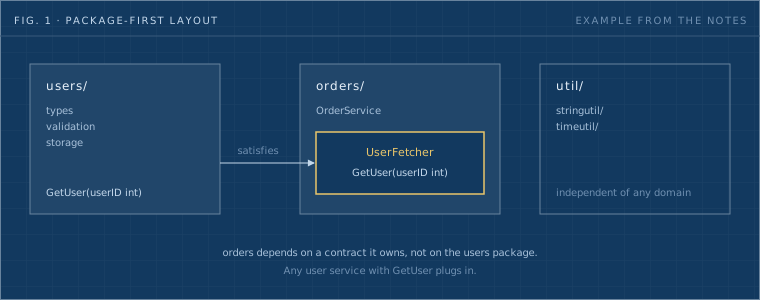
Fig. 1: A package-first layout from the example in rule 1. The orders package owns the interface it needs, and any user service that fits plugs in. The layout is the notes' example, not a Dwarves repository.
This series has 3 parts. Each one reads on its own.
- Rules 1 and 2: packages and import paths (this page)
- Rules 3 and 4: wrapping and error patterns
- Rule 5 and the checklist: generics and type safety
| # | Rule | In one line |
|---|---|---|
| 1 | Treat packages as the base unit | One purpose per package, unexported by default, tests beside the code. |
| 2 | An import path is a repository path | The git path gives each package a unique identity, and go.mod pins the version. |
| 3 | Extend by wrapping, not by editing | Embed or wrap an existing type to add behavior and leave the original code alone. |
| 4 | Choose the error pattern on purpose | Each of eight patterns has a rule of thumb and a failure mode. |
| 5 | Let constraints carry the type safety | Type parameters and constraints are checked at compile time, so a wrong type never gets through. |
Treat your packages as base units. From the outset, structure the project into reusable, well-encapsulated packages, each with a clear purpose.
Encapsulation and exporting. By default, Go keeps all symbols (functions, variables, constants, types) within a package private unless they are explicitly exported. Exported symbols start with an uppercase letter. This enforces encapsulation: only what is necessary reaches external users, and the internal details stay hidden.
For example:
// This function is public and can be used outside the package.
func Add(a, b int) int {
    return a + b
}

// This function is private to the package.
func subtract(a, b int) int {
    return a - b
}
Separation of concerns. Each package should serve a single purpose or set of related tasks. This makes the codebase more understandable and easier to maintain.
If you are building a web server, for instance, you might separate concerns into packages like:
- http: handles HTTP requests and responses.
- router: manages routing of different endpoints.
- db: manages database interactions.
Directory structure. Go's tooling is designed to work with a package-oriented directory structure. Each directory contains its own package, which other parts of your project can import.
Here is an example directory structure:
myproject/
  ├── go.mod
  ├── cmd/            // For command-line tools and executables
  │   └── myapp/
  │       └── main.go
  ├── pkg/            // For libraries and reusable code
  │   └── http/
  │       └── handler.go
  ├── internal/       // For non-public packages
  │   └── config/
  │       └── config.go
  └── vendor/         // Third-party dependencies (if needed)
Testing in packages. Each package should contain its own unit tests, in the same directory as the package, following Go's testing framework. Test files carry the _test.go suffix and can test both exported and internal functions of a package.
Example:
// In mathutil/add_test.go
package mathutil

import "testing"

func TestAdd(t *testing.T) {
    result := Add(2, 3)
    if result != 5 {
        t.Errorf("Expected 5, but got %d", result)
    }
}
Modularity and reusability. Distinct packages give you reusable building blocks. Teams can share them across projects, and since Go's import system relies on unique paths, there is no conflict as long as each package's import path is unique.
Keep reusability in mind from the start, so your code stays modular, maintainable and adaptable for future projects. All the examples below demonstrate the approach and are not a prescribed layout.
1. Identify core domains and reusable utility needs.
- Define key domains: break down the main areas of functionality in your project, such as users, orders or products for an e-commerce app.
- Identify reusable utilities: list generic functionality, like string manipulation or date formatting, that multiple domains might need. Plan specific utility packages for these, separate from domain logic.
Example structure:
myproject/
  ├── users/
  ├── orders/
  └── util/
       ├── stringutil/
       └── timeutil/
2. Design each package to be self-contained and purpose-driven.
- Each package should have a single responsibility, encapsulating everything it needs for its function. This makes it easier to reuse entire packages across projects.
- Avoid mixing different concerns. A users package, for example, should contain everything about user management (types, validation, storage) without unrelated functions.
With a single responsibility, you can reuse the package in another project without modification.
3. Create generalized, flexible functions.
- When writing functions within a package, think about how they might be used in other contexts. Avoid overly specific parameters or hardcoded values that tie a function to one scenario.
- For instance, instead of a ValidateUserEmail function, create a ValidateEmail function in a validation utility package, so it applies to emails in any domain.
4. Use interfaces to decouple dependencies.
- Define interfaces to allow flexible interactions between packages. Instead of calling functions from another package directly, define an interface in the calling package. Different implementations can then be plugged in as needed.
- For example, if orders needs data from users, create an interface in orders that describes only the needed methods. Any User service that meets this interface can be used.
// orders/service.go
package orders

type UserFetcher interface {
    GetUser(userID int) (User, error)
}

type OrderService struct {
    UserService UserFetcher
}
Interfaces like this raise reusability because each package relies on general contracts rather than specific implementations.
5. Structure utility packages for broad use.
- Create focused utility packages that are purpose-driven and independent of specific domains. For instance, stringutil could contain generic string functions, while timeutil could handle time parsing and formatting.
- Organized this way, utilities are reusable across any project or domain.
This avoids the common catch-all utils package and keeps unnecessary dependencies out of reusable functions.
6. Document with reusability in mind.
- Write clear documentation for each package: its purpose, its public API, and how to use it. Write it for another developer (or future you) who may reuse the package in a different context.
- For utility functions, provide examples in the documentation to clarify their general use.
Good documentation makes it easier for others to understand and adopt your package.
7. Write independent unit tests for each package.
- Write tests that validate each package's functionality independently of the rest of the project. This ensures correctness and supports reuse, because each package can be reused with confidence and without extra testing.
- Use test files (ending with _test.go) within each package and test each function's behavior as if it were in a standalone environment.
8. Refactor with reusability in mind.
- As you add features, review and refactor so packages stay focused and reusable. If a package accumulates functions that do not belong, move them into new packages and keep each package aligned with its single responsibility.
Periodic refactoring keeps packages easy to understand, maintain and reuse, and avoids monolithic packages that are hard to untangle or apply to new contexts.
- Code organization: small, focused packages keep the code clean and organized.
- Reusability: once written, a package can be reused in many projects or in different parts of a large project.
- Maintainability: a well-structured package layout makes code easier to maintain, modify and extend.
- Collaboration: teams can work on separate packages concurrently, because each package is an independent unit of functionality.
- Testing and debugging: each package is modular, so testing is easier and debugging stays within the context of one package.
Go's import system, linked directly to git repository paths, was crucial to its early adoption. Unlike most languages, Go ties version control to package management, which improves the developer experience and reusability.
Using the git repository URL as the import path gives each package a unique identity. That removes namespace conflicts and simplifies dependency management.
Example:
import "github.com/username/projectname/package"
This avoids complex dependency tools and keeps packages isolated and traceable, a simple structure that keeps Go codebases clean and organized.
Global uniqueness. Git paths give each package a unique identifier (for example github.com/user/repo/package). That avoids namespace issues, especially in large projects with many dependencies.
Direct version control. Go modules let developers pin dependencies to specific git tags or commits, which gives reproducible builds without a central registry. Any git repository, public or private, can serve as a Go package source, which reduces reliance on third-party registries.
Modularity and reusability. Git paths encourage modular, self-contained packages that are easier to reuse and maintain. Direct links to git repositories also simplify code inspection and troubleshooting.
Most other languages, like Python, Java and Ruby, rely on centralized registries (for example PyPI and Maven) where packages are fetched by name, which often leads to naming conflicts. Go's git-based identifier provides a direct source link and removes the need for centralized naming conventions. Go developers can pull packages directly from repositories, pin versions with go.mod, and keep dependency management simple and traceable.
Example go.mod:
module myproject

go 1.20

require (
    github.com/user/mathlib v1.3.0
    github.com/otheruser/utils v0.9.2
)
Git path-based imports connect package management directly to version control. They prioritize simplicity, clarity and reusability, which are key reasons Go became a preferred language for modular software.
The common telling is that Go began without dependency management, that community tools filled the gap, and that Go Modules swept them away in 2019. The author of a blog post on utcc.utoronto.ca argues that this story is incomplete, because the original Go developers did have a plan for development and dependencies. The points below paraphrase that post.
- Workspaces. In Go 1.0, you kept one or more workspaces (today's multi-module workspaces). Each held a project and all its dependencies as cloned, checked-out repositories. Every workspace could carry its own versions of the same packages, and updating a dependency in one workspace did not touch another.
- $GOPATH selects the workspace. A workspace held source code, precompiled build artifacts and built binaries, all confined under its $GOPATH. The original version did not default $GOPATH to $HOME/go. That default arrived in Go 1.8.
- Closest cousin. The result resembles a materialized Python virtual environment. You could archive or send the whole directory tree, or at least its src/ portion, to preserve it or give it to someone else.
- The assumption. The model assumes dependency updates are normally compatible. Go does not remember the identity of the last working version, so going back means digging it out of the git reflog or your own memory. For the same reason, go get -u on all dependencies only makes sense if the new versions mostly work.
- Gaps. Copying a workspace to preserve or share it was the developer's problem. Go 1.5 added experimental support for vendoring, which let a package with fully vendored dependencies act as a miniature workspace, with drawbacks of its own.
- The verdict. The author finds the original story limited and not unreasonable. It could have worked in a world where API compatibility was more common than it is.
Source: Go, the GOPATH development story.