Part 1 showed what goes wrong. This part turns to what works: the building blocks of Go concurrency, from launching a goroutine to waiting on several channels with select and putting a timeout on a receive. Each pattern comes with a small runnable program. Part 3 adds quit channels and a worked example.
Part 2 of 3 in the Go concurrency series. Previous: Concurrency in Go, part 1: unexpected pitfalls | Next: Concurrency in Go, part 3: quit channels and a concurrent search
1Some handy concurrency patterns in Go
1.1Launching our first goroutine
Here we have a trivial Go program, which launch a single additional goroutine. By using a trick time.Sleep we can show that both main and the launched goroutine are running.
func main() {
	go boring("boring!")
	fmt.Println("I'm listening.")
	time.Sleep(2 * time.Second)
	fmt.Println("You're boring; I'm leaving")
}
I'm listening.
boring! 0
boring! 1
boring! 2
boring! 3
boring! 4
boring! 5
You're boring; I'm leaving
But our concurrent program example above actually cheated: the main function couldn't see the ouput from the other goroutine. It was just printed to the screen, where we pretended we saw a conversation. Because the goroutines were independently executing, but they were not communicating or synchronizing their behavior in any way.
Real convesations require communication. To do a proper concurrent program, we need to be able to communicate among the goroutines inside it. To do that, there's a concept of a channel in Go, channels are sort of a fundamental concept in Go and they're also the first-class citizen in the language.
1.2Channels
Let's use channels to do something. Let's make the above program a little more honest.
func main() {
	c := make(chan string)
	go boring("boring!", c)
	for i := 0; i < 5; i++ {
		fmt.Printf("You say: %q\n", <-c) // Receive expression is just a value.
	}
	fmt.Println("You're boring: I'm leaving.")
}

func boring(msg string, c chan string) {
	for i := 0; ; i++ {
		c <- fmt.Sprintf("%s %d", msg, i) // Expression to be sent can be any suitable value.
		time.Sleep(time.Duration(rand.Intn(1e3)) * time.Millisecond)
	}
}
This is more honest, the main and the boring function are independently executing, but they're also communicating in a strong sense. So there's a point about what's going on here, which is:
- Obviously when you read from a channel, you have to wait for there to be a value there. It's a blocking operation.
- But also when you send to a channel, it's a blocking operation. When you send a value to a channel, the channel blocks until somebody's ready to receive it.
- As a result, if the 2 goroutines are independently executing, this one's sending, this one's receiving, whatever they're doing, when they're finally reach the point where the send and receive are happening, we know that's like a lockstep position. Those 2 goroutines are at that communication point - the send on this side - the receive on the other side.
- It's also a synchronization operation as well as a send - receive operations. An channels thus communicate and synchronize in a single operation.
1.3An aside about buffered channels
- Go channels can also be created with a buffer with syntax ch := make(chan type, capacity) .
- Buffering removes synchronization.
- Buffered channels are important for some problems but they are more subtle to reason about.
- We won't need them today.
1.4The Go approach
Given this idea of communication coupled with synchronization that Go's channels provide, the Go approach to concurrent software can be characterized as: "Don't communicate by sharing memory, share memory by communicating". In other words, you don't have some blob of memory then put locks,mutexes, condition variables around it to protect it from parallel access. Instead, you actually use the channel to pass the data back and forth between the goroutines and make your concurrent program operate that way.
So based on those "principles", we can now start to explore some what I call "concurrency patterns". I put those into quotes because I don't want you to think of these as being like "object-oriented patterns". They're just very simple, little, tiny examples that do interesting things.
1.5Channel factory (or generator): function that returns a channel
Channels are first-class values, just like strings or integers. The first and probably most important concurrency pattern is what I call a generator (or a channel factory), which is a function that returns a "receive-only" channel.
func main() {
	c := boring("boring") // Function returning a channel.
	for i := 0; i < 5; i++ {
		fmt.Printf("You say: %q\n", <-c) // Receive expression is just a value.
	}
	fmt.Println("You're boring: I'm leaving.")
}

func boring(msg string) <-chan string {
	c := make(chan string)
	go func() { // We launch the goroutine from inside the function.
	for i := 0; ; i++ {
		c <- fmt.Sprintf("%s %d", msg, i)
		time.Sleep(time.Duration(rand.Intn(1e3)) * time.Millisecond)
	}
	}()
	return c // Return the channel to the caller.
}
Note that, the boring function return parameter type is a receive-only channel of type string which indicates to the caller that must not send values to this channel.
In this case, in the main function, we call the boring function, and it returns a channel. Instead of sort of looping forever with a goroutine being launched in main, we actually launch the goroutine inside the boring function itself. You can see that we wrap the loop that we have before inside an anonymous function literal and launch that function as a goroutine with a go keyword at the top. This starts the computations running concurrently then returns back to the caller the channel with which to communicate to the other goroutine.
If we run this, this will just behave exactly the same way, but now we've got a much nicer pattern for constructing this service. In fact, this very much like having a "service". Let's say the total interface of the boring service is a receive-only channel, nowhere does the main function here know what that channel has behind it, it just a function in the background that's doing something, it could be an arbitrarily complex computation, and once you realize that that channel is, in effect, the capability to a service, for unit testing, you can mock this service behavior easily by wrapping our function with interface.
	type borer interface{
		boring(string) <-chan string
}
1.6Channels as a handle on service
Our boring function returns a channel that lets us communicate with the boring service it provides. We can have more instances of the service.
func main() {
	bob, alice := boring("Bob"), boring("Alice") // Function returning a channel.
	for i := 0; i < 5; i++ {
		fmt.Println(<-bob)
		fmt.Println(<-alice)
	}
	fmt.Println("You're boring: I'm leaving.")
}
It's exactly the same boring function as previously. We're just using it in a different way.
Bob 0
Alice 0
Bob 1
Alice 1
Bob 2
Alice 2
Bob 3
Alice 3
Bob 4
Alice 4
You're boring: I'm leaving.
Inside here, we're reading values from Alice and Bob, and because of the synchronization nature of the channels, the 2 guys are taking turns, not only in printing the values out, but also in executing them. Because if Bob is ready to send a value but Alice hasn't done that yet, Bob will still be blocked, waiting to deliver the value to main.
Well, that's a little annoying because maybe Alice is more talkative and Bob doesn't want to wait around. We can get around that by writting a fan-in function or a multiplexer.
1.7Multiplexing
These programs make Bob and Alice count in lockstep. We can instead use a fan-in function to let whosoever is ready talk.
func main() {
	bob, alice := boring("Bob"), boring("Alice")
	c := fanIn(bob, alice)
	for i := 0; i < 10; i++ {
		fmt.Println(<-c)
	}
	fmt.Println("You're boring: I'm leaving.")
}


func fanIn(input1, input2 <-chan string) <-chan string {
	c := make(chan string)
	go func() {
		for {
		c <- <-input1
		}
	}()

	go func() {
		for {
		c <- <-input2
		}
	}()
	return c
}
To do that, we can implement a "fan-in" function as above which actually stitch 2 guys together with the fanIn function and construct a single channel, from which we can receive from both of them
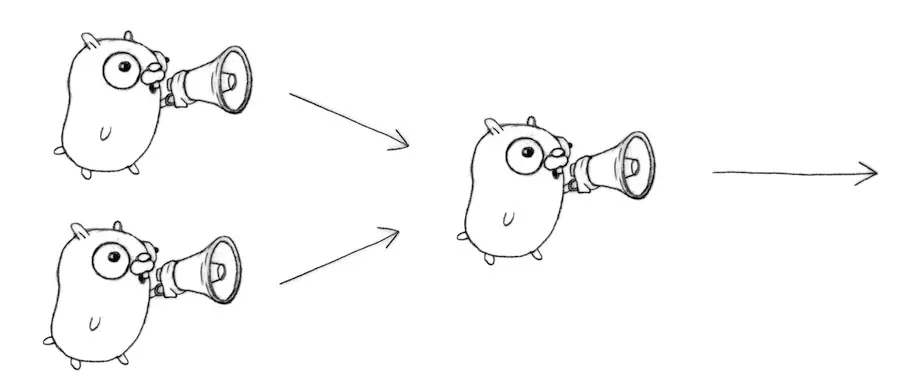
Again, using the "generator" pattern, the fanIn function is itself a function that returns a channel, it takes 2 channels as inputs and return another channel as it return value. What we do is again, make the channel and return it, but internally we launched 2 independent goroutines, one copy the ouput from input1 to the channel, and the other one copy from input2 to the channel
Alice 0
Bob 0
Bob 1
Alice 1
Bob 2
Alice 2
Bob 3
Alice 3
Bob 4
Alice 4
You're boring: I'm leaving.
Observing the result, we can say that Alice and Bob are now completely independent, because they ran in not necessarily sequential order since Bob gives 2 communications in a row be fore Alice has anything to say. So that helps decouple the execution of those guys, even though it's all synchronous, they can independently execute.
What if, for some reason, we actually don't want that? And we want to have them be totally lockstep and synchronous instead?
1.8Restoring sequencing
- Send a channel on a channel (channels are first-class citizen in Go), making goroutine wait its turn.
- Receive all messages, then enable them again by sending on a private channel.
- First we define a message type that contains a channel for the reply which plays the role of "signaler" in this approach, and the goroutines will block on the wait channel until the caller says: "OK, I want you to go ahead".
type Message struct {
	str string
	wait chan bool
}
This approach implies sending inside a channel another channel to be used for the answer to comeback.
func main() {
	bob, alice := boring("Bob"), boring("Alice")
	c := fanIn(bob, alice)
	for i := 0; i < 5; i++ {
		msg1 := <-c
		fmt.Println(msg1.str)
		msg2 := <-c
		fmt.Println(msg2.str)
		msg1.wait <- true
		msg2.wait <- true
	}
}

func fanIn(input1, input2 <-chan Message) <-chan Message {
	c := make(chan Message)
	go func() {
		for {
			c <- <-input1
		}
	}()
	go func() {
		for {
			c <- <-input2
		}
	}()
	return c
}

func boring(msg string) <-chan Message {
	c := make(chan Message)
	waitForIt := make(chan bool) // Shared between all messages
	go func() { // We launch the goroutine from inside the function.
		for i := 0; ; i++ {
			c <- Message{
				str: fmt.Sprintf("%s %d", msg, i),
				wait: waitForIt
				}
			time.Sleep(time.Duration(rand.Intn(2e3)) * time.Millisecond)
			<-waitForIt
		}
	}()
	return c // Return the channel to the caller.
}
Bob 0
Alice 0
Bob 1
Alice 1
Bob 2
Alice 2
Bob 3
Alice 3
Bob 4
Alice 4
Inside the boring functions, now we have this waitForIt channel, then everybody blocks waiting for a signal to advance. Observing the result, you can see they're back in lockstep, because even though the timing is random, the sequencing here with ms1.wait <- true and ms2.wait <- true means that the independently executing goroutines are waiting on different channels for the signal to advance.
1.9Select
We can make it a little more interesting by using the next part of concurrency in Go, which is the select statement. A control structure unique to concurrency, it is also the reason channels and goroutines are built into the language.
The select statement is a control structure, somewhat like a switch, that lets you control the behaviour of your program based on what communications are able to proceed at any moment (for the switch statement each case is an expression while with select each case is actually a communication). In fact, the select statement is really sort of a key part of why concurrency is built into Go as features of the language, rather than just a library.
Below are some facts about the select statement:
- When the control get to the top of the select statement, it evaluates all of the channels that could be used for communication inside the cases.
- Selection blocks until one communication can proceed, which then does.
- If multiple can proceed, select choose pseudo-randomly.
- A default clause, if present, executes immediately if no channel is ready. So if there's no default, then the select will block forever until the channel can proceed.
Let's rewrite our original fanIn function using the select statement. Only one goroutine is needed.
func fanIn(input1, input2 <-chan Message) <-chan Message {
	c := make(chan Message)
	go func() {
		for {
			select {
			case s := <-input1: c <- s
			case s := <-input2: c <- s
			}
		}
	}()
	return c
}
This has exactly the same behaviorand result as the other one, except that we're only launching one goroutine inside the fanIn function. Same idea, different implementation.
1.10Timeout using select
One of the most important is we can use select statement to time out a communication. If you're talking to somebody who's very boring, chances are you don't want to wait very long for them to get around to say something. In this case, we can simulate that with a call to a function in the library called time.After. The time.After function returns a channel that blocks for the specified duration. After the interval, the channel delivers the current time, once.
func main() {
	c := boring("Bob")
	for {
		select {
		case s := <-c:
			fmt.Println(s)
		case <-time.After(time.Second):
			fmt.Println("You're too slow.")
			return
		}
	}
}
Here, this select statement says either we can get a message from Bob, or a second's gone by, and he hasn't said anything, in which case we just get out of here. time.After is a function inside the standard library that returns a channel that will deliver a value after the specified interval.
{Bob 0}
{Bob 1}
{Bob 2}
{Bob 3}
{Bob 4}
You're too slow.
Observing the result, we can say that in this excecution Bob , only 4 times returns the result less than one second, the 5th times he exceeded the deadline in which case we just terminate the program.
1.11Timeout for whole conversation using select
Now we can do that another way. We might decide, instead of having a conversation where each message is at most one second, we might just want a total time elapsed. To do that, we can use the time.After channel more directly by just saving it inside a "timeout" channel and using the "timeout" channel inside the select statement.
func main() {
	c := boring("Bob")
	timeout := time.After(5 * time.Second)
	for {
		select {
		case s := <-c:
			fmt.Println(s)
		case <-timeout:
			fmt.Println("You talk to much.")
			return
		}
	}
}
In this case, this entire loop will time out after 5 seconds.
{Bob 0}
{Bob 1}
{Bob 2}
{Bob 3}
{Bob 4}
{Bob 5}
{Bob 6}
You talk to much.
So doesn't matter how many times Bob says anything. After 5 seconds, we're out of there.