This guide follows the order in which you meet Devbox in a project. Install it and pick a local or global shell, learn what goes into devbox.json, then use both to run a Go backend with PostgreSQL and no containers. For the reasons behind the move from Docker, see why we use Devbox.
1Install Devbox and pick a shell
Install Devbox with the one-liner:
curl -fsSL https://get.jetify.com/devbox | bash
Devbox then gives you two ways to run a shell: local to one project, or global to your machine.
1.1Devbox local
Devbox local is a bubble where you can install and run anything without touching the rest of your system.
-
Go to your project:
cd path/to/your/awesome/project -
Initialize Devbox:
devbox initThis creates two files: devbox.json, the blueprint of the environment, and devbox.lock, a snapshot of it.
-
Add packages:
devbox search go
devbox add go
Your devbox.json now looks something like this:
{ "$schema": "https://raw.githubusercontent.com/jetify-com/devbox/0.12.0/.schema/devbox.schema.json", "packages": ["go@latest"], "shell": { "init_hook": ["echo 'Welcome to devbox!' > /dev/null"], "scripts": { "test": ["echo \"Error: no test specified\" && exit 1"] } } } -
Start the shell:
devbox shellFor full isolation, use devbox shell --pure. It starts the shell without the variables and tools of your host environment.
1.2Devbox global
Devbox global makes Devbox your primary package manager.
-
Add this line to your shell's RC file, such as ~/.zshrc or ~/.bashrc:
eval "$(devbox global shellenv)" -
Restart your terminal, or run source ~/.zshrc (or the RC file you use).
-
Add packages globally:
devbox global add go -
If Devbox warns that your shell is out of date, run:
refresh-global
To see where a global package lives, run:
which go
# or
devbox global path
The path is usually ~/.local/share/devbox/global/default/. That folder holds the global configuration.
2What goes in devbox.json
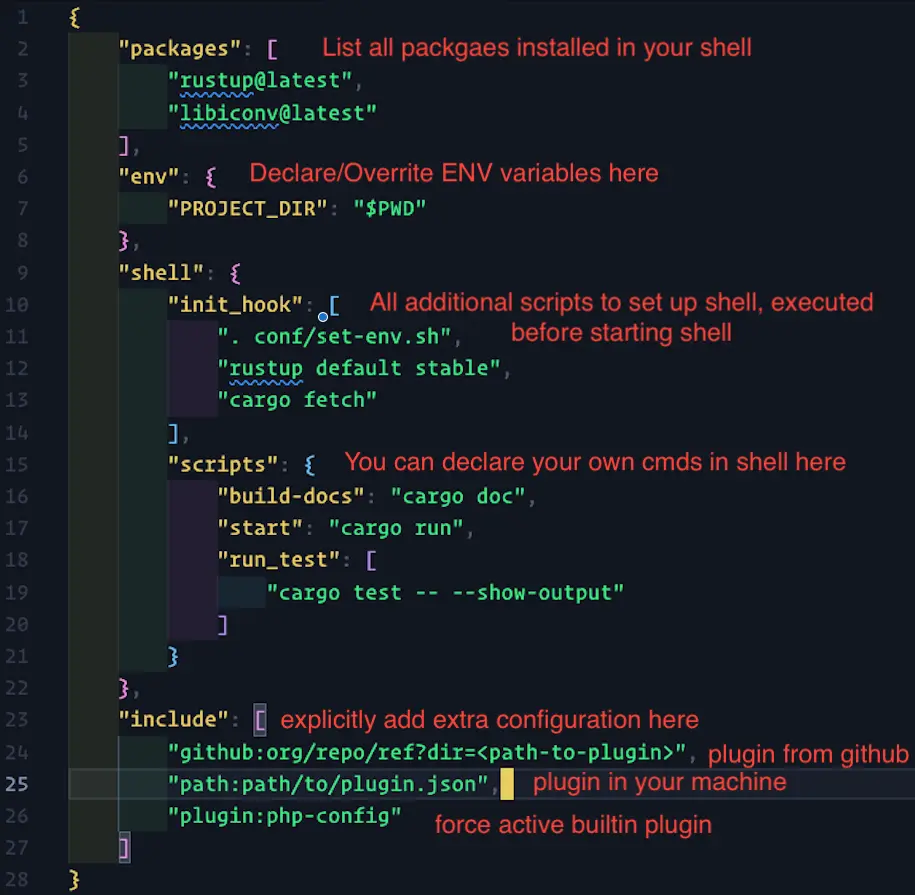
devbox.json is the file you commit so that every teammate gets the same environment. It has four parts.
2.1Packages
"packages": [
  "rustup@latest",
  "libiconv@latest"
]
List every package the project needs. To pin a version, add @<version> after the name. Use devbox search <package> to see the available versions.
2.2Env
"env": {
  "PROJECT_DIR": "$PWD"
}
Declare or override environment variables here.
2.3Shell
"shell": {
  "init_hook": [
    ". conf/set-env.sh",
    "rustup default stable",
    "cargo fetch"
  ],
  "scripts": {
    "build-docs": "cargo doc",
    "start": "cargo run",
    "run_test": [
      "cargo test -- --show-output"
    ]
  }
}
- init_hook runs every time you start the Devbox shell. Use it for setup tasks.
- scripts defines your own commands, so a complex task becomes a short name.
2.4Include
"include": [
  "github:org/repo/ref?dir=<path-to-plugin>",
  "path:path/to/plugin.json",
  "plugin:php-config"
]
include adds extra configuration. It can pull a plugin from GitHub, use a local plugin, or activate a built-in plugin.
2.5All four together
{
  "packages": ["rustup@latest", "libiconv@latest"],
  "env": {
    "PROJECT_DIR": "$PWD"
  },
  "shell": {
    "init_hook": [". conf/set-env.sh", "rustup default stable", "cargo fetch"],
    "scripts": {
      "build-docs": "cargo doc",
      "start": "cargo run",
      "run_test": ["cargo test -- --show-output"]
    }
  },
  "include": [
    "github:org/repo/ref?dir=<path-to-plugin>",
    "path:path/to/plugin.json",
    "plugin:php-config"
  ]
}
3Run a Go backend without containers
With Devbox services and plugins, local development needs no containers. The example is a Go API that manages books and needs PostgreSQL.
3.1Start the project and add Go
Initialize a Devbox project:
devbox init
This gives you a bare-bones devbox.json:
{
  "$schema": "https://raw.githubusercontent.com/jetify-com/devbox/0.12.0/.schema/devbox.schema.json",
  "packages": [],
  "shell": {
    "init_hook": ["echo 'Welcome to devbox!' > /dev/null"],
    "scripts": {
      "test": ["echo \"Error: no test specified\" && exit 1"]
    }
  }
}
Start the shell and add Go:
devbox shell
devbox add go
Go is now installed inside the project. Check it:
which go
# /Users/you/your-project/.devbox/nix/profile/default/bin/go
3.2Hit the missing database
Run the API:
go run main.go
# 2024/07/28 17:00:10 Error connecting to database: "dial tcp 125.235.4.59:5432: connect: operation timed out"
# exit status 1
There is no database yet.
3.3Add PostgreSQL
devbox add postgresql
Devbox does more than install the package. It also:
- Creates a process-compose.yaml for you.
- Sets the PGHOST and PGDATA environment variables.
- Gives you commands to manage the database.
Initialize the database:
initdb --username=yourusername
3.4Start the service and create the database
Devbox gives you two ways to start services:
- devbox services start runs them in the background.
- devbox services up runs them in monitoring mode.
Create the database:
createdb bookstore --username=yourusername --password
# Enter your password when prompted
3.5Point the Go code at it
Update the connection details:
const (
    host     = "localhost"
    port     = 5432
    user     = "yourusername"
    password = "yourpassword"
    dbname   = "bookstore"
)
Run it:
go run main.go
# Successfully connected to the database!
# 2024/07/28 20:43:46 Starting server on :8080
4A larger devbox.json from a real project
The starter file above is the minimum. This one comes from a project that mixes several languages, system libraries, databases and a message queue:
{
  "$schema": "https://raw.githubusercontent.com/jetpack-io/devbox/0.10.1/.schema/devbox.schema.json",
  "packages": {
    "github:NixOS/nixpkgs#darwin.apple_sdk.frameworks.CoreText": "",
    "nodejs": "18",
    "pnpm_8": "8.15.9",
    "pkg-config": "0.29.2",
    "pango": {
      "version": "1.52.2",
      "outputs": ["dev"]
    },
    "libpng": "1.6.43",
    "giflib": "5.2.2",
    "librsvg": {
      "version": "2.58.2",
      "outputs": ["dev"]
    },
    "python3": "3.11.9",
    "pixman": "0.43.4",
    "cairo": {
      "version": "1.18.0",
      "outputs": ["dev"]
    },
    "libjpeg": {
      "version": "3.0.3",
      "outputs": ["dev"]
    },
    "elixir": "1.15.7",
    "github:baenv/timescalepg-fake#postgresql": "",
    "redis": "7.2.5",
    "redis-plus-plus": "1.3.12",
    "apacheKafka": {
      "version": "2.13-3.8.0",
      "outputs": ["out"]
    },
    "kafkactl": "5.0.6",
    "zookeeper": "3.9.2"
  }
  // ... (env and shell configurations omitted for brevity)
}
What it shows:
- Several languages side by side. Node.js, Python and Elixir live in one environment.
- Pinned versions. Every package has a specific version, so the environment is reproducible.
- System libraries. Pango, Cairo and libpng sit next to the language runtimes.
- Databases and messaging. PostgreSQL, Redis and Kafka run without a docker-compose.yml.
- Custom packages. github:baenv/timescalepg-fake#postgresql is a package pulled straight from GitHub.
Devbox services also run these packages as scripts:
"scripts": {
  "zookeeper": "sudo $DEVBOX_PACKAGES_DIR/bin/zkServer.sh --config $KAFKA_CONFIG start-foreground",
  "kafka": "sudo $DEVBOX_PACKAGES_DIR/bin/kafka-server-start.sh $KAFKA_CONFIG/server.properties",
  // ... more scripts omitted
}
Start Zookeeper and Kafka with devbox run zookeeper and devbox run kafka.
5Why this beats containers for local work
- Speed. No container layer means faster startup and lower resource use.
- Flexibility. To add a system library, add it to devbox.json. No image rebuild.
- Transparency. One file defines everything. There are no hidden layers or unknown base images.
- Reproducibility. Every developer gets the same environment, down to the system libraries.