Our local development environments used to live in Docker. We moved them to Devbox, a tool built on Nix that gives each project an isolated, reproducible set of native packages. This page follows the order in which the questions come up: what went wrong with Docker for local work, what Devbox does about it, why we use Devbox instead of plain Nix, how the Nix pieces underneath work (shells and flakes), and the two Devbox features we lean on most (services and plugins).
With the rise of cloud services, we first adopted Docker to wrap our applications in an isolated environment for production. Then we started setting up the development environment inside a container too, and used docker-compose to run several services without installing them locally. That made the environment easy to share and easy to repeat with minimal changes, using only one or two script files.
Docker builds are not very effective for development. Each time the code changes, we rebuild the entire environment. The rebuild hits the image layer that holds the code and also every layer below it, which costs time and resources.
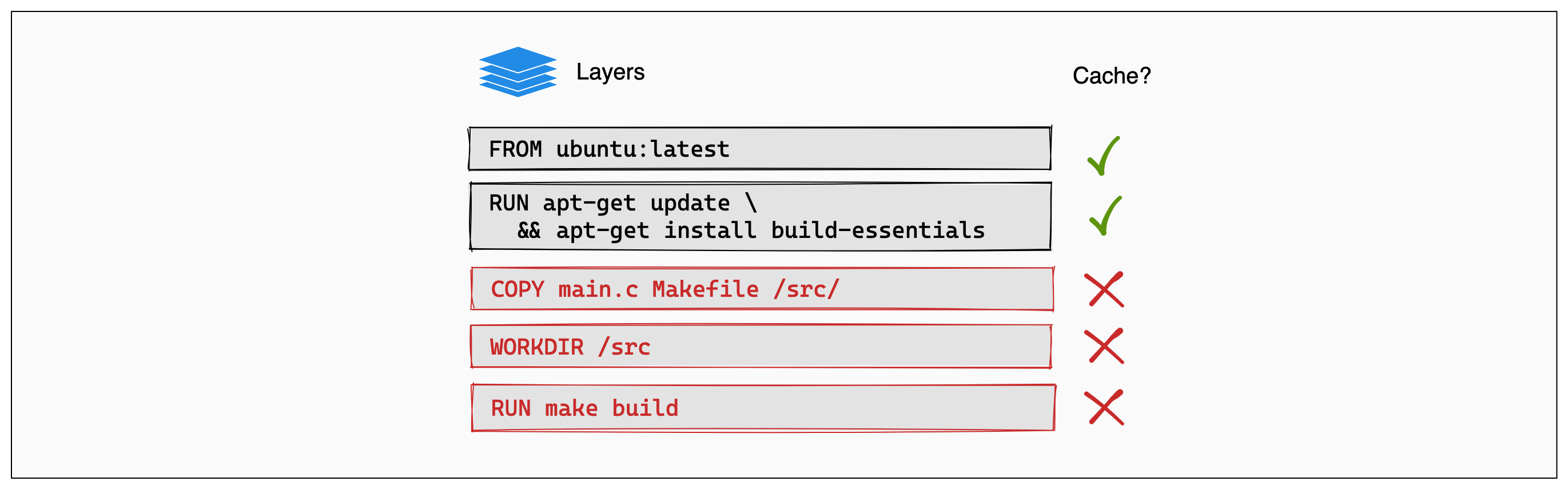
The version of an application can be pinned in the apt-get add script, but its dependencies are not pinned. Repositories get updated and transitive dependencies change without the main package version changing. So after apt-get update, the image we build can differ from the previous build.
On Windows and macOS, Docker containers run inside a Linux VM. The VM takes a share of the host machine's resources, which makes the computer slow.
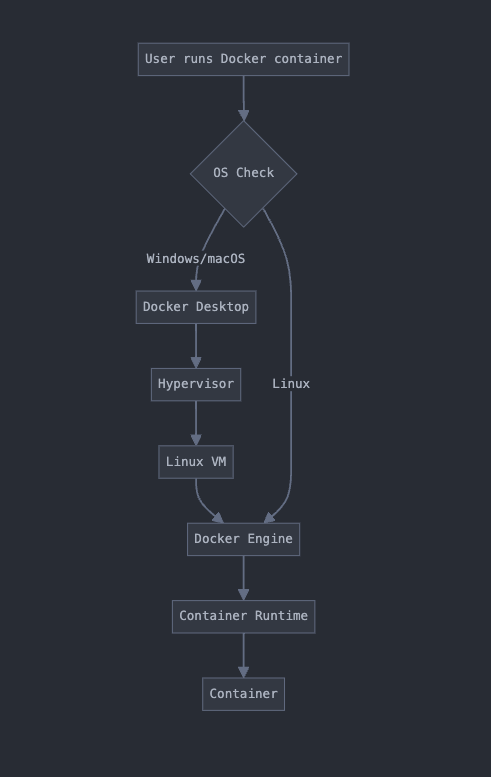
The three problems add up to local development that is slow, asynchronous and cumbersome. Some Docker hacks can fix them. We could also avoid Docker (or change the machine). Of the options we looked at, we tried Devbox.
Remember the last time you onboarded a new developer, or tried a new tool without wrecking your setup. Devbox is built for those moments. With it, the whole team works in identical environments, new tools can be tried safely, version conflicts go away, and the environment follows you from machine to machine.
Everything lives in a single devbox.json: dependencies, environment variables and init scripts. You define it once and reuse it. "Works on my machine" becomes "works on every machine."
{
  "packages": ["nodejs@14", "python@3.9", "postgresql@13"],
  "env": {
    "DATABASE_URL": "postgresql://localhost/myapp"
  },
  "shell": {
    "init_hook": ["npm install", "flask db upgrade"]
  }
}
This gives everyone the same Node.js, Python and PostgreSQL setup, plus any custom config you add.
Devbox is powered by Nix, a cross-platform package manager for Unix-like systems that can build any package or application and run it natively on your machine. Devbox scopes an isolated workspace and installs the dependencies there. They are native to your OS, so nothing sits in the middle. Nixpkgs offers well over 80,000 packages (our earlier notes cite both "80,000+" and "100.000+").
Every package in a Devbox workspace links from your local Nix store, where all applications are installed. Each package is identified by a unique hash and linked through a dependency tree, so it does not change over time. A Devbox environment can be reproduced exactly and shared with teammates through one script file.
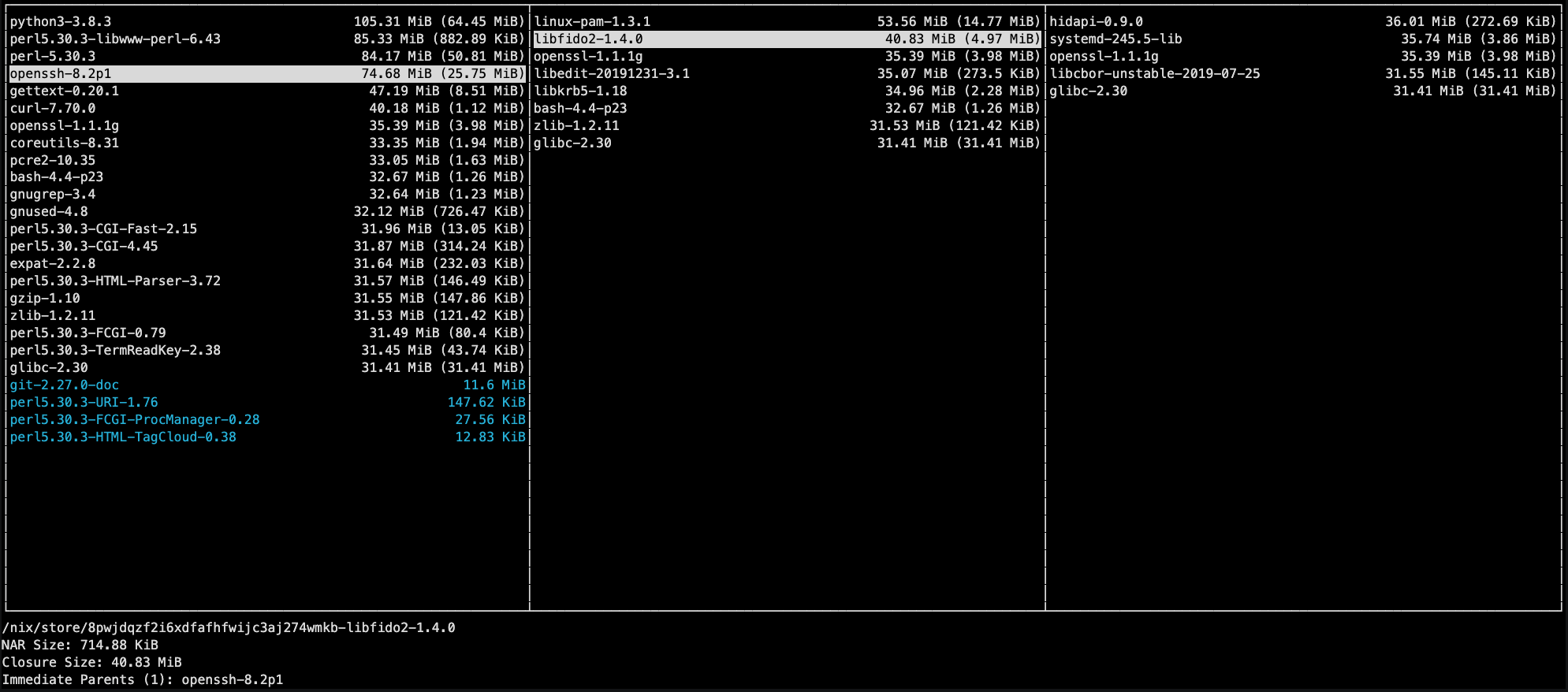
The hash differs between versions of the same application. The store therefore holds several versions of a package side by side, and each project can link the version it needs.
# Install Devbox
curl -fsSL https://get.jetify.com/devbox | bash

# Create a project
mkdir my-awesome-project && cd my-awesome-project
devbox init

# Add packages
devbox add nodejs python

# Fire it up
devbox shell
That gives you a clean environment with Node.js and Python. You don't need to learn Nix to use Devbox, but if you do, more becomes possible: for bleeding-edge packages, you can use Nix flakes directly. There is a learning curve.
Devbox is Nix with training wheels, and we think that is a good thing. It is built on Nix, so you keep the strengths:
- Isolated environments that hold up
- Reproducibility
- The ability to run your setup on any machine
You get them without learning Nix itself.
Devbox is developer-first. Nix can do a million things. Devbox does one: it creates development environments, and it stays focused on that.
The interface is simpler. Compare the two.
Nix:
{ pkgs ? import <nixpkgs> {} }:
pkgs.mkShell {
  buildInputs = [ pkgs.nodejs pkgs.yarn ];
}
Devbox:
{
  "packages": ["nodejs", "yarn"]
}
Which one would you rather explain to a new team member? Nix also has its own programming language. It is powerful, but learning a new language just to set up a dev environment is a steep price. With Devbox, if you can write JSON, you can use it.
The obvious question is what happens when you need Nix's advanced features. Devbox can reach those too. A custom Nix derivation works, and so do Nix flakes. With Devbox you start simple and add complexity when you need it. With pure Nix the complexity starts on day one.
Nix may well be more powerful in the hands of an expert. Devbox makes everyone on the team productive on day one, and that matters more to us.
Nix shell drops you into an isolated environment quickly. Its main benefits:
- Zero system pollution. You can try packages freely and the host system stays clean.
- Reproducible environments. The same setup on every machine, every time.
- Multiple versions without conflicts. Python 2 and 3, or Node 12 and 16, can coexist.
The parts that make this work:
The Nix store. Every package lives in its own location, usually under /nix/store. No package can interfere with another.
Hashed versions. Nix gives each version of a package a unique hash that represents everything about that specific version. Different versions live side by side:
/nix/store/1fxz1flmv4a4m5pvjmmzxlaznjzybjcp-go-1.21.3/
/nix/store/i04a1a6qgxhjw6c0ld2b3x1v815sbxjc-go-1.22.3/
User environments. Nix creates a sandbox for you. You install packages without sudo.
Nix shell runs in two modes:
- Team mode. Drop the global $PATH for a pure, reproducible environment. It suits team projects where "it works on my machine" is not good enough.
- Personal mode. Keep your global $PATH and extend your everyday shell.
A flake is a self-contained unit that defines everything a project needs, from dependencies to build instructions. Think of it as a more powerful package.json. Like package-lock.json, it has a flake.lock that pins everything so it stays reproducible.
Why flakes matter:
- Reproducibility. The same setup on every machine, every time.
- Discoverability. You share your setup as easily as a Git repo, and others can use it directly.
- Flexibility. You can customize existing packages.
Here is an example. We need PostgreSQL with TimescaleDB, and there is no pre-built package. A flake builds one:
{
  description = "PostgreSQL on Steroids: Now with TimescaleDB!";

  inputs = {
    nixpkgs.url = "github:NixOS/nixpkgs/nixos-unstable";
    flake-utils.url = "github:numtide/flake-utils";
  };

  outputs = { self, nixpkgs, flake-utils }:
    flake-utils.lib.eachDefaultSystem (system:
      let
        pkgs = import nixpkgs {
          inherit system;
          config.allowUnfree = true;
        };
        psqlExtensions = [
          "timescaledb"
        ];
      in {
        packages = {
          postgresql = pkgs.postgresql_15.withPackages (ps:
              (map (ext: ps."${ext}") psqlExtensions));
        };

        defaultPackage = self.packages.${system}.postgresql;
      });
}
How it reads:
- Inputs. We pull the latest Nixpkgs and some handy utilities.
- Outputs. This creates a custom PostgreSQL package for every system Nix supports.
- The key line. postgresql = pkgs.postgresql_15.withPackages (...) adds TimescaleDB to PostgreSQL.
Adding more extensions means adding them to psqlExtensions. The flake works on any system Nix supports, Linux or Mac, and anyone can use it to get the same PostgreSQL setup.
Devbox Services runs on process-compose, a leaner cousin of Docker Compose for non-containerized apps. There are no Dockerfiles, volumes or registries. You define your services and start them.
A process-compose.yml for a PostgreSQL database and a Telegram bot looks like this:
version: "0.5"

processes:
  postgresql:
    command: |
      if ! grep -q "shared_preload_libraries = 'timescaledb'" $PGDATA/postgresql.conf; then
        echo "shared_preload_libraries = 'timescaledb'" >> $PGDATA/postgresql.conf
      fi
      pg_ctl start -o "-k $PGHOST"
    is_daemon: true
    shutdown:
      command: "pg_ctl stop -m fast"
    availability:
      restart: "always"
    readiness_probe:
      exec:
        command: "pg_isready"

  telegram-bot:
    command: |
      cd telegram-bot
      make install
      make dev
    availability:
      restart: "always"
    depends_on:
      postgresql:
        condition: process_healthy
    readiness_probe:
      http_get:
        host: 127.0.0.1
        scheme: http
        path: "/healthz"
        port: 5001
      initial_delay_seconds: 5
      period_seconds: 10
      timeout_seconds: 5
      success_threshold: 1
      failure_threshold: 3
The postgresql process does six things:
- It checks whether TimescaleDB is enabled and adds it to the config if not.
- It starts PostgreSQL with a custom socket directory.
- It tells process-compose this is a long-running daemon.
- It defines how to shut PostgreSQL down gracefully.
- It restarts PostgreSQL if it crashes.
- It uses pg_isready to check that PostgreSQL is ready.
The telegram-bot process does four:
- It starts the bot with a simple make install && make dev.
- It restarts if it crashes.
- It waits until PostgreSQL is healthy before it starts, which removes the race condition.
- It has an HTTP health check to confirm the bot works.
Devbox wraps process-compose in a small CLI, so you don't call process-compose directly:
- devbox services ls lists the services.
- devbox services restart restarts them.
- devbox services start starts everything.
- devbox services stop shuts it all down.
No containers are involved. You get the workflow of a containerized setup without the overhead, which suits a development environment where simplicity and speed count.
Adding a package such as Nginx to a project usually means writing a custom config, setting environment variables and managing files. With a Devbox plugin, you add Nginx to the project and you are done. The plugin handles the rest:
- It writes a solid default config.
- It exposes the right environment variables for tweaking.
- It organizes the config files so they are easy to find later.
- It sets up a service, so you can start and stop Nginx with one command.
All of it happens when you add the package.
There are two kinds of plugins.
Built-in plugins are pre-built for popular packages such as Nginx, PostgreSQL and Node.js. Add the package and the plugin applies automatically. The list is in the built-in plugins docs.
Custom plugins cover anything else. You can write your own following the plugin schema and host it locally or on GitHub.
Plugins take part in the lifecycle of the Devbox shell. Each time you start a shell, run a script or start a service, your plugins run and set things up.
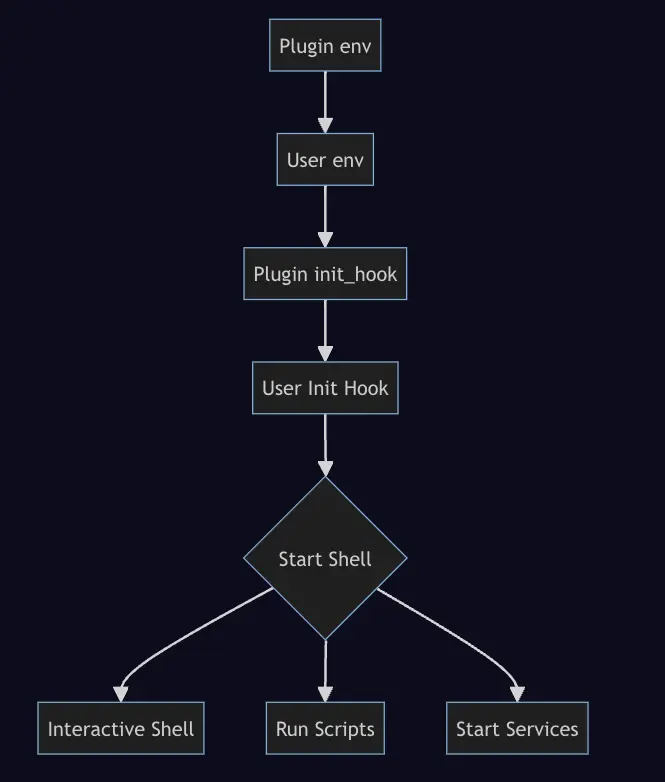
A plugin has this layout:
my-awesome-plugin/
├── README.md              # Because documentation matters
├── plugin.json            # The brains of the operation
├── config/
│   ├── my-plugin.conf     # Default configs
│   └── process-compose.yaml  # Service definitions
└── test/
    ├── devbox.json        # For testing your plugin
    └── devbox.lock
plugin.json is the core file. It defines what the plugin does, which packages it needs and which environment variables it sets.
Embracing Devbox has streamlined our development process and made the team more collaborative. As our projects scale, reproducibility and efficiency are what we expect Devbox to keep giving us.
- Devbox documentation
- Nix package manager
- Nixpkgs repository
- Nix flakes
- Devbox: improving on Nix
- Devbox on Hacker News
- Nix language documentation
- Nix shell: the foundation
- Nix shell manual
- Why you should try Nix
- Nix flakes documentation
- Nix flake command reference
- Reddit: explaining flakes
- process-compose Documentation
- Devbox services guide
- PostgreSQL documentation
- TimescaleDB documentation
- Devbox plugins guide
- Creating custom Devbox plugins
- Nginx documentation