Part 1 covered why HDFS exists and how it stores blocks. This part shows how to use it: the shell commands that mirror local file commands, then the read and write paths through the name node and data nodes, including node proximity and replica placement.
Part 2 of 2 in the HDFS explained series. Previous: Hadoop distributed file system, part 1: why HDFS and how blocks work
1Working with HDFS
There are some well-known commands to work with a local file system in Linux.
ls - to list a content in a directory
mkdir - to create a directory
cp - to copy
mv - to move
rm - to delete
And there are some HDFS commands which always start with hdfs.
Listing root directory
hadoop fs -ls /
Listing default to home directory
hadoop fs -ls
hadoop fs -ls /user/dungho
Create a directory in HDFS
hadoop fs -mkdir hadoop-test1
Copy from local FS to HDFS
hadoop fs -copyFromLocal /tmp/stocks.csv hadoop-test1
Copy from HDFS to local FS
hadoop fs -copyToLocal hadoop-test1/stocks.csv .

hadoop fs -ls hadoop-test1
Create 2 more directories
hadoop fs -mkdir hadoop-test2

hadoop fs -mkdir hadoop-test3
Copy a file from one folder to another
hadoop fs -cp hadoop-test1/stocks.csv hadoop-test2
Move a file from one folder to another
hadoop fs -mv hadoop-test1/stocks.csv hadoop-test3
Check replication
hadoop fs -ls hadoop-test3
Change or set replication factor
hadoop fs -Ddfs.replication=2 -cp hadoop-test2/stocks.csv hadoop-test2/test_with_rep2.csv

hadoop fs -ls hadoop-test2

hadoop fs -ls hadoop-test2/test_with_rep2.csv
Changing permissions
hadoop fs -chmod 777 hadoop-test2/test_with_rep2.csv
File system check - requires ad previleges
sudo -u hdfs hdfs fsck /user/dungho/hadoop-test2 -files -blocks -locations

sudo -u hdfs hdfs fsck /user/dungho/hadoop-test3 -files -blocks -locations

sudo -u hdfs hdfs fsck /user/ubuntu/input/yelp/yelp_academic_dataset_review.json -files -blocks -locations

vi /etc/hadoop/conf/hdfs-site.xml

/data/1/dfs/dn/current/BP-2125152513-172.31.45.216-1410037307133/current/finalized
Delete directories/files in HDFS
hadoop fs -rm hadoop-test2/test_with_rep5.csv

hadoop fs -rm -r hadoop-test1
hadoop fs -rm -r hadoop-test2
hadoop fs -rm -r hadoop-test3
2HDFS - read & write
Copying from local to HDFS does a write operation to HDFS because from the local file system we are writing a file into HDFS. Whereas copy from HDFS to local does a read operation because it reads a file from HDFS and write it to the local file system. We know that a file or data set is divided into chunks of blocks and stored across the nodes in the cluster. Imagining that we are the client and we are trying to read a file from HDFS and how do we know where the blocks are physically stored?
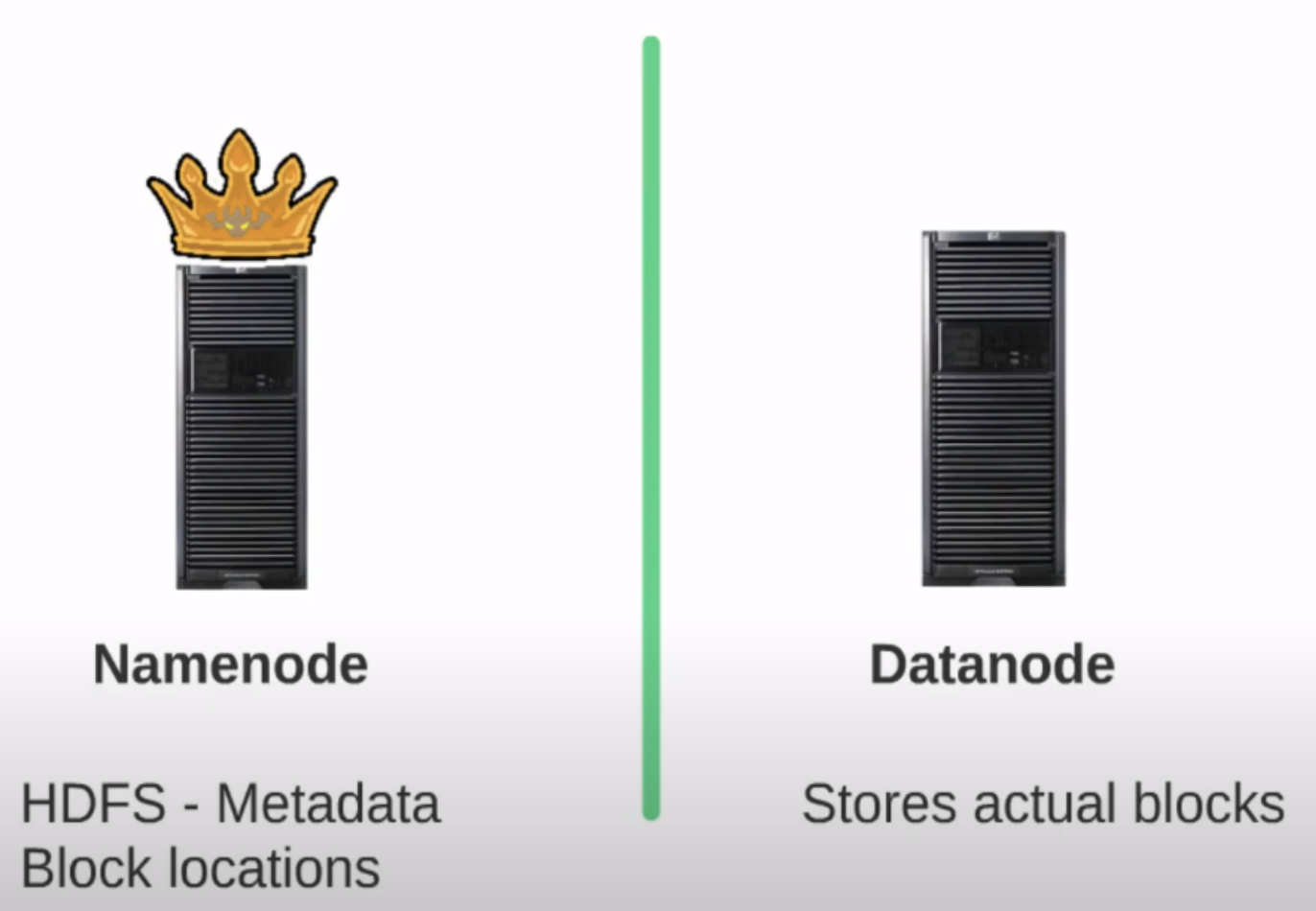
A Hadoop cluster has two types of nodes. The first type of node and the most important node in the hadoop cluster is called the name node, also known as the master. The second type of node is known as the data node also known as the slave.
The master node has the metadata of HDFS meaning it has all the infomation about: list of files, the list of blocks, who created the files, when a file got created, when it was modified, the permission of the files, etc. In other words, it has all the information about hdfs and what is in HDFS. Hence, name node is a very important node in the cluster. Name node does not store the actual files or data sets. The files or data sets are stored in another type of nodes called the data nodes data nodes also known as the slaves stores the physical blocks for the files in HDFS. Usually there is only one active name node in the cluster and we can have as many data nodes as we like in the cluster depending on the amount of data we would like to store in HDFS. In short, if we take a file in HDFS, the data nodes will store the actual physical blocks for that file. Whereas the name node knows the list of blocks that make up the file and the list of data nodes that stores the blocks for that file and also information about the file like who created it, when it was created, its permissions, etc.
2.1Read operation
For example, we want to read a file from HDFS and the file is made up of 10 blocks. We execute hadoop fs -copyToLocal command from one of the data nodes in the cluster to copy the file from HDFS to the local file system. When we execute hadoop fs -copyToLocal, a Java program is executed behind the scenes which does a series of operations to read the file from HDFS. All these operations happens behind the scenes and it is intransparent to us.
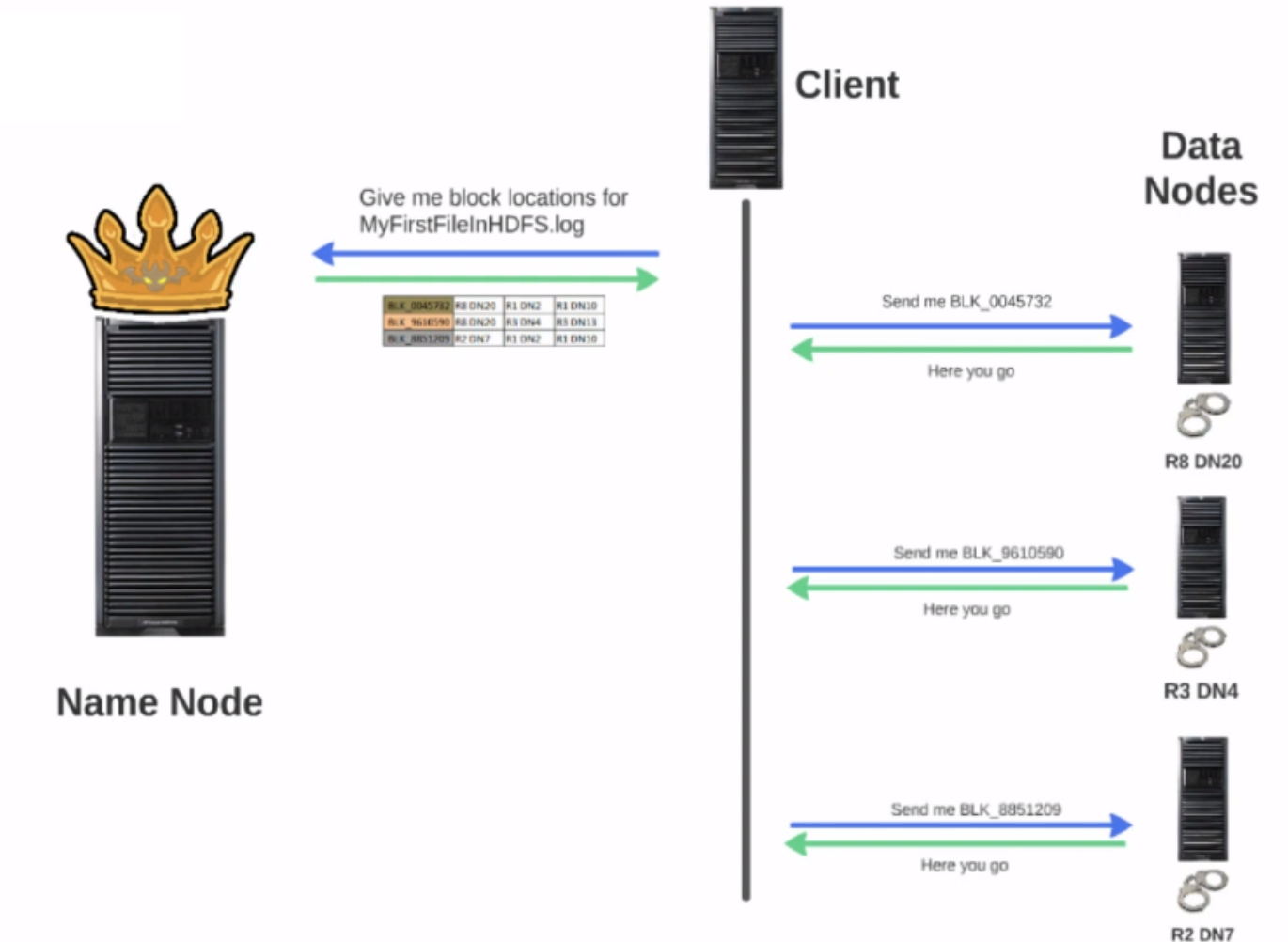
The above image shows step by step what happens behind the scenes. First the client program trying to read the file will contact the name node to get the list of block locations for the file. If the replication factor for the file is 3, then for each block, the name node will return address of all three data nodes that stores a copy of the actual block. When the name node returned the list of data nodes that has a copy for each block, it also sorts the data node in terms of proximity to the client requesting the read. Thus, the client can read the block from the closest data node.
What is node proximity?
If you have 100 nodes in the cluster, how does the client know which node is the closest one in a Hadoop cluster? The data nodes are physically organized into racks, the data nodes in a rack are connected to one another and all the racks in the cluster are connected to one another.
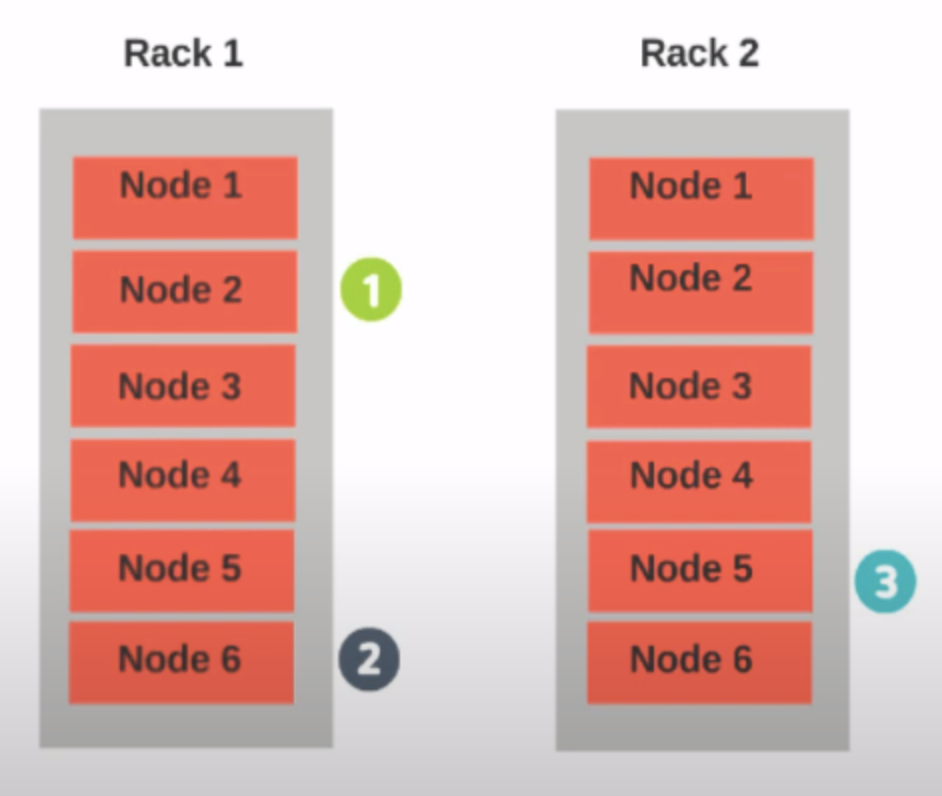
Let's consider to the example showing in the above image, we have two racks: Rack 1 and Rack 2. And our client who is trying to read the file is running on Rack 1 - Data Node 2. There will be 3 replicas for a block: for example, the first replica is stored in Rack 1 - Data node 2, the second replica is stored in Rack 1 - Data node 6 and the third replica in Rack 2 - Data node 5. Now Rack 1 - Data Node 2 is considered the closest data node to the client because the client is also running on the same node. The next closest node to the client will be the node which is on the same rack, in this case, it will be Rack 1 - Data Node 6. The next closest node to the client will be the node which is on a different rack in this case it will be Rack 2 - Data node 5. If the client runs on a data node which does not hold a copy of the block and if we have two data nodes on the same rack which holds the replica of the block then one of the data nodes from the same rack will be chosen at random. In essence, the closest node to the client is a node on the same rack as the client and the next closest node is a node on a different rack. For the read operation, the client will reach out to the data node which is closest and start reading the block. Once it is done reading block number 1, it will move on to block number 2 and then block number 3 and so on.
For a crash scenario, client is reading block number 3 and the data node it is trying to read from is not responding. The client will take a note of the data node which is not responding, it will not try to reach the same data node again for the current read operation. And it will move on to the next data node that has the copy of the block from the list sent by the name node. Therefore, even when a data node is down during the read operation, the read operation continued to progress without any issues.
2.2Write operation
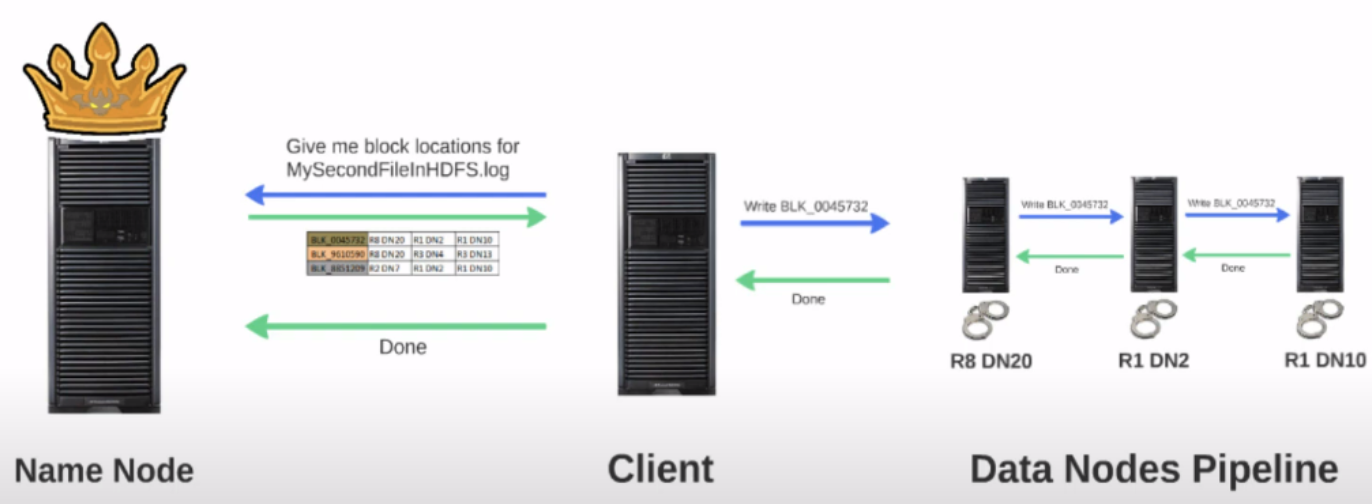
Now, we want to write a file to HDFS using hadoop fs -copyFromLocal command. Behind the scenes, when a client request a write operation, it will request the name node to allocate blocks for the file and the list of data nodes for each block where the replicas for each block needs to be stored. The name node will do few checks to make sure whether the user requesting the right operation has proper permission to do so and whether the file name already exists in the directory etc. When all the checks are okay, it will proceed with the block allocation. The name node will now have to come up with a list of data nodes. While picking the data nodes to store the replica, the name node will pick the data nodes which are not busy and has enough space to hold the blocks.
Replica placement
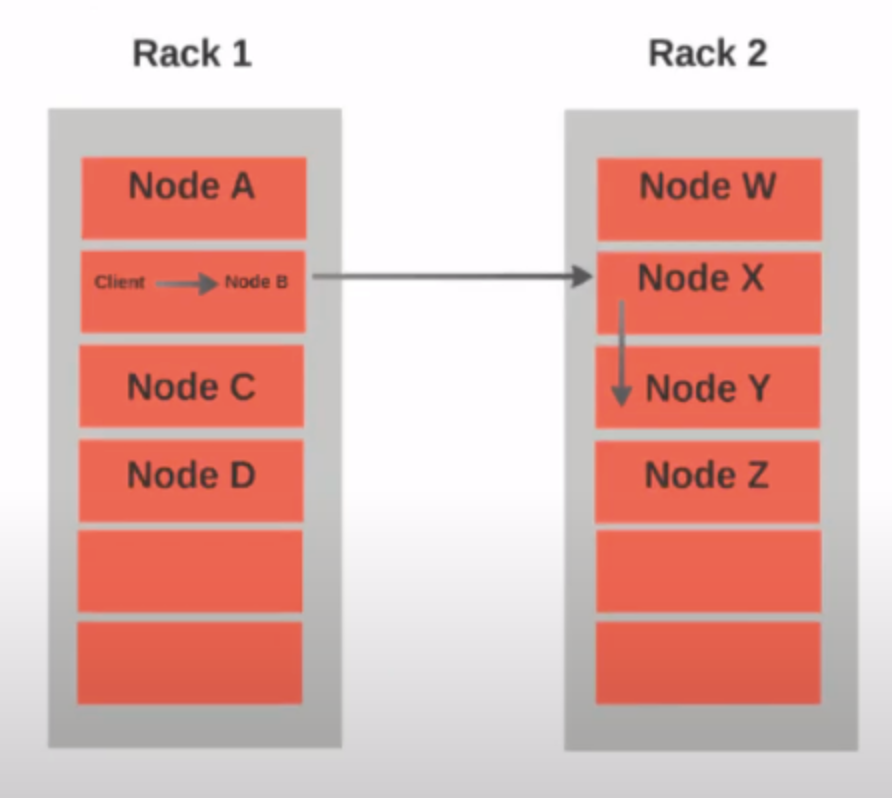
To pick the data nodes to store the replicas for each block, the name node will use a replica placement strategy. The default replica placement strategy will work like this:
- The first replica will be written on the same node as the client requesting the right.
- The second replica will be placed on a random data node on a different rack from the first one.
- The third replica will be placed on a data node which is chosen at random on the same rack as the second one.
When the nodes are selected, a data pipeline, as shown in the above image, is formed and the data for the block will be written in the form of packets. The first node will then store the packet and pass it on to the second node. And once the packet is stored on the second node it will be passed on to the third node. Once all three nodes stored the packet, an acknowledgement will be sent back indicating a successful write of the packet. once all the packets for the blocks are written the write operation will move on to the next block.
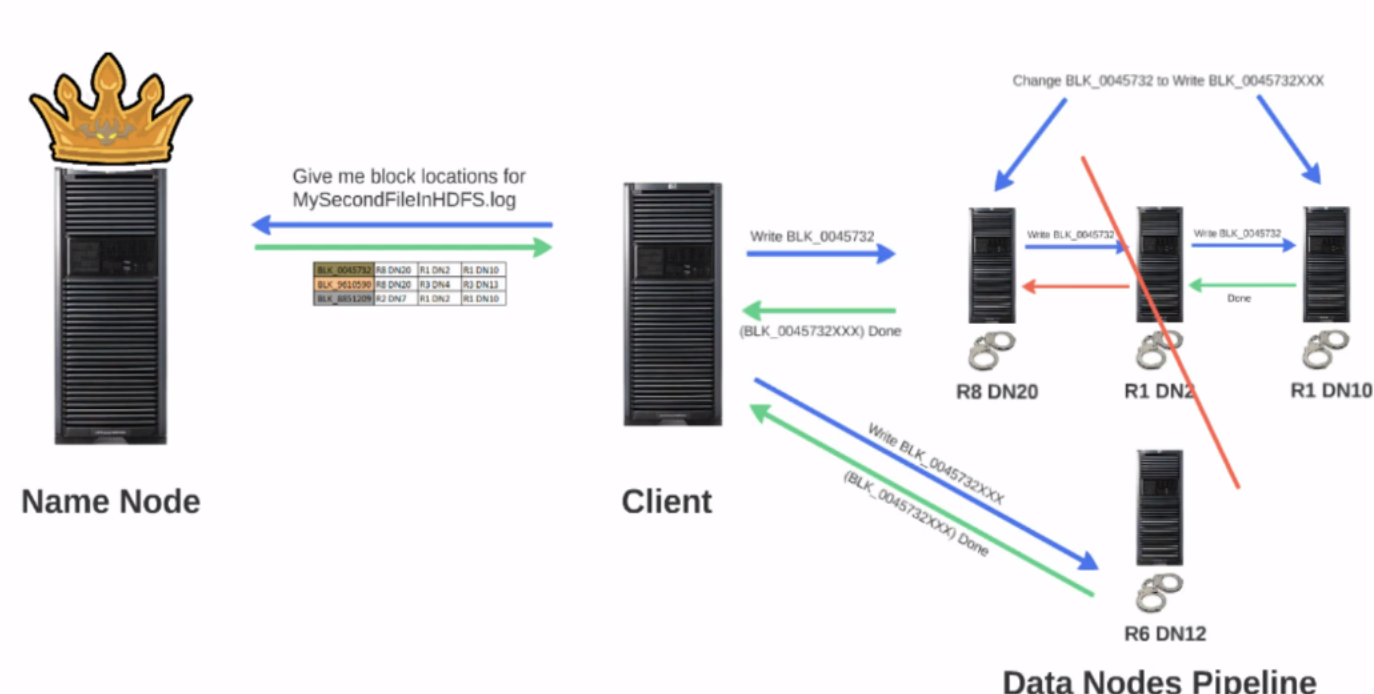
For example, the block we are writing is named Block 123. While writing Block 123 on Node 2, Node 2 suddenly went down in the middle of the write operation. How do we handle this failure? First the packets for Block 123 are moved to the front so that Node 3 will not miss those packets. Next, the block name will be changed. If we keep the block name as Block 123 when Node 2 finally recovers, it will claim that it has Block 123. But the Block 123 is not complete since Node 2 went down in the middle of the write operation. Assuming that block name will be changed to Block 456. Hence, when Node 2 recovers and claims that it has Block 123, the name node will know that Block 123 is non-existent and will order Node 2 to remove Block 123. The parameter dfs.namenode.replication.min indicates the minimum number of replications that is needed for a block, by default, it is one. In case of such failure, the write operation will succeed as long as the block is returned to at least one node. Later, the name node will coordinate with the data nodes and arrange to write the missing replicas.