The Dwarves Operations team keeps one checklist per recurring job. This page gathers them so a person on duty can find the right list without browsing a folder. The lists fall into three groups: people, clients and money, and projects.
| Checklist | Use it when |
|---|---|
| Hiring | Running a recruiting round, from job post to offer |
| Onboarding | A new employee joins the team |
| Leave requests and holidays | An employee asks for leave, or a public holiday approaches |
| Offboarding | An employee leaves the team |
| Company assets | Anyone borrows or returns a company asset |
| Consulting contract | Reviewing a client contract before signing |
| Billing and invoices | Issuing, sending and chasing a client invoice |
| Vietnam invoice | Producing a Vietnamese tax invoice |
| Project communication | Setting the communication rules of a project |
| Back up artifacts | Every 3 months, to record the project's progress |
| Project handover | A new member takes over project work |
| Project case study | Writing the case study of a finished project |
1People
1.1Hiring
The checklist presents how hiring proceeds.
Resume collecting
- Job Description
- List of job sites/hiring channels
- Job post materials
- Hiring system (Notion)
Timeline
- Invitation & calendar send out (also the interviewer assigned?)
- Interview result after each round must be reported
- Responsive?
- Follow the process? Skip any round?
- Ignore or miss any applicant?
- Meet deadline for each round?
- Does the assignment grader carefully grade the applicant assignment?
- Conflict of interest? (Applied for the referral model)
Dates to fix
- Deadline for application
- Time of interview
- Time of confirmation emails
- Time of on-boarding
- Time of probation
Offering
- If a candidate is the right fit, move quickly
- Before you make an offer, make sure you know exactly what the offer package will look like and don't be vague about it
- If the candidate turns you down, remain friendly and maintain a relationship. They might change their minds in the future.
- Enough information? (salary, probation, title, benefit, start date...)
- Are the department head, accounting, operation aware of the offer?
Material
- Handbook
- Pre-assignment Test
- Assignment
- Templates for multiple scenarios (see Dwarves email templates)
1.2Onboarding
Through onboarding, the employee gradually forms their own perspective and their fit with Dwarves. This is the stage when they decide whether or not to commit to the company.
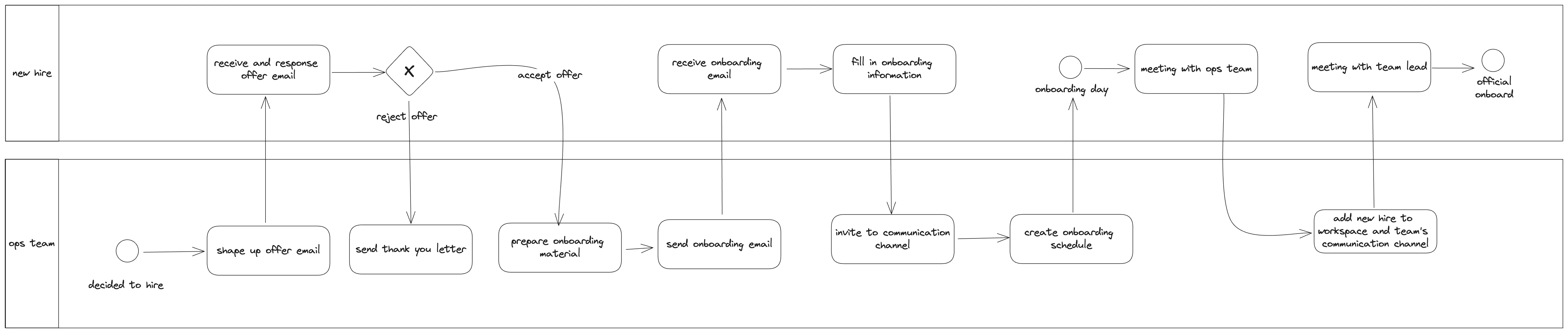
Important notes. The original list names six onboarding pitfalls:
- Starting on-boarding on the new hire's first day
- Not setting expectations and company policies.
- Instituting a one-size-fits-all approach for every new hire.
- Involving only the new hire's direct team or department.
- Limiting on-boarding to one week.
- Forgetting to follow-up.
Offer email. An offer email should cover these points:
- Net/gross salary
- Onboarding day
Onboarding email. After sending the offer email and getting the confirmation from the candidate, send the onboarding email. It asks the new hire to complete the onboarding process, which includes:
- Request setting up Transferwise and its account number
- Request Identity card information
- Insurance information
- Fill the Fortress form
- Sign the contract with LLC
- Create onboarding schedule
- Invite to Dwarves Foundation Discord server
Onboarding call with the Operations team. The Operations team makes sure the new hire knows their position, prepares their personal account for company access, and understands the daily workflow. The new hire must also know how the company runs, benefits and perks, essential paperwork, the review period, and the expectations for culture fit. The call introduces:
- The goal of the probation
- Team, Leader, and Project Introduction
- Personal 60 days plan
- Workspace Introduction
- Discord: Team's communication channel
- Basecamp: Task, document, and onleave request management
- Onboarding to Reward system (ICY)
- Create and connect crypto wallet to Dwarves Foundation server
- Create and connect GitHub account to Dwarves Foundation server
- The team's workflow
- Daily report and check-in
- On-leave request and reimbursement
- Communication channels
Add the new member to the working space and communication channels
- Self-introduction in Discord. The introduction should include:
- How we should address you (name/nickname/English name)
- Your role at Dwarves
- Which project you will join
- What your goals are as a software engineer
- Ops: mention the teammates on Discord for a warm welcome
- Onboard the new hire to the project (the original list named four teammates here: Thanh, Giang, Ngoc and Huy)
Meeting with the team lead: probation guideline (60-day plan)
- Goals and targets for the 2-month probation period
- Schedule the review date after 2 months
- Introduce the new hire to the department head
- Make sure the new hire has a line manager/leader
- Understand the work scope and expectations
- Check in on work experience and culture fit, with bi-weekly check-ins
- First 2 weeks: culture fit and workflow
- First probation: SOW and expectations
- Second probation: the next 6 months
- Engage and share Dwarves activities. Share with the team about:
- Technical topics
- News
- Practices and examples
- Assign topics for Radio Talk
- Apply and train for mentor/coach
1.3Leave requests and holidays
As an Ops Team or Manager member, you manage leave requests so projects run smoothly and everyone knows who is away. This checklist guides you through verifying, approving or denying leave requests, and handling holiday notifications.
Verification and notification
- Acknowledge the employee's leave request.
- Discuss the request with the employee.
- Confirm the leave details.
- Align workload and resources to prevent interruptions.
- Reassign critical tasks (if necessary).
- Plan for covering the employee's responsibilities (if necessary).
Approval or denial. After you receive the Basecamp ticket notification:
If approved:
- Mark the ticket as done and note the employee's return date.
- Ensure Basecamp sends a notification to involved parties and updates Google Calendar.
- Inform the client via email.
- Update the project timeline (if necessary).
- Monitor project progress during the employee's leave.
If denied:
- Note the reason in the ticket.
- Inform the employee and provide feedback (if applicable).
- Suggest alternative solutions or adjustments (if possible).
1-2 weeks before a holiday
- Send an official announcement via email to all clients (see the holiday templates in Dwarves email templates).
- Confirm that all ongoing projects have a holiday plan in place.
- Announce the holiday schedule on Discord to all team members.
2-3 days before a holiday
- Remind clients informally via Slack or other communication channels.
- Review the holiday plan with the team to address any last-minute issues or concerns.
- Send a short reminder about the holiday schedule on Discord.
1.4Offboarding
An offboarding process must ensure three things:
- Your employee feels good.
- The departure causes minimal disruption.
- The termination process is well wrapped, so company policy and procedures are all followed.
Project offboarding
- Last day confirmation with client by email
- Resource replacement
- Project handoff completed
- Source code backup
Company offboarding: exit interviews and final communications
- Exit interview with lead/manager
- Gather feedback
- Invite to join alumni activities on Discord/events
- Exit talk with HR/Ops
- Remind about important points in the Contractor Agreement
- Last day and final paycheck informed
- Offboarding email: remind on survival terms in the Contractor Agreement
- Thank you and farewell letter to personal email
- Farewell message posted (optional)
- Update the DF resource planning file
- Update LinkedIn and endorse Dwarves
Company offboarding: account and access management
- Remove email account
- Remove Git account
- Remove 1Password account
- Remove Basecamp account
- Remove access to other work channels
- Remove database access
- Update Fortress profile
- Update Discord role to Alumni and remove Discord access from work-related channels
Company offboarding: equipment and resources
- Office card / work device (laptop, phone) if applicable
- Any other company-owned equipment
- Remind the member to delete source code from their machine
After the departure
- Follow up on any outstanding items or handover tasks
- Conduct a brief team meeting to address any gaps left by the departure
- Update relevant documentation and contact lists
Handover transfer
- Conduct handover transfer sessions with team members
- Document any unique scripts or tools created by the employee
- Capture information about ongoing experiments or research
This checklist aims for a smooth, positive offboarding that keeps good relations with the departing employee while protecting company interests. Adapt it to the specific role and the company's technology and processes.
1.5Company assets
This checklist is for administrators and employees to manage company assets.
For the admin
Lending:
- Collect the request on Basecamp at Woodland > To dos > Asset Request
- Check the status of the asset
- Have the borrower's information logged in Airtable
- Set a deadline for returning the asset
Collecting:
- Collect the asset from the borrower
- Check the status of the asset
- Report for damage caused (if any)
- Tick done on the To-dos ticket
For the employee
Borrowing:
- Request on Basecamp at Woodland > To dos > Asset Request
- Collect the asset from the Admin/Ops Associate
- Report for damage (if any)
- Set up a deadline for returning
Returning:
- Check the asset status
- Report for damage (if any)
- Sync up with the Admin/Ops Associate
2Clients and money
2.1Consulting contract
The checklist presents the process of contract evaluation.
Content
- The contract must be numbered incrementally according to the total number of contracts in that year
- The contract must have paging
- The contract must have enough contractors information
- The payment term in the contract should be numbered and have a concise description
- The currency, country and applicable law (Clause 18) need to be updated accordingly
- The termination term in the contract should be reviewed carefully
- The features list or scope of work must be specified clearly (i.e. the design and requirement documents must have a version)
Process
- Contract is signed legally by parties/people having responsibility (i.e. hellosign.com)
- Contract must be signed before initiating the project
- The final and signed contract is put in the Official folder on Drive
- The contract is stored on Drive including the final PDF and the final source file (i.e. Word/Google Docs/Pages)
2.2Billing and invoices
This checklist illustrates the process of billing approval.
Person in charge (PIC). The person in charge of an invoice is the person in charge of the Account. If the Account has no person in charge, another member of the Operation team takes it. Ideally, the second person in charge is the Salesperson of the project. For example, Nam is the second person in charge of the Attrace account, because she is the Salesperson of that project.
Invoice statuses
- Every month, Fortress automatically generates the invoices for open projects, based on the previous month. At this stage the invoice is saved as Draft.
- During the 25th to 27th of each month, the PIC sends the Off-days report to Special Clients and asks for their confirmation.
- The PIC checks the invoice content, including member time-off.
- After receiving feedback from clients and reviewing all invoice contents, the PIC sends the official invoice to the client. The status changes to Sent.
- When Han receives the money transferred from the client, he changes the invoice status to Paid.
- If the invoice has not been paid 7 days after the send date, its status changes to Overdue. The PIC sends a follow-up email for the invoice.
- If there are errors after the invoices have been sent to clients, we mark the invoice as Error. The PIC sends an email that explains why the invoice is incorrect, then makes a new invoice and resends it to the client.
Compliance check: issue an invoice
- Invoice shows the correct numbers of item price, total price
- Invoice has invoice date
- Invoice has due date (= invoice date + 7)
- Invoice has a clear description to explain the item we charge the client and any other important note to help them understand the invoice content
- Invoice has a note for important details (i.e. routing number, reference number, etc.)
Compliance check: invoice status
- Invoice status must be up-to-date with the reality
- Invoice status is updated by the Person In Charge
Compliance check: sending
- Invoice is sent by the designated Person In Charge
- Error invoice must be notified to the Clients and marked as error in Fortress as soon as possible
- The Person In Charge has to follow up an overdue invoice within 3 days
- After the payment is deposited in DF's account, an official confirmation is sent to the Clients
- Invoice must be sent before or right on the monthly invoice date or after completing a payment milestone.
2.3Vietnam invoice
The process of taking a Vietnam invoice.
Invoice checklist
- Invoice Date must increase with Invoice Number.
- Company Name, Tax Code, Address on Business Registration Form.
- Item must be identical to the contract.
- Include Contract number.
- VAT: use "/" in VAT fields.
- Sign on each sheet of the invoice, do not sign overlapping.
- Mark on each signature
- Mark new address
- Send invoice to customer
For an error invoice
- Revoke the error invoices
- Clamp 3 sheets of the invoice
3Projects
3.1Project communication
The rules of communication in a project.
Transparency
- Email communication should follow email communication and use.
- Work related discussion which is common knowledge for the team must be discussed in the public/shared channel
- In case a work related discussion which is common knowledge for the team is unintentionally chatted privately, the person should update the related people or the rest of the team
Professionalism
- The message sent out should be professional and polite in any case
- Avoid NSFW chat in work related discussion
- Be responsive to the discussion
- Avoid ignoring people. There should be at least a signal for getting back later
- Loop the related people if the discussion needs them
- No swearing
- Do not babble in a discussion in which you do not have any responsibility.
3.2Back up artifacts
To make sure the project's progress stays aligned with the team plan, the team collects artifacts every 3 months and saves them as a record of what was done.
Why we need artifacts
- Track the project's progress against the plan, which makes it easier to manage and control
- Future team members can learn from past projects, understanding the decisions made, the problems faced, and how they were solved
- Smooth the handover and onboarding process, keep a track record, and trace back if needed
Artifacts checklist. Every 3 months, update and synchronize the project charter and the artifacts below.
Back up all source code:
- If applicable, establish a pull process to back up all source code
Project charter:
- Description: What is the purpose of the project and which problem does the product solve?
- Project scope: Which functions is our team involved in?
- Tech stack: Which tech stack does our team provide?
- Stakeholders: Who you work with and their roles
- Resource allocation: Which role is assigned to whom?
- Meetings: When the meetings are set up and for which purpose
- Communication channels
- Changelog: Link to the current changelog directory, which records the updates of the team's work
Milestones and roadmap:
- What would the team do in the next 3 months?
Documents:
- High-level diagrams, with a description of the function of each component
- ERD or class diagram
- Container diagram
- Component diagram
- Infrastructure diagram
- Flow, activity or state machine diagrams for core or complex features
- README
- Project description
- How to install and run the source code
- How to contribute (coding convention, explanation of source structure and architecture...)
- .env document
- Potential issues and roadblocks
3.3Project handover
Source code
- Detailed diagrams created.
- Source code up to standard.
- All tests must be passed prior to the handover.
- Provide HOW-TOs to guide the new member to the development process.
- New team member has been able to compile, run, test, deploy code to all involved systems.
- Code walkthrough done.
- New member has written and deployed code to QA without supervision. It could be a bugfix or small feature.
- New members know how and where to find information why certain design/implementation decisions are done.
- Do pair programming for at least 1 hour (an old member with a new member).
- Code review time is scheduled weekly.
3.4Project case study
The case study should focus on what the audience wants to read.
Non-tech client. The client wants to know if you have the capability to deliver their work.
- Does it reflect the problem, solution and value proposition from Dwarves?
- Does it show the familiar / personas of previous clients?
- Does it contain a demonstration of the final delivery?
Tech manager and potential new hire. The tech readers want to know how strong the team is from a technical perspective.
- Does it contain the technical challenge?
- Does it contain the system design and architecture design?