React builds a tree of elements from your components, compares it with the previous tree, and applies the difference to the DOM. State lives in React, not in the component, and React attaches it to a spot in that tree. Most surprises with rendering, hooks and effects follow from these two facts. This page covers how React finds and applies changes, how it decides which state belongs to which component, what goes wrong when you call a component as a plain function, and why effects run twice in development.
1How React turns state changes into DOM updates
1.1The virtual DOM
Under the hood, the virtual DOM is a mapping of JavaScript objects to the actual DOM. In React, an example of this looks like this:
{
  tag: "ul",
  props: {},
  children: [{
    tag: "li",
    props: {
      className: "item"
    },
    children: ["item", 1]
  }]
}
The output of the above virtual DOM is translated to the following HTML:
<ul>
  <li className="item">item 1</li>
</ul>
React implements a one-to-one correspondence between the virtual DOM and the browser's DOM. How does that relationship help page rendering speed? When a state changes, React performs these steps:
- Generate a new virtual DOM.
- Compare the differences between the new virtual DOM and the previous virtual DOM.
- Generate a diff object.
- Traverse the diff object and update the actual DOM.
Take the initial virtual DOM as the previous state, and the following as the new virtual DOM after a state change:
{
  tag: "ul",
  props: {
    className: 'list'
	},
  children: []
}
Mapping the steps onto the two trees gives a series of changes:
- Check the ul tag. Nothing has changed, so keep it untouched.
- Check the ul props. A new className prop appears, so register the change in the diff object.
- Check children. The array of children is now empty, so register the change in the diff object.
- Traverse the diff object and do a batch update to modify the actual DOM (which probably invokes the classList.add and removeChildren methods).
Building a new JavaScript object tree and then running a diffing algorithm on the two trees does not sound performant at all. Why go through all those extra steps if, in the end, we still make the same DOM changes? The purpose of the whole process is to limit the number of method calls and the frequency of DOM updates. Two scenarios show this most clearly:
- Grouping all updates together and applying them in one batch is better than synchronizing the updates as they occur.
- The diff can identify unnecessary changes. For example, when a state change modifies an attribute of an element, and the next state change removes that element, the former update is unnecessary.
Minimizing DOM updates is a big win in performance optimization because it reduces the number of computations needed to render the page. DOM manipulation invokes complex algorithms, so diffing the virtual DOM is much cheaper than performing all of those calculations.
A common assumption says the virtual DOM is fast. It is slow. It is only faster than performing unnecessary real DOM updates.
1.2Interruptible reconciliation with Fiber
Fiber is the reconciliation algorithm since React 16, a completely backward-compatible rewrite of the old reconciler (the Stack Reconciler).
With the old Stack Reconciler, reconciliation and rendering work were not separated and ran synchronously without interruption. Render changes could only be inserted after the current stack was cleared. This often resulted in lagging inputs and choppy frame rates.
Fiber has these purposes:
- Improved performance by breaking the limits of the call stack. It divides the work into multiple chunks and spreads the rendering work over multiple frames. This lets it pause or restart work conditionally.
- Control over the priority of the work. Smaller chunks mean each chunk can be prioritized by its context. For example, functions that originate from user actions should be processed before less important background functions.
- Better suitability for advanced UI (animations, layouts and gestures) as a result of the priority control.
- Some other new features.
By breaking the work into smaller chunks that can be paused, resumed or aborted based on a set priority order, Fiber helps apps deliver a more fluid experience.
2How React ties state to the UI tree
The rendering flow of React is:
JSX --(React)--> UI tree --(React DOM)--> DOM
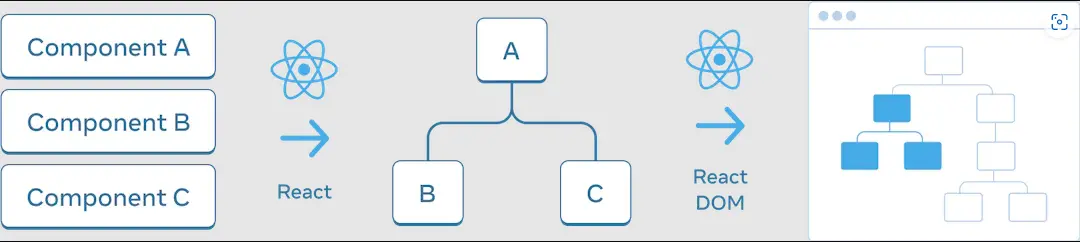
Consider this component and the two ways to render it for two players:
const [isPlayerA, setIsPlayerA] = useState(true);

function Counter({ name }) {
  const [score, setScore] = useState(0);
  return (
    <>
      <div>
        {name}: {score}
      </div>
      <button onClick={() => setScore(score + 1)}>+1</button>
    </>
  );
}

// ----------

// Do you think they are the same?
// ----- Approach 1
{
  isPlayerA ? <Counter name="A" /> : <Counter name="B" />;
}

// ----- Approach 2
{
  isPlayerA && <Counter name="A" />;
}
{
  !isPlayerA && <Counter name="B" />;
}
They are not the same. The next sections explain why.
2.1State is tied to a position in the tree
The component itself has no state. React stores the state and associates it with the correct component based on its position in the UI tree. React preserves a component's state for as long as it is rendered at its position in the UI tree.
function Counter() {
  const [score, setScore] = useState(0);

  return <div>...</div>;
}

return (
  <div>
    <Counter />
    <Counter />
  </div>
);
- Q: Are the two <Counter /> components the same?
- A: No. These are two separate counters because each is rendered at its own position in the tree. Each of them gets its own, independent score state.
If a <Counter /> is removed, React discards its state.
2.2Same component at the same position preserves state
const [isFancy, setIsFancy] = useState(false);

 return (
  <div>
    {isFancy ? (
      <Counter isFancy={true} />
    ) : (
      <Counter isFancy={false} />
    )}
  </div>
  ...
)
- Q: Are <Counter isFancy={true} /> and <Counter isFancy={false} /> the same component?
- A: Yes. Same component, same position: from React's perspective it is the same Counter.
- Q: Why is it the same position?
- A: The position that counts is the position in the UI tree, not the position in the JSX markup.
=> Same component + same position -> preserve state
2.3Different components at the same position reset state
const [isPaused, setIsPaused] = useState(false);

 return (
  <div>
    {isPaused ? (
      <p>See ya!</p>
    ) : (
      <Counter />
    )}
  </div>
  ...
)
In this example we switch between different component types at the same position. Initially, the first child of the <div> contained a Counter. When a p replaces it, React removes the Counter from the UI tree and destroys its state.
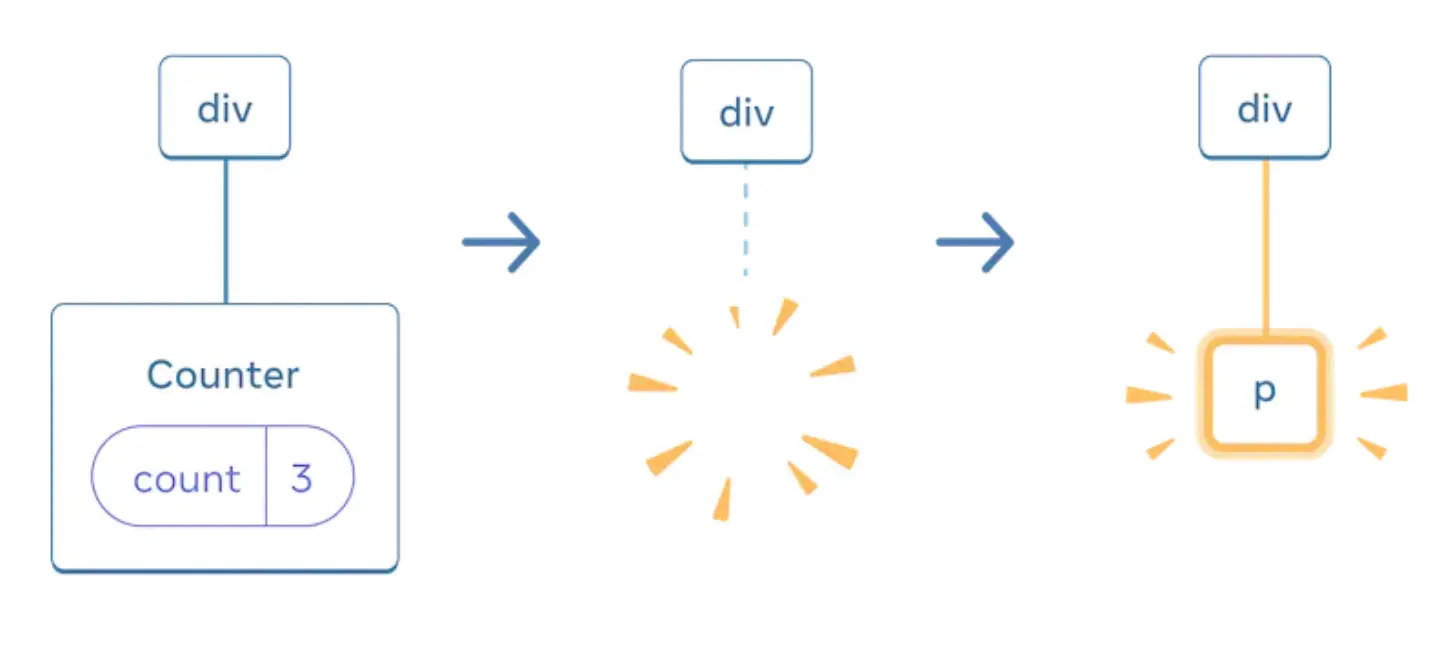
=> Different component + same position -> reset the state of its entire subtree
2.4Resetting state at the same position
By default, React preserves the state of a component while it stays at the same position. Approach 1 from the opening example shows the catch:
// Approach 1
{
  isPlayerA ? <Counter name="A" /> : <Counter name="B" />;
}
- Q: What happens with approach 1?
- A: The counter is the same component at the same position in both cases, so the state stays. The name prop changes but the score stays. This is normal in React, but it is a bug here. There are two ways to fix it.
Option 1: render the component at different positions
This is what approach 2 does:
{
  isPlayerA && <Counter name="A" />;
}
{
  !isPlayerA && <Counter name="B" />;
}
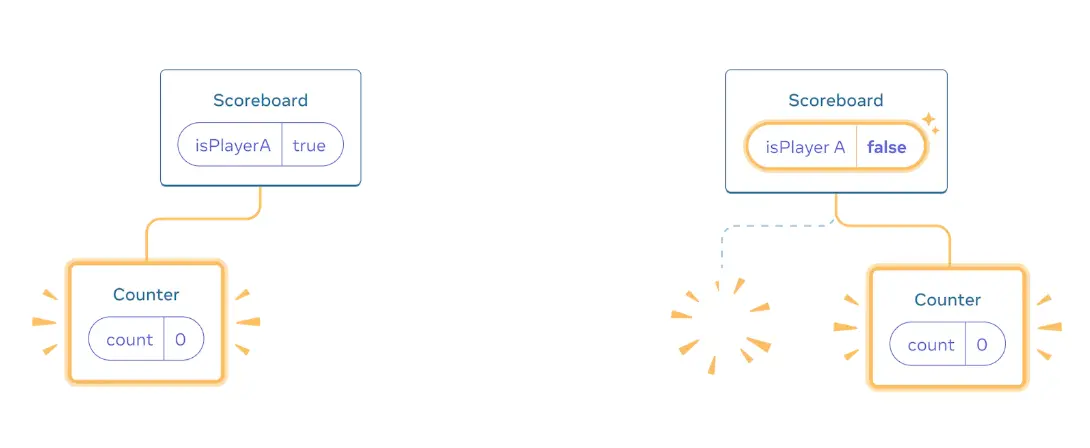
Option 2: reset state with a key (recommended)
{
  isPlayerA ? <Counter name="A" key="A" /> : <Counter name="B" key="B" />;
}
Keys are not only for lists. You can use keys to make React distinguish between any components. By default, React uses the order within the parent (first Counter, second Counter, and so on). With a key, React knows A's counter from B's counter and does not share state between them.
3Calling a component function directly
What happens if you invoke a component function directly in React? Take this example:
const ExampleComponent = () => {
  const [input, setInput] = useState("");
  //do something here
};

export const App = () => {
  const [show, setShow] = useState(false);
  return (
    <div>
      <button onClick={() => setShow(!show)} />
      {show && ExampleComponent()}
    </div>
  );
};
//This will trigger error "Render more hooks than during the previous render"
//Solution: use <ExampleComponent /> instead
The call turns ExampleComponent and App into one super component. React treats ExampleComponent as a custom hook that runs right before the return statement. So whenever some state in ExampleComponent changes, the entire App re-renders.
- The first time App renders, show is false. ExampleComponent does not render and only one hook runs.
- When we click the button, show is true. ExampleComponent renders and triggers a second hook, which violates the React rules of hooks.
To avoid it, use the component syntax <ExampleComponent />. It translates into React.createElement(ExampleComponent, null), so React controls the properties of that component in the virtual DOM tree.
4Effects that run twice in development
React 18 adds a development-only check that mounts, unmounts and remounts components, restoring their state on the second mount.
4.1What changed and why
- Beginning with React 18, in development mode and StrictMode, components are mounted, unmounted, and then mounted once again.
- In the future, React will support adding and removing sections of the UI while maintaining state. For example, when a user navigates back from a screen and then revisits it, React should be able to show the previous screen right away. React would do this by unmounting and remounting trees with the same component state as before.
- This functionality will improve the performance of React projects out of the box. It requires components to be resilient to effects being mounted and unmounted several times. Most effects work as-is. Some assume they are only mounted or destroyed once, so the new behavior might cause trouble for existing useEffect code that intends to trigger mount and unmount once.
- React 18 adds a development-only check in StrictMode to identify these issues. After a component mounts for the first time, the check immediately unmounts and remounts it, restoring the previous state on the second mount.
4.2What differs from React 17
- In React 17, the useEffect hook is called every time the component is mounted.
- In React 18, each component is mounted, unmounted, and remounted. A useEffect call with no dependencies runs twice in StrictMode.
4.3Example
The cleanup function of the useEffect hook confirms the behavior:
useEffect(() => {
  console.log("Hello Dwarves!");
  return () => console.log("Cleanup..");
}, []);
The console output looks like this:
Hello Dwarves!
Cleanup..
Hello Dwarves!
Solution
Embrace the double-firing and make sure your cleanup function works, so double-firing in development does no harm.
Workaround (not recommended)
You can create a custom hook so that the useEffect is called only once. This approach can cause leaks and is not good engineering practice.
export const useEffectOnce = (effect: () => void | (() => void)) => {
  const destroyFunc = useRef<void | (() => void)>();
  const effectCalled = useRef(false);
  const renderAfterCalled = useRef(false);
  const [val, setVal] = useState<number>(0);

  if (effectCalled.current) {
    renderAfterCalled.current = true;
  }

  useEffect(() => {
    // only execute the effect first time around
    if (!effectCalled.current) {
      destroyFunc.current = effect();
      effectCalled.current = true;
    }

    // this forces one render after the effect is run
    setVal((val) => val + 1);

    return () => {
      // if the comp didn't render since the useEffect was called,
      // we know it's the dummy React cycle
      if (!renderAfterCalled.current) {
        return;
      }
      if (destroyFunc.current) {
        destroyFunc.current();
      }
    };
  }, []);
};
5References
- Rich Harris - Rethinking reactivity talk at YGLF 2019
- https://www.geeksforgeeks.org/reactjs-reconciliation/
- https://www.velotio.com/engineering-blog/react-fiber-algorithm
- https://flexiple.com/react/react-fiber/
- https://beta.reactjs.org/learn/preserving-and-resetting-state
- https://reactjs.org/blog/2022/03/29/react-v18.html#new-strict-mode-behaviors
- https://www.techiediaries.com/react-18-useeffect/
- https://dev.to/ag-grid/react-18-avoiding-use-effect-getting-called-twice-4i9e