These notes cover seven of the classic Gang of Four patterns. Each one answers a recurring design problem: how to create objects (Singleton, Builder, Prototype) and how objects share work and talk to each other (Strategy, State, Observer, Command). Every pattern below follows the same path: the problem, the idea, a concrete example, then trade-offs and where it fits. The examples mix pseudocode, Go, TypeScript and JavaScript, because each author wrote in the language they knew best.
Source: Refactoring.Guru design patterns. The notes paraphrase its explanations and add their own examples.
1Creational patterns
Creational patterns control how objects get made. Three of them are covered here, and they interact: Factory, Abstract Factory and Builder produce the original object, Prototype copies one that already exists, and Singleton makes sure only one ever exists.
1.1Singleton
Singleton is a creational pattern. A type has exactly one instance, and the pattern gives global access to it. There are several implementations, picked by whether the environment is single-threaded or multi-threaded.
Problem
Say we build a simple web page that shows the live subscriber count of a YouTube channel. The main object is the subscriber, so we need a counter that updates in real time. There are two actors: subscribers (YouTube) and visitors (our web page).
When a user subscribes, the counter goes up by one, and so on for each new subscriber. Two things need care:
- Concurrent subscription requests must be handled properly. Otherwise we may miscount some subscribers.
- All actors (subscribers and visitors) must update and read the same counter.
Singleton solves both. It creates the counter once and provides global access to it. All subscribers and visitors reach the same counter, so the data stays consistent. Since several subscribers can subscribe at the same moment, the instantiation of the counter must be thread-safe.
Applicability
Use Singleton when you must manage one and only one instance of a resource, such as configuration or a logger.
Approaches
There are two ways to implement it:
| Eager | Lazy | |
|---|---|---|
| When it initializes | As soon as the app starts | The first time the instance is requested (for example, the counter is created when the first subscription arrives) |
| Fit | Only for light resources, because initializing at startup costs compute and reduces app performance | Not for heavy resources, because the first request then pays a large compute cost |
| Complexity | Simple to implement, with no race condition to worry about | More complex, and the instantiation must be thread-safe to avoid redundant instances |
Implementation in Go
First, define the counter struct:
type counter struct {
	views int
}
Eager initialization:
var instance *counter = &counter{}

func getCounter() *counter {
	return instance
}
Lazy initialization uses double-checked locking, which avoids taking the lock once the instance exists:
var instance *counter

func getCounter() *counter {
	// instance has not been initialized
	if instance == nil {
		// lock to avoid multiple instances are created simultaneously by multi threads
		lock.Lock()
		defer lock.Unlock()

		// need to recheck because first check can be passed by multiple gorountines
		if instance == nil {
			instance = &counter{}
		}
	}

	// when instance has already been initialized -> return
	return instance
}
Benefits and drawbacks
Benefit: if the implementation is correct, the type has only one instance.
Drawbacks:
- The codebase becomes tightly coupled.
- It is hard to debug.
- Writing unit tests gets tricky.
- Use cases are limited.
Diagram: Singleton design pattern (PDF)
1.2Builder
Builder constructs a complex object step by step while keeping flexibility.
Problem
We want a complex object without worrying about how it is made. A Factory can hide those details and hand us the output, but the drawback is that we get the same fixed object every time. When you need to tweak some properties to get the result you want, use Builder.
The pattern
- Create a builder for the object you want, for example QueryBuilder or ButtonBuilder.
- Add methods that act as steps to build the object gradually. Each step returns the builder itself, which allows method chaining. Chaining is not required, but it is a distinctive feature of the pattern.
- Add a method that finalizes and outputs the object. By convention it is called build().
Here is a DrinkBuilder for a Drink object:
class DrinkBuilder implements Builder {
  private drink: Drink;
  private name = "";
  private ingredients = [];

  constructor() {}

  name(n: string) {
    this.name = n;
    return this;
  }

  addIngredient(name: string, ml: number) {
    this.ingredients.push({ name, ml });
    return this;
  }

  // where the actual building happens
  mix() {
    return new Drink(this.name, this.ingredients);
  }
}
And the usage:
new DrinkBuilder()
  .name("JagerBomb")
  .addIngredient("Jagermeister", 30)
  .addIngredient("Redbull", 120)
  .mix();

new DrinkBuilder()
  .name("JagerGrenade")
  .addIngredient("Jagermeister", 30)
  .addIngredient("Tequila", 30)
  .addIngredient("Vodka", 30)
  .addIngredient("Redbull", 50)
  .mix();
Because each step is a method, the consumer (the code that uses the builder) can add, skip or modify properties easily. A Factory class would have hidden all of that. Method chaining also helps readability.
Real-life examples
jQuery was one of the early pioneers of this pattern in its API. Those little $(something).on("click", func).toggle("class")... calls are Builder in action. The JavaScript ecosystem is fond of the pattern. Other libraries that use it:
- wretch, a wrapper for the native Fetch API with intuitive syntax
- zod, a schema validation library
- spotify-web-api-node, a Node.js wrapper for Spotify's web API
- and many others
Pros and cons
Pros:
- Readability: each step communicates what it does and which parameters it needs.
- Flexibility: you can add X, modify Y or skip Z without touching the internal logic.
Cons:
- Every object you want to build needs its own Builder class. This can become a problem as the codebase grows.
Diagram: Builder design pattern (PDF)
1.3Prototype
Prototype minimizes the effort of recreating an object by cloning the original, the "prototype".
Problem
We want a copy of an object, but recreating it is hard. Its config may only be initialized at runtime, its fields and methods may be private, or its properties may have been changed through many processes. Two examples:
- A database access object whose credentials are only provided at runtime.
- A ledger object that holds transaction histories in private fields and exposes a Total() function for the balance. To replicate the whole ledger, we would have to recreate all its transaction histories.
The pattern
Ask the object (the prototype) for a clone, without looking up its class or implementation. The target object becomes a prototype by getting a Clone() function that mirrors the object with enough properties for whoever uses the clone.
The following example is in Go. We are building an RPG with a Hero object, and a new skill called "Mimic" needs a copy of the hero with the same level.
type Hero struct {       // level, experience, and killLogIDs are private to avoid editing the Hero object
 level         int64
 experience    int64
 killLogIDs    []int64
}

type (h *Hero) KillConfirm(targetID int64) {
 h.killLogIDs = append(killLogIDs, targetID)
 h.experience += 10

 if h.experience >= 100 {
 h.level += 1
 h.experience -= 100
 }
}

// Creates a clone of the Hero without repeating the whole kill log
type (h *Hero) Clone() Hero {
 return Hero {
 level: h.level,
 experience: h.experience,
 killLogIDs: h.killLogIDs,
 }
}
Where it fits
Prototype works in tandem with other creational patterns:
- Factories, abstract factories and builders help create the original object. Prototype provides a clone of that object without calling those patterns again.
- Prototype behaves opposite to Singleton. Singleton keeps a single instance for the operational flow. Prototype can clone the object in the middle of its processing flow for other uses, without changing the original.
The most common use cases:
- Credential or access objects for databases and external services.
- Ledger or bank statement objects, which we clone for statistics and simulations.
Diagram: Prototype design pattern (PDF)
2Behavioral patterns
Behavioral patterns decide how objects divide work and communicate. Strategy and State both swap the behavior behind an object, Observer pushes change notifications to many listeners, and Command turns a request into an object that can be queued or undone.
2.1Strategy
Strategy is a behavioral pattern. It groups interchangeable classes behind one interface. The context, with the help of helper objects, selects the right implementation of that interface.
Problem
Picture a renowned cookbook that the restaurant keeps as a single copy, to prevent trade secrets from leaking. To keep standards, head cooks must follow the complicated recipes in it. As the restaurant grows, head cooks fight over turns with the one book.
The fix is to split the cookbook into multiple books by type (appetizer, main dish, side dish) and by cuisine (Asian, French, Italian). Each head cook picks the books (strategies) that match their station and the cuisine of their dish.
The pattern
Create an interface that represents the shared function of a group of similar classes, and give each class its own implementation of it. To choose the right strategy, the context uses the information provided and selects the appropriate implementation.
Example:
// Given an interface to group classes with similar functionality
type Calculation interface {
 func Calculate(x, y int) int // calculate two numbers: x and y, return int result
}

// Implementations
type CalculationAdd Calculation

// Calculate returns the addition result of x and y
func (c CalculationAdd) Calculate(x, y int) int {
 return x + y
}

type CalculationMinus Calculation

// Calculate returns the subtraction result of x and y
func (c CalculationMinus) Calculate(x, y int) int {
 return x - y
}

// The program calculator, from the input operator, calculates two numbers and prints the result
func main() {
 var x, y int
 x, y = env.GetInputNumbers()
 var operation string
 operation = env.GetInputOperation()

 var calculation Calculation
 // Select calculation
 switch operation {
 case "ADD":
 calculation = CalculationAdd
 case "Minus":
 calculation = CalculationMinus
 }

 log.Printf("Result of operation %d %s %d is: %d, x, operation, y, calculation.Calculate(x, y))
}
Use cases
Strategy is common in systems with diverse business flows. A few examples:
- A route planning system that changes with the vehicle type.
- A transaction system that deals with different types of charging, subscription and discount.
Diagram: Strategy design pattern (PDF)
2.2State
State is a behavioral pattern that lets an object change its behavior when its internal state changes. It is useful when an object can exist in many states and its behavior depends on them.

Example scenario
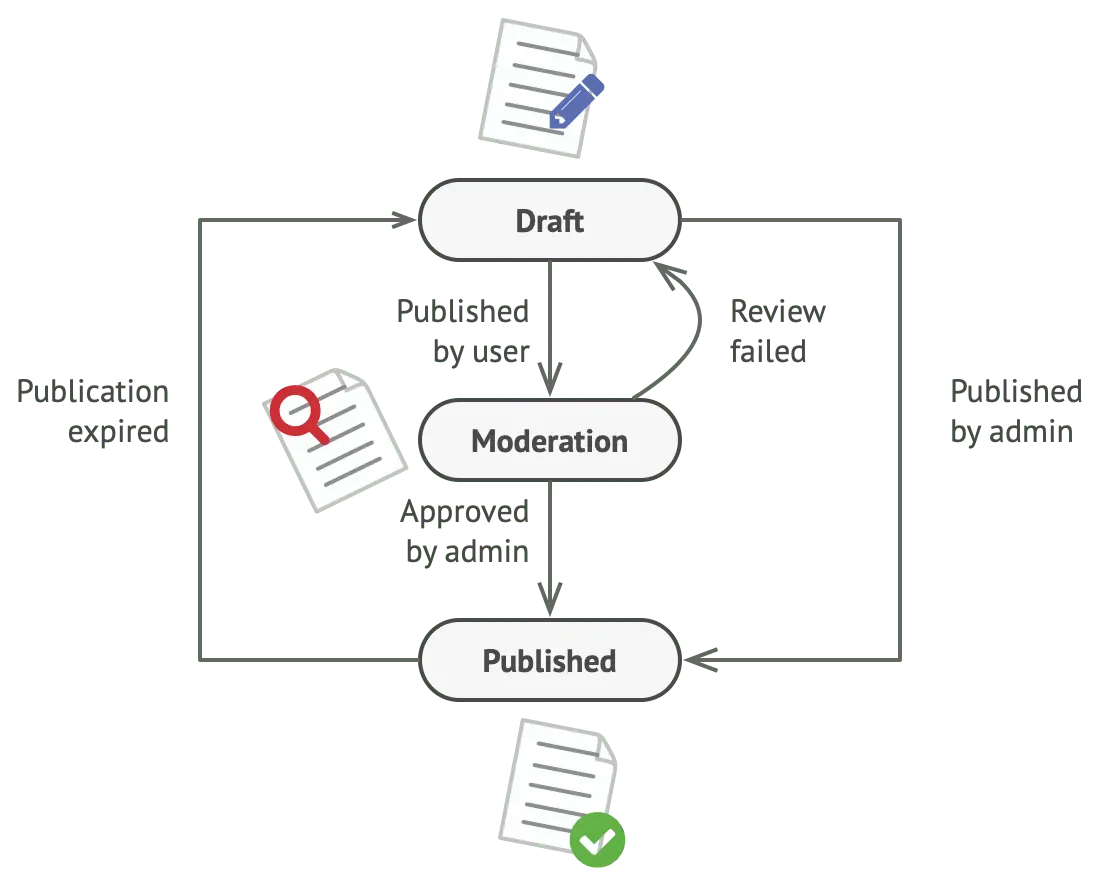
Consider a Document class with three states: Draft, Moderation and Published. The publish method behaves differently in each one:
- Draft: moves the document to Moderation.
- Moderation: publishes the document if the current user is an administrator.
- Published: does nothing.
Common implementation issues
class Document is
    field state: string
    // ...
    method publish() is
        switch (state)
            "draft":
                state = "moderation"
                break
            "moderation":
                if (currentUser.role == "admin")
                    state = "published"
                break
            "published":
                // Do nothing.
                break
    // ...
- Monstrous conditionals: as states and transitions multiply, the conditional logic becomes complex and hard to manage.
- Maintenance difficulty: changing state transitions means updating conditionals in several places, which raises the risk of errors.
- Scalability issues: predicting every state and transition at design time is hard, and the state machine bloats as new states and behaviors arrive.
Solution
State moves state-specific behavior into separate state classes. The context class delegates behavior to the state objects, which keeps the code cleaner and easier to manage.
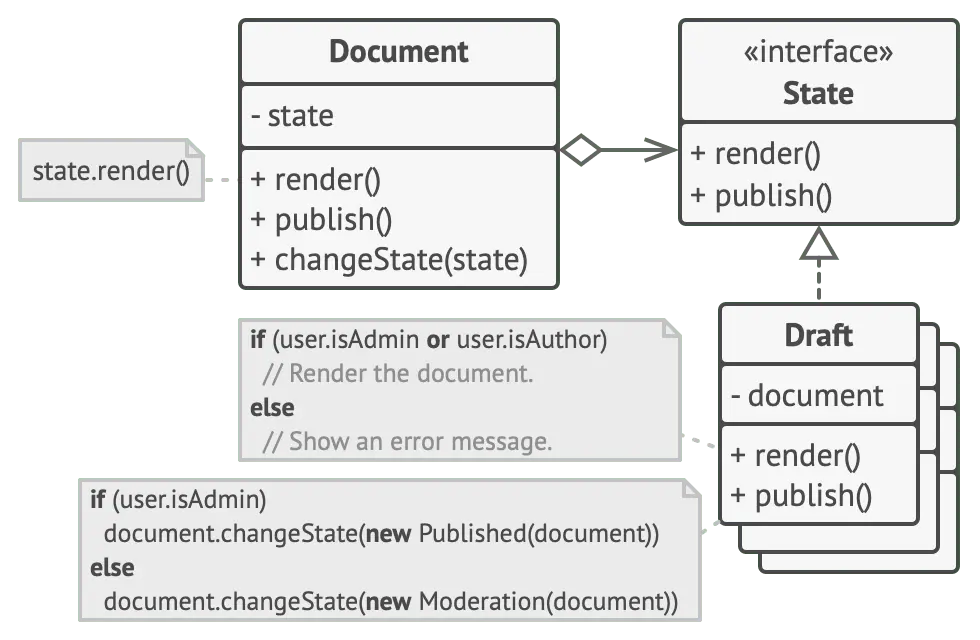
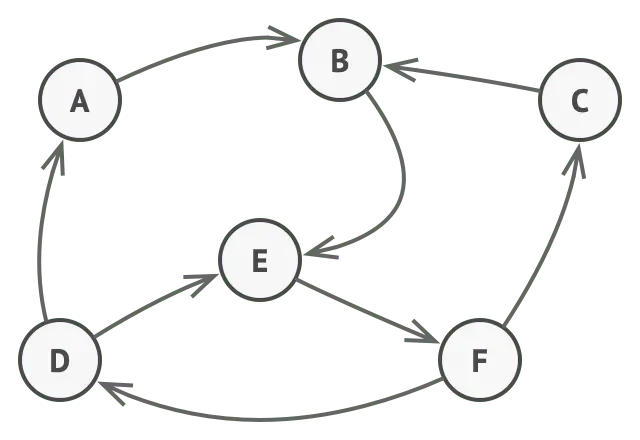
The state of the object is a set of state-specific classes. The object, called the context, delegates state-specific behavior to its current state object. As the state of the context changes, it moves between state objects, and each one implements its own set of behaviors.
Structure
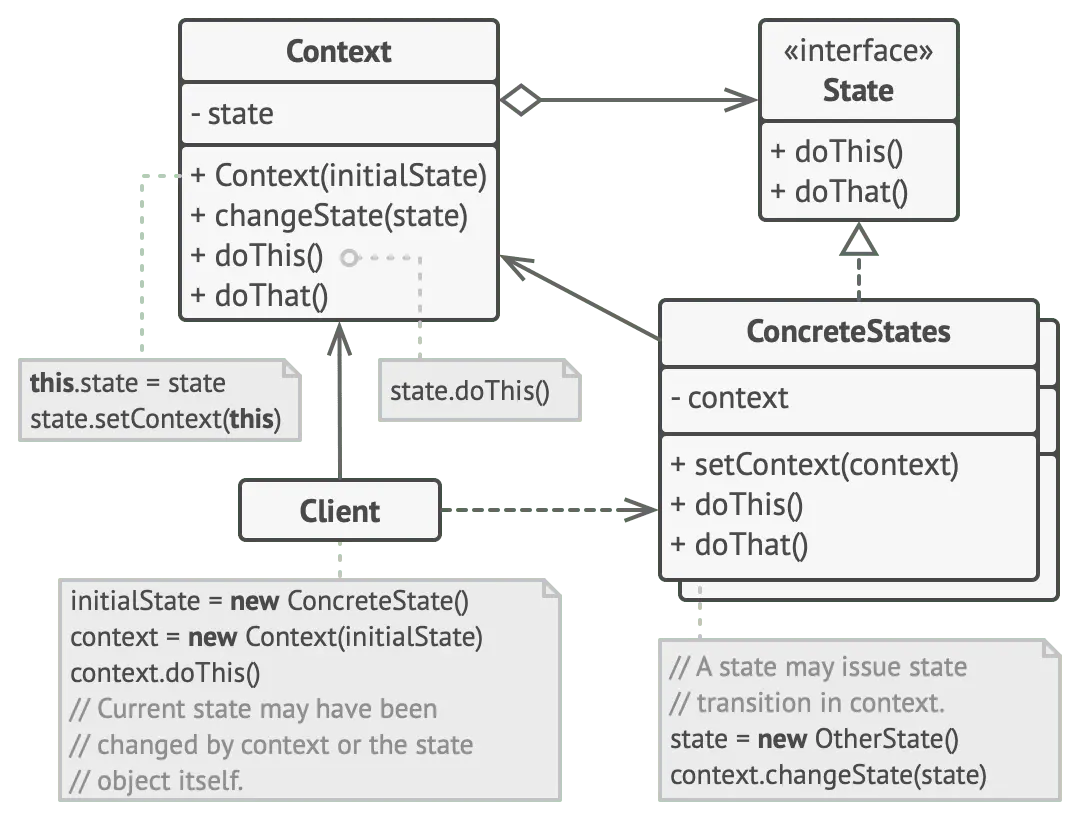
- Context: holds an instance of a ConcreteState subclass that defines the current state.
- State: defines an interface for the behavior tied to one state of the Context.
- ConcreteState: implements the behavior tied to a state of the Context.
Advantages
- Simplifies state transitions: state-specific behavior and transitions are encapsulated, so adding a state does not modify existing ones.
- Enhances readability: state-specific behavior lives in separate classes, which improves maintainability.
- Promotes the open/closed principle: the system extends with new states without altering existing code.
Use cases
- Finite state machines: an object can be in one of a limited number of states.
- User interfaces: managing UI states such as enabled, disabled and focused.
- Game development: handling game states such as running, paused and stopped.
State compared with Strategy
State can be seen as an extension of Strategy. Both are based on composition, and both change the behavior of the context by delegating some work to helper objects.
| Strategy | State |
|---|---|
| An interface is created from the similarity of function, and the helper objects select the appropriate strategy | Each class represents a state. The helper objects move the context to a state and then perform that state's behavior |
| Strategy objects are completely independent and unaware of each other | Dependencies are not restricted, so states may know about each other and start transitions from one state to another |
2.3Observer
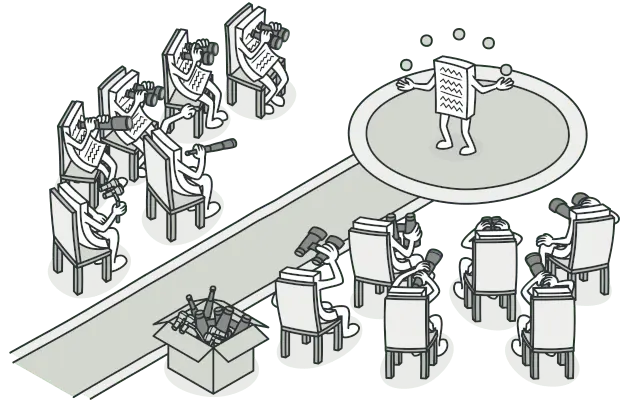
Observer is a design pattern where an object, the subject, keeps a list of its dependents, the observers, and notifies them of state changes.
Problem
Take two kinds of objects: a Customer and a Store. The customer wants a particular product, say a new iPhone model, that the store will stock soon.
The customer could visit the store every day to check. While the product is still on its way, most of those trips are wasted.
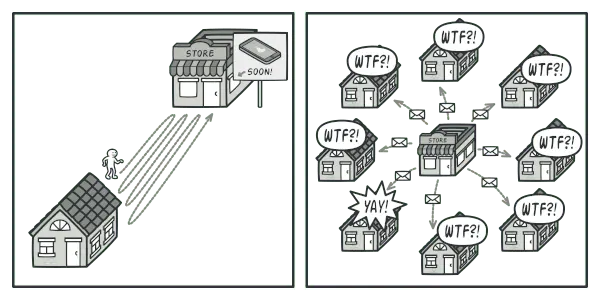
The store could instead email every customer whenever a new product arrives. That spares some customers the trips, but it looks like spam to customers who do not care about new products.
So there is a conflict. Either the customer wastes time checking, or the store wastes resources notifying the wrong customers.
Real-world analogy
A magazine subscription removes the need to check the store. The publisher sends each new issue to your mailbox right after publication, or even before. The publisher keeps a list of subscribers and knows which magazines each one wants. A subscriber can leave the list at any time to stop receiving issues.
Examples
DOM events and event listeners. In the browser, Observer shows up as DOM events. The DOM element is the subject and the event listeners are the observers.
button.addEventListener("click", () => {
  console.log("Button clicked!");
});
Custom event emitters. We can build our own emitters to decouple code and improve modularity.
const EventEmitter = require("events");
const emitter = new EventEmitter();

emitter.on("event", () => {
  console.log("An event occurred!");
});

emitter.emit("event");
Here emitter is the subject. When we emit the event, every registered observer gets notified.
Redux uses Observer under the hood. The Redux store is the subject, and components that subscribe to the store are the observers.
const { createStore } = require("redux");

const reducer = (state = {}, action) => {
  switch (action.type) {
    case "UPDATE":
      return { ...state, data: action.payload };
    default:
      return state;
  }
};

const store = createStore(reducer);

store.subscribe(() => {
  console.log("State changed:", store.getState());
});

store.dispatch({ type: "UPDATE", payload: "new data" });
The store dispatches actions, and the subscribed components get notified so they can update their state.
Pros and cons
Pros:
- Loose coupling: fewer dependencies between subject and observers, so the system is easier to maintain and extend.
- Automatic updates: observers are notified and updated when the subject's state changes, which keeps them in sync.
- Reusability and flexibility: observers and subjects can be reused independently, and new observers can be added without modifying the subject.
- Event handling: a structured way to handle events and notify interested parties.
- Simpler communication: the notification mechanism is abstracted away.
Cons:
- Potential for memory leaks if observers are not unregistered properly.
- Unexpected updates: observers may receive updates at unexpected times, which can cause race conditions or inconsistent state.
- Performance overhead: notifying every observer costs more with many observers or complex notifications.
- Unnecessary complexity in simple applications.
- Debugging is harder, because tracking the flow of notifications and the order of updates is difficult.
2.4Command
Command is a behavioral pattern that encapsulates a request as an object. That lets you parameterize methods with different requests, delay or queue a request's execution, and support undoable operations. It also decouples the sender of a request from its receiver, which improves flexibility and maintainability.

Key components
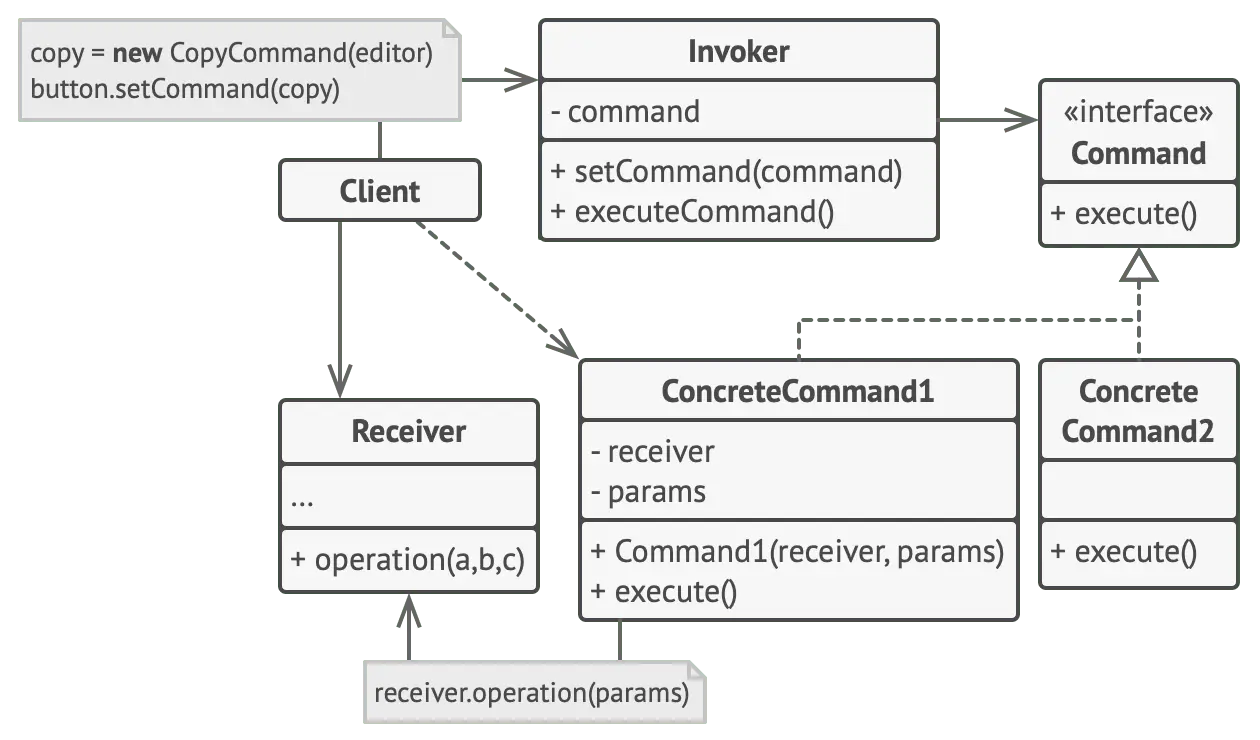
Command interface
- Purpose: declares a method for executing a command and makes every concrete command implement it, so the interface stays consistent.
- Responsibility: defines an execute() method that concrete commands must implement.
Concrete command
- Purpose: implements the Command interface, defines the binding between a Receiver object and an action, and calls the right operations on the Receiver.
- Responsibility: implements execute() by invoking the matching operation(s) on the Receiver, and holds a reference to the Receiver.
Receiver
- Purpose: knows how to perform the operations needed to carry out the request.
- Responsibility: does the actual work when the concrete command calls its methods.
Invoker
- Purpose: asks the command to carry out the request. It can store and queue commands, and it can support undo by keeping the commands it executed.
- Responsibility: holds a reference to a Command object (or a list of them) and calls execute() on it.
Real-life example
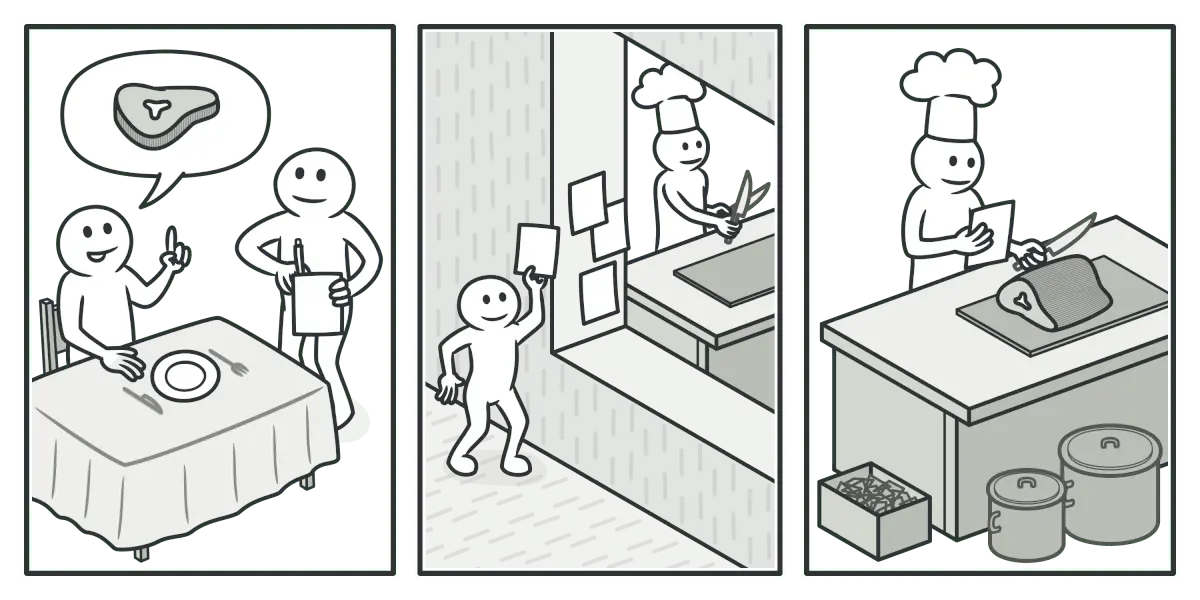
Imagine you run a small restaurant and you are both the chef and the person taking orders. As the restaurant gets popular, you cannot keep up with the orders, so you hire a waiter. The waiter takes orders from customers and writes them on paper.
The waiter brings the written orders to the kitchen and sticks them on the wall. You, the chef, pick up the slips from the wall and cook. When a meal is done, you put it on a tray with its order slip. The waiter takes the tray, double-checks the order and serves the customer.
The paper order is the Command. It waits in a queue until the chef is ready. It carries everything needed to cook the meal, so the chef can start at once instead of asking the customer for details.
Pros and cons
Pros:
- Single Responsibility Principle: separates the classes that invoke operations from the classes that perform them.
- Open/Closed Principle: new commands can be added without breaking existing client code.
- Undo and redo: supports implementing both.
- Deferred execution: operations can run later.
- Complex commands: simple commands can be assembled into a complex one.
Cons:
- Complexity: it adds a whole new layer between senders and receivers, which can complicate the code.
Applicability
- Transactional systems: financial and payment systems, e-commerce platforms.
- Task scheduling: job schedulers, cron jobs, task queues, batch jobs, data processing pipelines.
- User interfaces: optimistic UI.