1Thinking in teams
I recently got a request to "track user visits to more pages," which sounded simple. But it unraveled into questions about scope, performance, and privacy that most AI coding assistants can't handle. They're great for writing a single function, but ask for a full feature, and they start losing context.
My own attempts felt like this. Using a single AI was like having a distractible intern doing everything from architecture to QA. It was clear I was on a path to building the wrong solution. The problem wasn't the AI's capability, but my approach. I was asking a soloist to perform a symphony.
It finally clicked for me that you can’t expect one person to do the work of an entire engineering department. You have to build a team. That sparked a thought: what if AI was organized as a group of specialists? One agent could handle research, another could focus on planning, and another on testing. It reflects how we approach building software, and it seemed like a promising direction to take.
2The Five-phase flow
This led me to design a workflow with five distinct agent roles, organized into a five-phase process. The key idea is that the agents don't all talk to each other at once. That would be chaos. Instead, they work sequentially, each producing documentation that becomes the input for the next. The system is managed by a master orchestrator that handles the handoffs, much like a project manager ensuring each person has what they need to start their work.
It looks something like this:
- Analyze & Research: A Researcher agent digs into the problem space.
- Planning: A Project Manager agent creates architectural plans and specifications.
- Test Case Design: A Test Case Designer defines how we'll know if the solution works, before a line of code is written.
- Implementation: A Feature Implementer writes the code to pass those tests.
- Quality Assurance: A QA Engineer validates the whole thing against the original requirements.
Before any of this happens, though, there's a critical pre-phase. The master orchestrator has a detailed conversation with the user to clarify the requirements. This isn't just about getting a yes or no; it's an exploration that often uncovers hidden assumptions. The goal is to turn a vague request into a concrete, documented plan.
3How it works in practice
Let's return to that "track more page visits" request.
My initial prompt was, "I want to track user visits to more pages. Currently, we only track when users go to the home page."
A simple AI might have just started spitting out code. Instead, the master orchestrator analyzed the existing codebase and came back with questions. It had already figured out I only tracked one visit per session and laid out four possible interpretations of my request, from simply tracking more pages to adding deep engagement metrics. It recommended Option 1—tracking individual page navigations—and asked clarifying questions about API calls, privacy, and the admin dashboard.
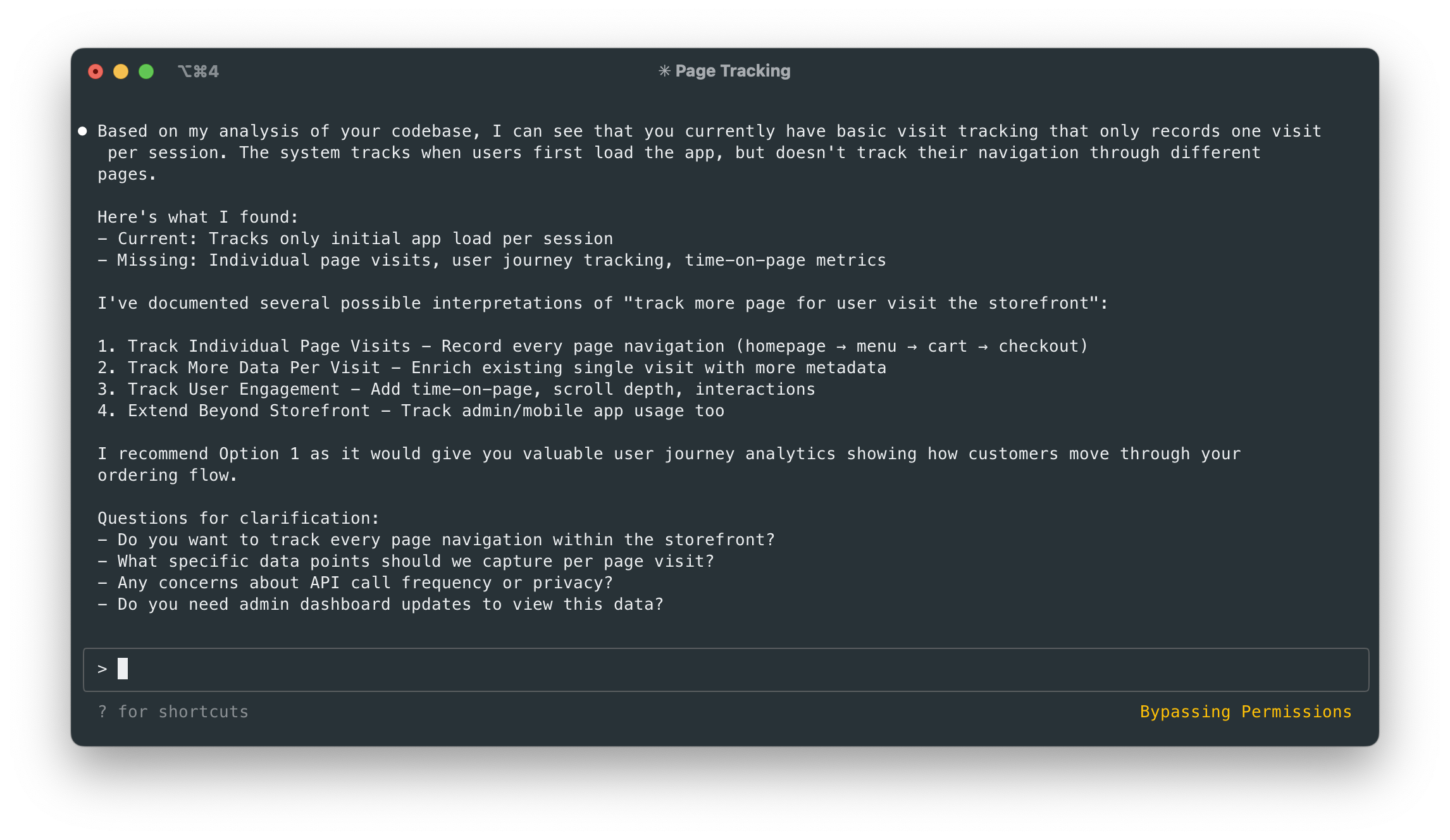
This initial back-and-forth was transformative. My vague idea became a concrete plan. I decided to track every page navigation, make a single API call per page to avoid spamming the server, and enhance the admin dashboard. The orchestrator documented this in a file, final-requirements.md, complete with timestamps and unique IDs for each requirement. This document became the source of truth for the entire project.
With the requirements locked in, the team got to work.
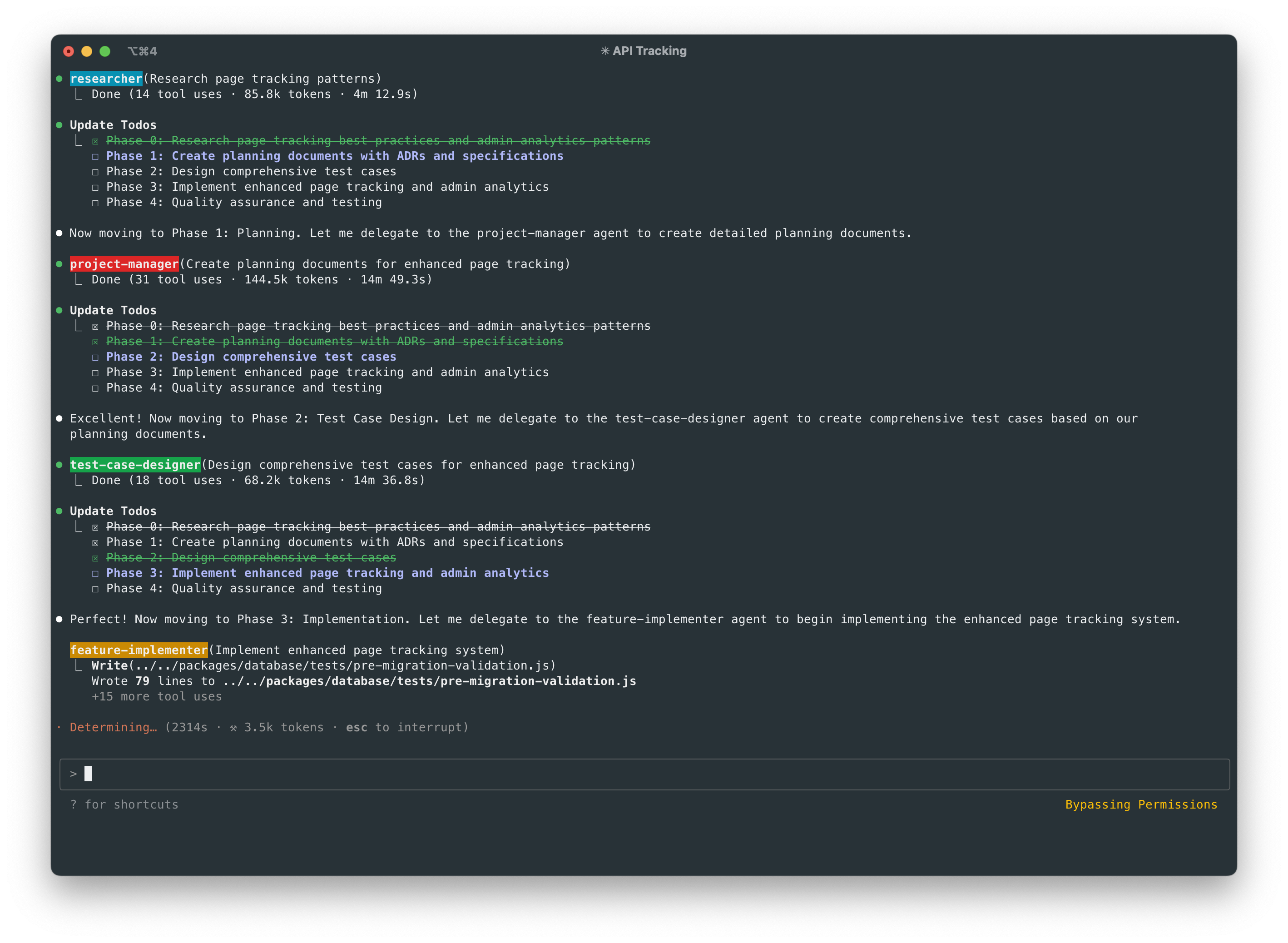
The Researcher spent four minutes and used 14 tool calls to analyze my routing architecture and research best practices for the specific stack.
The Project Manager then created Architecture Decision Records (ADRs) and detailed specifications. It broke the work down into route-level tracking, session management, and dashboard components, all tracing back to the IDs in the requirements file.
Next, the Test Case Designer spent fourteen minutes and 35 tool calls creating a comprehensive suite of tests. There were unit tests for the tracking logic, integration tests for the analytics service, and end-to-end tests for user journeys. This felt like a lot of work upfront, but it was really just diligence.
Only then did the Feature Implementer start writing code. It built the TypeScript interfaces, the tracking middleware, and the new dashboard components, with the explicit goal of making all the tests pass.
Finally, the QA Engineer validated the whole implementation. It checked not only that the code worked but that it correctly fulfilled the original requirements from final-requirements.md. Did it track all page visits? Did it avoid duplicate API calls? Did the dashboard show meaningful insights? This phase wasn't just about finding bugs; it was about ensuring I had built what I'd set out to build.

The result was a production-ready analytics system, complete with tests and documentation that explained not just what was built, but why.
4What I learned
The difference was noticeable. I saw fewer post-deployment bugs, especially for complex features. The documentation became radically better because every decision was captured as it was made. And onboarding new engineers became easier because they could read the session logs and understand the thinking behind a feature. The "works on my machine" problem for complex setups virtually disappeared.
But the biggest change wasn't a number on a chart. It was a feeling of predictability. Complex features no longer felt like a gamble.
If you wanted to build something like this, the lessons I learned are straightforward.
First, think in terms of roles, not just prompts. Start with three: a Researcher, a Planner, and an Implementer. You can add more specialized roles as you find you need them.
Second, make documentation the centerpiece of the workflow. Every task should start with a timestamped directory. The structure I use looks like this:
docs/sessions/YYYY-MM-DD-HHMM/
├── requirements/
├── research/
├── planning/
├── test-cases/
└── implementation/
The output of one agent in its directory becomes the input for the next. This creates an audit trail that is invaluable. Each phase ends by creating a STATUS.md file, which is a narrative of what was done, what decisions were made, and why, all linked back to the original requirements. It’s a quality gate, not just a checkbox.
The most surprising thing is that this system feels less like operating a machine and more like managing a very efficient team. The documentation reads like a series of well-documented conversations and handoffs.
5Realistic expectations
This workflow isn’t magic. It doesn't produce a perfect, finished feature in a single pass. What it does produce is a very strong first draft—maybe 50-70% of the way to the final solution. From there, a human developer needs to step in, assess what's missing, and perhaps run the process again on smaller, more targeted tasks.
And maybe that's the right model. The goal isn't to replace human developers, but to give them a much better starting point. I've spent so much of my time on the scaffolding of software development—understanding requirements, setting up tests, writing boilerplate. The agent team automates much of that, leaving me to focus on the hard parts that require real judgment and creativity.
It turns out that a simple request to track page visits led me to a new way of thinking about building software with AI. The answer wasn't a better AI, but a better process. By structuring the work like a human team, I didn't just get better code; I got a system that documents its own thinking. And in the long run, that might be the most valuable thing it builds.