Local-first software prioritizes storing data on the user's device, ensuring ownership, privacy, and offline functionality. It synchronizes with other devices and the cloud when possible, offering the benefits of cloud-based collaboration without the downsides of centralized data storage.
Let's take a quick look at how local-first compares to the conventional stack:
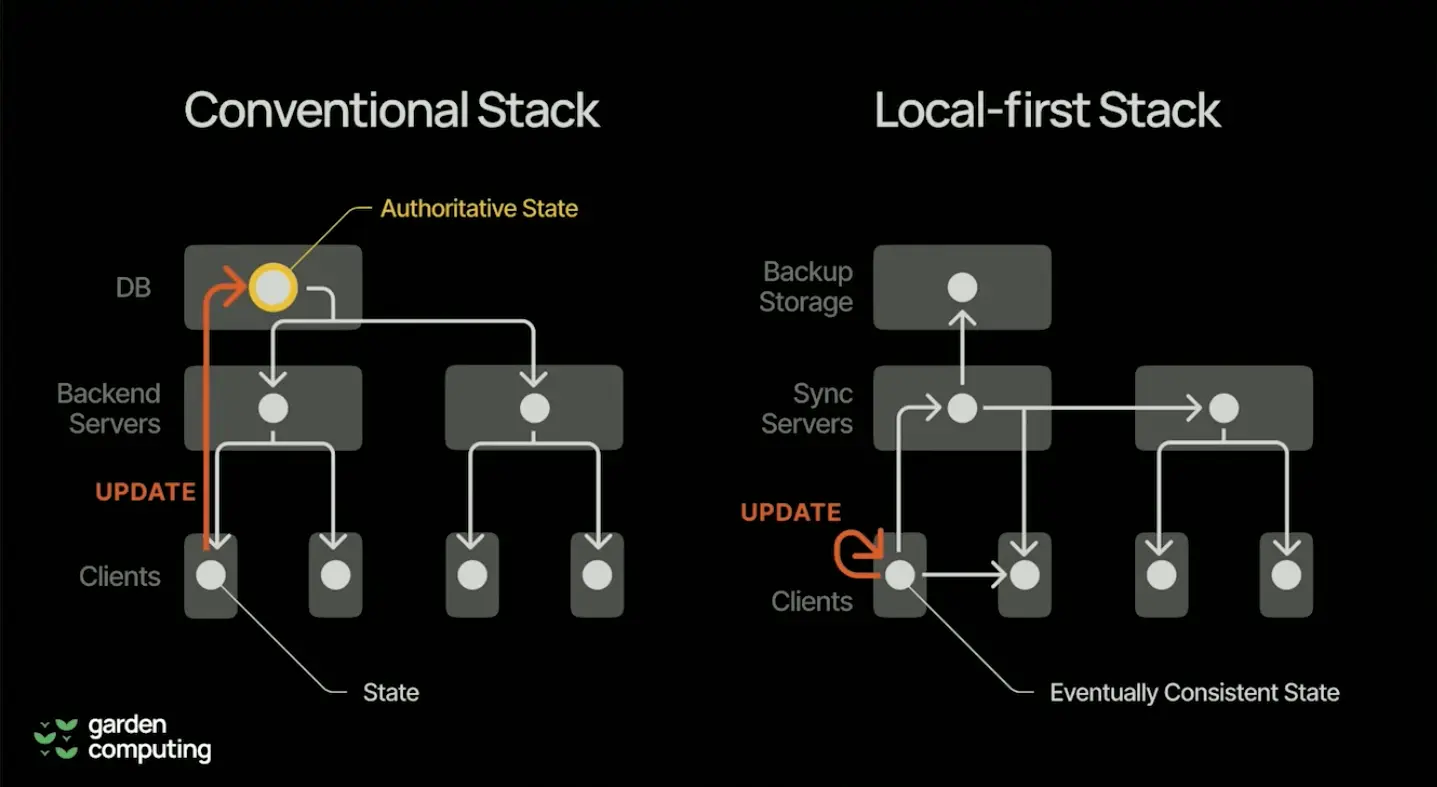
For a "traditional" app, the clients are a "thin" layer that depends on the servers for any read/write operations.
Local-first shifts the roles between servers and clients, making clients the primary source of data while servers act as backup and synchronization sources.
Generally, local-first is enabled by two core concepts:
- CRDTs (Conflict-free Replicated Data Types): These data structures allow multiple users to edit documents simultaneously, merging changes without conflicts. You can read more about CRDTs here: Introduction to CRDT.
- Data synchronization: Changes made offline are synced with other devices and the cloud when a connection is available.
In most cases, end-to-end encryption is required to ensure data security during synchronization.
- Data ownership and privacy: Users have full control over their data, reducing the risk of breaches.
- Offline functionality: Applications remain fully functional without internet connectivity.
- Performance and reliability: Local data storage enhances performance and ensures reliability even with poor or no network connections.
- Seamless collaboration: Enables real-time collaboration and conflict resolution without central servers.
- Traditional file systems and email attachments: Offer local data storage but lack real-time collaboration and seamless multi-device synchronization.
- Cloud-based Solutions (e.g., Trello, Google Drive): Improve accessibility and collaboration but centralize control and expose users to data breaches and loss of access.
- Hybrid Models (e.g., Dropbox): Offer local storage with cloud sync but still depend on centralized servers for data availability.
Popular apps that are known to adopt a local-first approach:
- Figma: A design tool that supports real-time collaboration with local-first principles.
- Obsidian: A knowledge base that stores data locally, allowing offline access and synchronization.
- Notion: While primarily cloud-based, it incorporates local-first elements for offline editing and data synchronization.
- Linear: A project management tool that adopts the local-first approach, ensuring data remains accessible and synchronized across devices even without an internet connection.
- Complexity of CRDTs: Implementing efficient and scalable CRDTs is technically challenging.
- Security: Ensuring robust encryption and secure data synchronization is critical.
- User experience: Balancing simplicity and the benefits of local-first architecture in user interfaces.
- Performance overhead: Managing the performance impact of data synchronization and CRDT operations.