Memo has three doors, and the one you use depends on who you are: a member (current staff), a fellow (alumni) or a guest writer. Staff with write access open a branch in dwarvesf/brainery and send a pull request. Staff without write access and alumni without a blog send the same pull request from a fork. A writer who owns a blog domain skips the repo: they prove the domain, an editor approves, and each approved post lands as a native note.
No outside writer has published on memo yet. The only guest note so far comes from truonghan.com, the maintainer's own blog, so the guest door works and has never been used by a stranger. The fork door has a similar record, covered in the fellow path below.

Fig. 1: Find yourself, follow the branch. The bottom row names the agent skill for each path.
1Find your path in 30 seconds
| You are | Your door | First move | Chapter |
|---|---|---|---|
| Dwarves staff or contractor with write access | Branch and pull request | git clone, then a branch | The member path |
| Dwarves staff or contractor without write access | Fork and pull request | gh repo fork | The fellow path, fork steps |
| Alumni with a blog | Guest writer flow | Tell your agent to read skill.md | The fellow path |
| Alumni without a blog | Fork and pull request, or email | Fork, or write to team@d.foundation | The fellow path |
| Outsider who owns a blog domain | Guest writer flow | Tell your agent to read skill.md | The guest writer path |
Not sure about write access? One command answers it, and it prints true or false:
gh api repos/dwarvesf/brainery --jq .permissions.push
An outsider with no blog and no Dwarves history has no built door yet. Write to team@d.foundation and say what you want to write.
2Why write on memo
Memo publishes a page only when it can win a search against a generic one. That bar has a name, the GEO bar, short for generative engine optimization: would an AI assistant answering a question about your subject cite your page? A page earns that with one of three things: firsthand data, a real verdict, or an angle nobody else has. A definitional page ("what is a pull request") loses every retrieval race, and the editors do not publish it.
You can test your own draft before anyone else does. Delete every specific from it: the numbers you measured, the date you decided, the thing that broke. If the post still stands, it was generic, and no amount of polishing fixes that. A post that survives names a verdict a competent peer could dispute and admits one thing that did not work.
The folder tests in the next chapter show the bar for each kind of post. A report in reports/shipped/ needs a deployment that has been live for two weeks, with real metrics. A report in reports/lessons/ needs three months of hindsight, checked against records instead of memory.
What you get back depends on your door.
| Door | Byline | Reward |
|---|---|---|
| Member | A contributor page at memo.d.foundation/contributor/<handle> | No per-post reward for member posts today |
| Fellow, fork path | The same contributor page | No per-post reward rule is published |
| Guest writer | A contributor page with your verified domain, plus a rel=canonical link back to your own site | 5 to 20 ICY per published post, set by an editor, under a monthly cap the editors can change |
Dwarves has no rule that pays members for posts in the repo, so this page promises none. The ICY figures for guests come from the live join page, and chapter 5 covers them.
3Anatomy of a memo post
A memo post is one Markdown file, a folder of media beside it, and a frontmatter block the lint reads line by line. Four decisions shape it: the folder, the frontmatter, the voice and the figures.
3.1Pick the folder
Each folder holds one kind of claim, and each has a test. _meta/taxonomy.md is the source of truth for the full list. This table keeps the folders most posts land in.
| Folder | Test | Default kind | Word floor |
|---|---|---|---|
| reports/shipped/ | A live deployment, two weeks or more, with real metrics | Field report | 1,200 |
| reports/experiment/ | A controlled, reproducible setup with honest limitations | Field report | 1,200 |
| reports/lessons/ | Hindsight on a project three months or more old, from records | Field report | 1,200 |
| reports/commentary/ | Cited sources plus an original Dwarves angle | Essay | 800 |
| essays/ | Remove the date and it still reads | Essay | 800 |
| journals/<series>/ | Remove the date and it loses its meaning | Digest | none |
| case-studies/ | A client project outcome | Case study | 800 |
| site/ | A website function page | Reference | none |
A second classification goes in tags or series, never in a new folder. Reports stay flat: reports/<tier>/<name>.md, with no subfolders.
3.2Write the frontmatter

Fig. 2: A frontmatter block, annotated. Required fields, optional fields, and the two things that never belong.
Three fields are required: title, description and date. Playbooks and handbook pages may skip the date. Add a slug to every new post. It is flat kebab-case, unique across the vault, and it becomes the URL, memo.d.foundation/<slug>. The build fails on a duplicate.
The lint does not parse YAML. It counts any key: line as a top-level key and wants exactly one colon outside quotes on each. A title like Why: a thing fails until you quote it. Put nested values on one line in flow style, and quote a numeric tag such as "101".
The lint treats everything else as optional: authors, tags, kind, series, image and redirect. Set authors anyway, or the post credits nobody. A page adapted from someone outside the contributor list sets credit: <source name> instead (add a quoted credit_url: for a link) and leaves authors: []. The byline then reads "Adapted from " and links no contributor page. A moved file keeps its slug and appends its old URL to redirect:. draft: true hides a page in production, and a draft cannot be a redirect target. Two things never go in the frontmatter. An evidence key is out because the build derives the tier from the folder. A Discord name in authors is out because it creates a wrong contributor page, which chapter 7 covers.
3.3Kinds and word floors
Every note resolves to one kind: note, reference, digest, playbook, essay, field report or case study. The folder sets the default and a kind: line overrides it. The lint warns when the body falls under the floor: 150 words for a note, 400 for a playbook, 800 for an essay or a case study, 1,200 for a field report. Reference and digest have no floor. Code blocks, images and link addresses do not count. A warning does not fail the check. Expand the post, merge it into a sibling, or set the kind it really is.
3.4Voice
Memo reads as an essay, so first person and contractions are fine. Three things make a post worth reading: something firsthand that only the author could write, a verdict a peer could dispute, and evidence in the page, such as a command, a pull request or a before-and-after.
AI writing gives itself away through structure more than word choice. The tells lists the patterns the editors reject, among them corrective negation, antithesis pairs, setup-and-payoff landings and summary closers. Name the concrete thing in your title, and leave the body H1 out because the title already renders.
3.5Figures and media
The full rules sit on their own page, the Memo media and styling standard. They apply to every path, guest imports included. The budgets are targets that editors check by hand.
- Format. Draw diagrams as SVG. Use a raster only for photos, screenshots and scans, as webp at quality 80 or PNG after pngquant. Keep one file per image, because the worker never serves a .webp twin beside a .png.
- Size. Aim for a raster under 200 KB and between 704 and 1600 pixels wide, and an SVG under 60 KB. The reading column is about 704 pixels wide, so a narrower image blurs.
- SVG. Author at a viewBox width of 720 to 760 with no fixed width or height, and add style="width:100%;height:auto;max-width:<W>px;display:block". Start with an opaque background rect, or the figure floats on the dark theme.
- Alt and captions. Every image gets non-empty alt text. Put an italic _Fig. N: caption._ line under each figure, and name files <slug>-figN-<name>.svg.
- Hero and share card. The first image in the body is the hero and the social card. Set image: only when the hero is not first, with an absolute path like /content/<vault-path>/assets/<file>.png.
- Credit. Credit any image you did not make on the line under the caption.
After a merge, media-sync moves raster files to the storage bucket and strips them from git. SVG stays in the repo. The workflow compresses each raster first and prints a warning in the run summary for any file still over 200 KB. The warning never fails the run.
4The member path
You are Dwarves staff or a contractor and you can push to dwarvesf/brainery. This road is short, and it has fewer guard rails than most people assume.
The rules here are conventions. main has no branch protection and no ruleset, the repo has no CODEOWNERS file, and no check is required. A direct push to main works. Dwarves asks for a branch and a pull request anyway, because the pull request is the only place the lint and the formatting bot run before a page goes live. In 2026, 139 pull requests have merged into the repo. The same person opened and merged every one, with a median of 113 seconds from open to merge. Nobody assigns you a reviewer. If you want a second reader, ask a teammate yourself.
4.1Check your access
Run the gh api command from the chooser. Roughly ten people get true: the direct collaborators plus the members of the leadership and community teams. Dwarves does not hand out more push access, because with no branch protection every push right is also a push-to-main right. Staff who get false take the fork steps in chapter 4. Everything after the clone is identical.
4.2Clone and branch
git clone git@github.com:dwarvesf/brainery.git
cd brainery
git switch -c post/my-first-memo
The repo is text only and has no submodules, so the clone stays small. Branch names carry no rule. Pull request titles do follow a pattern: recent ones read feat(commentary): ... and fix(content): ..., which is conventional-commit style, and yours should match.
4.3Write the post
Chapter 2 covers the folder, the frontmatter and the voice. Three frontmatter fields are mandatory because the lint rejects a file without them: title, description and date. The date is optional only under playbook/ and handbook/. Every new post also gets a slug, which becomes its URL.
If your post carries raster images, expect a follow-up commit after the merge. Brainery's media-sync workflow uploads raster images, video and PDF files to a storage bucket and strips them from git. The site keeps serving them at the same address. SVG stays in git.
4.4Lint before you commit
./pre-commit-hook.sh install
The script writes a pre-commit hook into .git/hooks. On every git commit the hook downloads the current ci-lint.js from memo.d.foundation/tools/ci-lint.js and runs it on your staged Markdown files. It needs node and either curl or wget. ./pre-commit-hook.sh status shows whether the hook is installed, and remove takes it out.
The hook also fixes. On a test file with a double-spaced heading and star bullets, it ran prettier, rewrote the file to a single space and dash bullets, and staged the result. It does not run the sentence-case check without AI-gateway credentials. It prints sentence-case: CF_AI_GATEWAY_URL/CF_AIG_TOKEN not set ... skipping, and CI runs that check for you.
4.5Open the pull request
git push -u origin post/my-first-memo
gh pr create --title "feat(essays): what we measured on X" --body "Adds a field note on X to essays/. Figures are SVG."
The organization's default pull request template is a generic code form, with prompts like "What's this PR do? Add new routes for user". Overwrite it with two sentences about the post and where it sits. Never write [skip ci] in the body. Brainery squash-merges with the pull request title plus body as the commit message, and that string in the message makes GitHub skip the publish run for the merge.
4.6What runs on the pull request
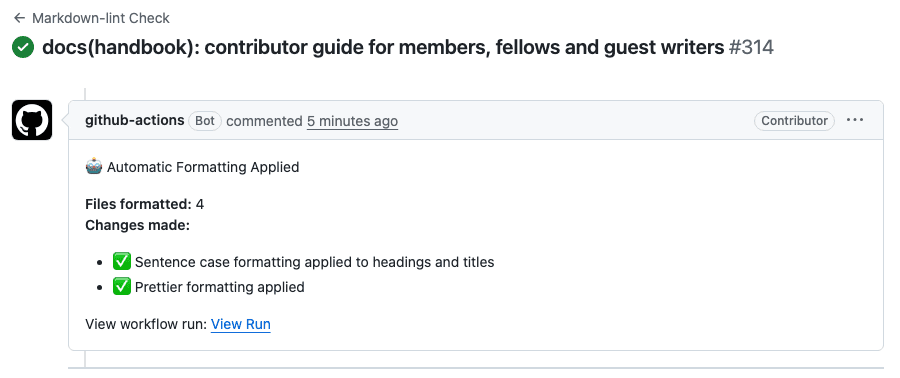
Fig. 3: The article's own pull request, with the lint check and the "Automatic Formatting Applied" comment.
Any pull request that touches a .md or .mdx file runs the "Markdown-lint Check" job on the changed files only. When the job fixes something, it pushes a commit named chore: automatic formatting (sentence case, prettier, lint fixes) [skip ci] to your branch within about a minute and leaves a sticky comment headed "Automatic Formatting Applied". Run git pull --rebase before your next push, or the push is rejected as non-fast-forward. Do not force-push over the bot.
Read the bot's diff before you merge. It sentence-cases headings, and its proper-noun list is partial, so chapter 8 lists what it mangles. The check is not required, so a red lint does not block the merge button. Treat red as a stop anyway, because every error names a real defect in the page.
4.7Merge
Squash is the only merge method the repo allows. Merge commits and rebase merges are switched off.
gh pr merge --squash --delete-branch
The repo does not delete merged branches by itself, so the flag keeps the branch list short.
4.8Two halves publish

Fig. 4: A merge to main fires two publishes. The formatting bot lands within about a minute, and the publish pair takes 5 to 15 minutes.
A merge to main triggers the workflow "Publish memo.d.foundation on content push". It dispatches two other repos with one bot token. dwarvesf/foundation-workers publishes the data plane: the memo API, search index, menus, rollups and the media bucket. dwarvesf/foundation-apps publishes the df-memo frontend Worker that serves the site. A full pair takes 5 to 15 minutes, since each repo runs its publishes one at a time.
4.9Verify it is live
curl -s https://memo.d.foundation/<slug> | grep -c "a phrase only your post contains"
The count should be above zero. Grep the body for something specific to your post instead of trusting a status code alone. Then confirm the publish ran for your merge:
gh run list -R dwarvesf/brainery --workflow publish-on-push.yml --limit 1
The newest run must carry your merge commit. If it does not, fire the publish by hand:
gh workflow run "Publish memo.d.foundation on content push" -R dwarvesf/brainery --ref main
If the page is still absent after 15 minutes, tell the editors. A failed earlier publish run can make later content-only runs refuse, and an editor resets that with one full publish.
5The fellow path
A fellow is anyone who once worked at Dwarves, as staff or as a contractor. The programs page puts it as "once a Dwarf, always a fellow." Your road splits on one question: do you have a blog?
A fellow with a blog could use either door, and the choice decides where the post lives. The guest door keeps your own site as the source, with memo holding a mirrored copy that points back to it. A pull request makes memo the home of the post. Pick the guest door when your site should stay canonical. Pick the fork when you want the post to exist only on memo. The guest door also has an approval flow built for outsiders, while a first fork pull request waits on a manual click.
5.1You have a blog
Use the guest writer flow. The fellow program page's own "Write as a Fellow" button leads to memo.d.foundation/writers/join. Tell your agent to read memo.d.foundation/skill.md and get you onto Dwarves Memo, or fill in the form on the join page. Chapter 5 walks the flow.
Two points apply to fellows. If you already have a contributor handle from earlier posts, ask the editors at team@d.foundation to link your domain to it. The dwarves.json file you publish has an optional native field for that link, and memo treats it as a proposal that an admin confirms. After the link, your page is the member page, and the old contributor URL redirects there. Posts that arrive through the guest flow follow the guest reward rule in chapter 5.
5.2You have no blog
Send a pull request from a fork. The repo is public, forking is allowed, and four forks exist today.
gh repo fork dwarvesf/brainery --clone
cd brainery
git switch -c post/my-first-memo
./pre-commit-hook.sh install
gh repo fork --clone makes your fork origin and keeps dwarvesf/brainery as upstream. Write and commit as in chapter 3, then push to your fork and name the target repo explicitly:
git push -u origin post/my-first-memo
gh pr create --repo dwarvesf/brainery --head <your-login>:post/my-first-memo --title "feat(essays): ..." --body "Two sentences about the post."

Fig. 5: The fork flow. Two steps differ from the member path: a first-run approval, and no formatting bot.
Two things differ from the member path, and both come from how GitHub treats fork pull requests.
The first run needs an approval. The repo's contributor-approval policy is first_time_contributors, so the lint workflow stays idle until a maintainer clicks "Approve and run". Your pull request can sit with no check at all until someone does. No response time is published for this click.
The formatting bot does not run on forks. A fork's token cannot push to your branch, so the format step and the sticky comment are skipped by design. The lint itself still runs, and a missing title or an H1 in the body still fails it. The sentence-case check skips with a warning, because it needs credentials that fork runs do not receive. You get no automatic fixes. Run the local hook before every commit, and write headings and the title in sentence case by hand. Only a maintainer can merge, since you have no write access. After the merge, publishing and verification match chapter 3.
The fork door has a thin record. In the repo's history, all 17 fork pull requests came from a single contributor. Fifteen merged, the last on 2025-06-20, and the other three forks have never sent one. That contributor wrote internal handbook pages and appears in the author alias table, so they were most likely staff. I found no outsider fork pull request that merged. The door works for staff. How a stranger fares is untested.
5.3You have no GitHub account
Email the draft to team@d.foundation. Include the Markdown in the message, say whether you are staff or alumni, and say what the post is about. An editor takes it from there. No reply time is published, so plan around that.
5.4Staff without write access
The fork steps above are yours too.
6The guest writer path
You own a blog domain, and your post lives on your own site first. After approval, an editor imports it as a native memo note with your name, your avatar and a link back to your original. The import is a bot commit straight to main, so there is no pull request to open.
6.1Join
Two routes lead to the same request. Tell your agent to read memo.d.foundation/skill.md, or fill in the form on memo.d.foundation/writers/join. The form emails you the verification code and the setup steps. Your agent shows them in the chat instead.
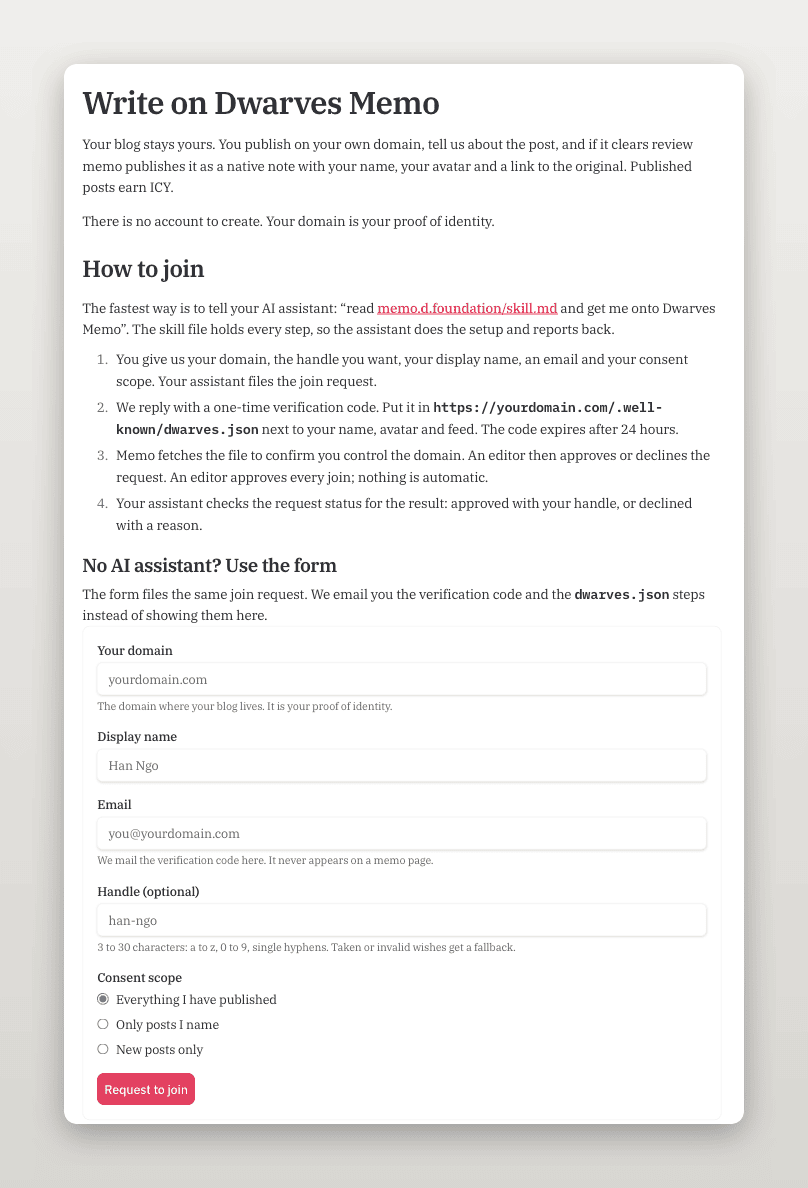
Fig. 6: The join page. The agent route sits at the top and the form below it files the same request.
The request carries your domain, an optional handle, a display name, an email and a consent scope. Memo answers with a one-time code. You publish it at https://<domain>/.well-known/dwarves.json next to your name, and it expires after 24 hours. The file requires name and accepts optional avatar, feed, bio, memo_verification and native fields. Unknown fields are rejected. Memo fetches it to confirm you control the domain, and then an editor approves or declines. Nothing is automatic.
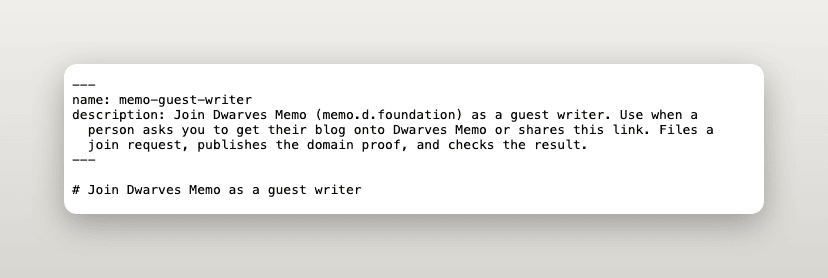
Fig. 7: The top of skill.md, the one file an agent reads to run the join.
6.2Consent scope
You pick one scope at join, and editors can only select posts inside it.
| You choose | What it means |
|---|---|
| "Everything I have published" | Memo may list any post from before today. Editors pick which to import |
| "Only posts I name" | Memo lists only the URLs you give. Nothing else is touched |
| "New posts only" | Nothing from before today. Memo may suggest posts you publish later |
6.3How posts get picked
A post reaches review in one of three ways. If you gave memo a feed, it checks the feed daily and suggests new posts to the editors. An editor can also pick past posts from your site, inside your scope. Or you email the URLs to team@d.foundation. There is no submit API, so the email is the whole mechanism, and no reply time is published.
6.4Review and rewards
A review agent judges each post against a written rubric: original, grounded in real work, and coherent. The bar is deliberately permissive. The verdict is published, rejected with a plain reason, or held for a human. A published post becomes an ordinary note in a folder an editor chooses, credited to you and linked to your original.
A published post earns 5 to 20 ICY, a whole number an editor sets for that post. A skipped post earns 0 and carries a written reason. Each person has a monthly cap that the editors can change. Views and likes never enter the math. Payouts are manual and batched, and wallet linking opens later.
6.5Removal
Delete or unpublish the post on your own site and memo takes its note down at the next daily check. Serve a 410 and it goes that day. A 404 gets a one-day grace period. Small edits sync through, and a rewrite or a new title goes back through review.
6.6What happens to your images and styling
Memo does not copy your images. The importer keeps each <img> as a Markdown image that points at your server. It never fetches the file, and the committer writes .md files only. So today:
- Your images are hotlinked. A post shows an image only while you keep it online at the same address. Remove the post from memo before you move or delete its images, or the memo copy breaks until the next check.
- Memo does not compress them. Aim for a raster under 200 KB and at least 704 pixels wide. Nothing measures either number today. The editors' checklist on the media standard page has them open each image address during review, and an over-budget image never blocks an approval. Memo does not check alt text either.
- Only https image addresses survive. An http: or data: image is dropped with no warning, and so is an <img> inside a figure.fig.
- Your own share image is not carried. The social card uses the site default unless an editor sets a hero.
- Whether your consent covers copying images is an open question for the editors, and re-hosting is not built.
The one live guest note, "Designing Out SNAP Fraud", shows what survives. All 26 of its rich figures came through intact. It has no raster image, so the hotlink path is untested in production.
Your site probably does more than memo carries over. The table lists the common cases. The full list is in the Memo media and styling standard.
| Your site does this | On memo | Do this instead |
|---|---|---|
| Custom web fonts | Dropped. Type maps to memo's sans and mono | Set type with --font-body, --fk-font and --fk-mono |
| Page-wide CSS, theme or layout | Not loaded. Only figure stylesheets load | Put figure styles in a figures.css, with fig in the path |
| Inline <script> or <style> | Ignored | Use figkit attributes such as data-tip and data-animate |
| <iframe> embeds | Removed | Link out, and add a still image with alt text |
| <img> inside figure.fig | Dropped silently | Draw it as inline SVG, or place the image in a plain paragraph |
| <svg> outside figure.fig | Removed, with a dropped_figures warning | Wrap it in <figure class="fig"> |
Rich figures follow their own contract at memo.d.foundation/figures.md. The static figure must read fully with scripts off, and memo loads at most three same-host stylesheets whose path contains fig.
6.7Where this stands
The door has worked once, for the maintainer's own domain. No outside writer has gone through it. The rubric and the reward rule are written down, and neither has been tested on a stranger's post. If you are the first, tell the editors at team@d.foundation what confused you.
7Let your agent do it
Every door has a file an agent can read. You paste one sentence and the agent does the setup. A person still approves the steps that need one.
| Your path | Agent skill | Mode |
|---|---|---|
| Guest writer, or fellow with a blog | memo.d.foundation/skill.md | Join |
| Member with write access | memo.d.foundation/contribute-skill.md | Branch |
| Staff or fellow without write access | memo.d.foundation/contribute-skill.md | Fork |
Paste the prompt for your path into Claude Code, Codex, Cursor or any agent that can run shell commands.
Guest writer, or fellow with a blog
Fetch https://memo.d.foundation/skill.md with curl, read it whole, and get me onto Dwarves Memo.
Member with write access
Fetch https://memo.d.foundation/contribute-skill.md with curl, read it whole, and help me publish a post on memo. I have write access to dwarvesf/brainery, use branch mode.
Staff or fellow without write access
Fetch https://memo.d.foundation/contribute-skill.md with curl, read it whole, and help me publish a post on memo. I do not have write access, use fork mode.
Ask for curl by name. Some assistants summarise a page they fetch, and a summary drops the exact commands. In a test run, an agent that read a summary took its commit message from the wrong file.
7.1What the guest skill does
skill.md is named memo-guest-writer. The agent asks you for a domain you control, an optional handle, a display name, a contact email and one of three consent scopes. It posts the join request, publishes the one-time code at https://<domain>/.well-known/dwarves.json on your site (or stops and tells you when it cannot write there), and checks the result with a read-only call until an editor approves or declines. Memo sends no email about the outcome today, so that check is how you hear it. It refuses to improvise: on a 409, 422 or 429, or an expired code, it reports the error to you. Anything outside the join flow ends with a pointer to team@d.foundation. It also refuses to tell you your contributor URL from memory. The page address can change after an editor links you to a member profile, so the agent reads it from the API.
7.2What the contributor skill does
contribute-skill.md, named memo-contributor, is written for people who edit the repo. The agent first asks GitHub what access you have, and that answer picks the mode. In branch mode, it clones, branches, writes, installs the hook, opens a draft pull request with a body that replaces the template, and verifies the live page with the curl check from chapter 3. In fork mode, it forks first and then covers the same ground, and it warns you about the two fork differences: the first-run approval and the missing bot. With no GitHub account, it writes the post and an email to team@d.foundation for you to send.
The skill has hard stops. It never merges, never pushes to main, never skips the hook with --no-verify, never force-pushes, and never writes [skip ci] into a pull request body. It puts your GitHub handle in authors, never a Discord name, and checks that your slug is free. It reads the taxonomy file for the folder choice, and when two folders fit, it asks you.
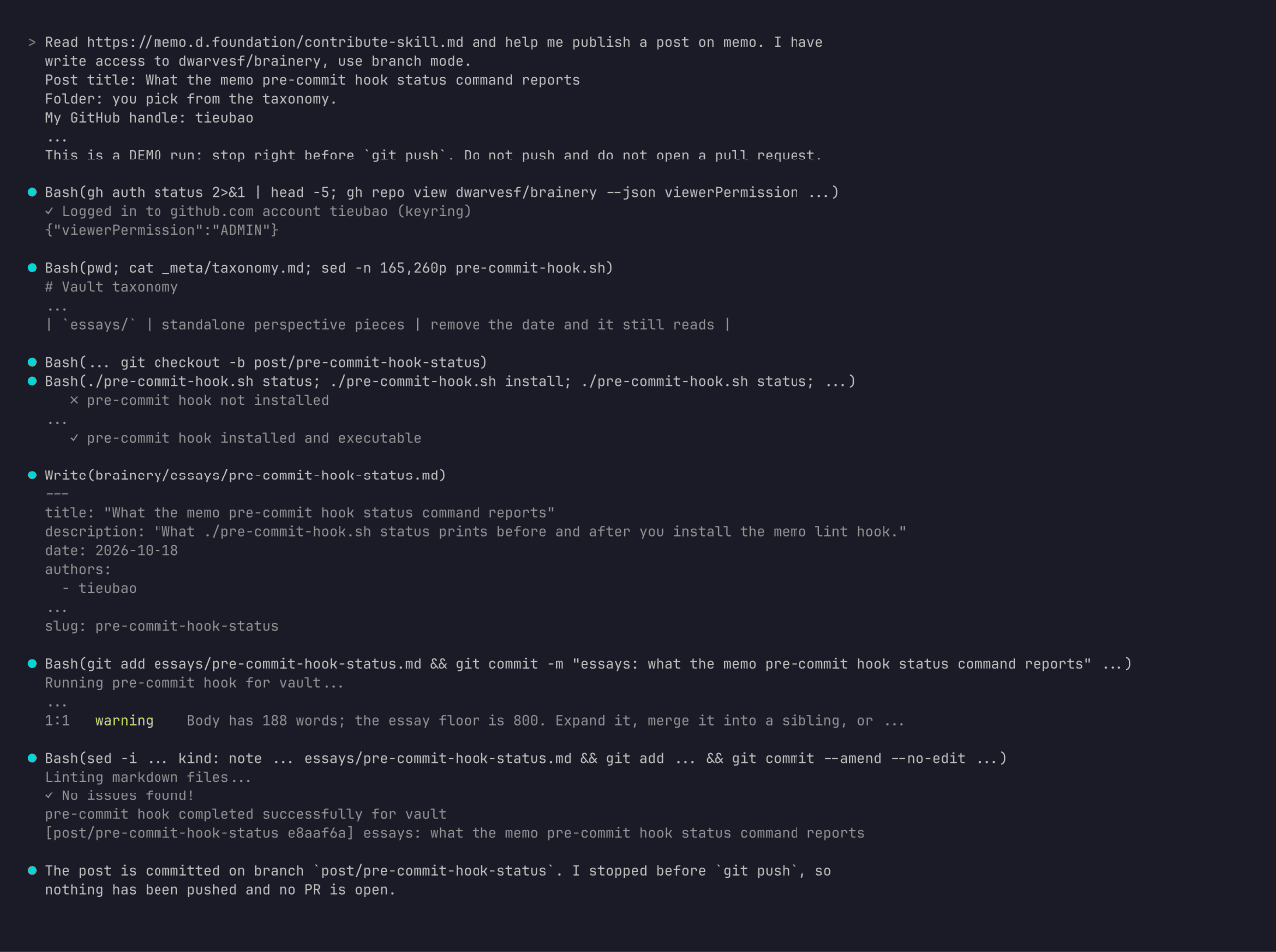
Fig. 8: An agent session running contribute-skill.md in branch mode, stopped before the push. Lines are trimmed from the real transcript.
The skills do not replace a person at the two steps that need one. An editor approves a guest join, and a maintainer clicks "Approve and run" on a first-time fork pull request. Your agent can report that the step is waiting.
8Getting credited
Put your GitHub-style handle in authors:, one entry per author:
authors:
  - tieubao
Memo builds a contributor page for every author string it finds. The route is /contributor/<slug>, where the slug is the name lowercased and stripped to letters, digits and hyphens. A free-text name such as Jane Doe becomes jane-doe, and jane and Jane D. become separate pages. Nothing registers a page, so a mistyped handle gets a page of its own. The handle tieubao appears in 453 non-draft notes, all under one spelling, so the credit sits on one page.
A Discord username is the wrong value. Discord names create wrong pages, and the editors spent a pass cleaning them up: brainery #387 credited minhluuquang instead of the 0xm alias, #388 credited tuanddd and zlatanpham instead of Discord aliases, and #389 credited tieubao instead of the baddeed alias. All three merged on 2026-10-18.
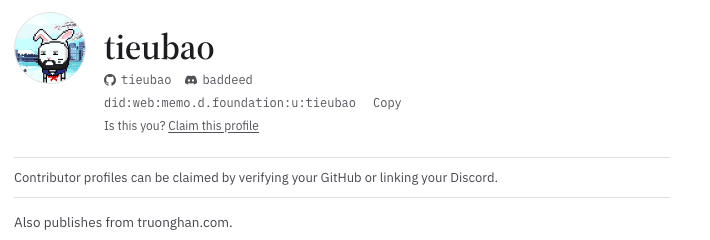
Fig. 9: A contributor page: name, avatar, linked GitHub and Discord accounts, and a DID. Memo shows no team or fellow badge on this page today.
The page shows a name, an avatar, a bio and links when the contributor has a profile record. A handle with no profile still gets a page. It shows the handle as the name and no picture. The page shows no team, fellow or guest badge today. Guest writers get a handle that memo assigns, so they never choose a byline in frontmatter.
If you are outside the Dwarves Discord and want to prove that a GitHub byline is yours, open memo.d.foundation/claim. You add one token to your GitHub profile README, and memo checks it. There is no account to create and no password to enter.
Two things live in code and have no frontmatter field. Merging two bylines into one needs a row in dwarvesf/foundation-apps for the redirect, and so does a request to have your Discord handle tagged when memo announces your post. The foundation-apps code keeps that directory by hand on purpose, because a wrong guess would tag the wrong person. Ask the editors, and attach the handle you want.
9When the lint says no
Run the hook before you push, and most of these never reach CI. The messages below come from running the live ci-lint.js against small test files.
| What you see | Cause | Fix |
|---|---|---|
| H1 headings are not allowed in this document (markdown/no-heading1, error) | A # Title line in the body. The frontmatter title already renders the page title, so a body H1 doubles it | Delete the line, or demote it to ## |
| Required frontmatter field missing: 'title' (also description, date) | The field is absent or its value is empty. Legacy gaps in a file you touch block the lint too | Fill it in. Take a missing date from git log --diff-filter=A --format=%as -1 -- <file>, and never invent one |
| Line 1 should contain exactly one colon outside quotes | The frontmatter reader works line by line, not as YAML, so a second colon in title: Why: a thing breaks it | Quote the value: title: "Why: a thing" |
| TypeError: e.replace is not a function, no file reported | A numeric tag such as - 101 crashes the lint | Quote it: - "101" |
| Headline changed after the bot's commit, for example What i'd do | The sentence-case bot lowercases a mid-heading I or a product name outside its short proper-noun list | Rephrase the heading to avoid a mid-heading I or a product name |
| Publish skipped after a merge | [skip ci] in the pull request body ended up in the squash message | Dispatch the manual publish from chapter 3, and keep the string out of future bodies |
| A figure runs into the sidebar | A fixed-width SVG wider than the reading column | Drop the fixed width and height, keep viewBox, and add style="width:100%;height:auto;max-width:<W>px;display:block" |
| git push rejected as non-fast-forward | The formatting bot pushed a commit to your branch | git pull --rebase, then push again. Do not force |
| A fork pull request shows no checks | First-time contributor approval is pending | Wait for a maintainer to click "Approve and run" |
Warnings do not fail the check, but two are worth reading. A markdown/relative-link-exists warning means a relative link points at a missing file; raster media is exempt because it lives in the bucket and not in git. A markdown/kind warning means the body is shorter than the floor for its kind, 400 words for a playbook.
10Pre-PR checklist
Run down this list before you open the pull request. The contributor skill checks the same items.
- File lives in the folder that matches its test (taxonomy)
- Frontmatter has title, description, date and a unique slug
- Every tag is a quoted string, and no value has a stray second colon
- authors: holds a GitHub-style handle, not a Discord name
- No H1 in the body; headings are in sentence case
- Figures are SVG without a fixed width, or optimized raster; every image has alt text and a caption
- ./pre-commit-hook.sh install ran and the commit passed
- The pull request body is mine, and contains no [skip ci]
- Fork path only: I asked a maintainer to click "Approve and run"
- After the merge: the publish run shows my sha, and the curl check finds my phrase