Claude Code Projects (public beta) turn one long conversation into a coordinator. You give it a goal, it splits the work into threads, and each thread is a full Claude Code session that usually runs in the cloud on its own branch and opens a pull request. Threads keep going after the laptop closes. The catch for a team like ours is the shape of the work: we run many repos, and most real goals cross several of them. Map a Project to a goal or a workstream, never to a repo, and keep the repo rules in each repo's CLAUDE.md so every Project inherits them. Route work by what it needs: plain GitHub code goes to cloud threads, anything that needs secrets, a specific machine or client data stays local. Pilot one Project for two weeks before you open a second one.
A Project is a conversation that does not do the coding itself. It reads your goal, decides which tasks exist, and starts a thread for each one. You talk to the coordinator; the coordinator talks to the threads.

Each thread is a complete session. In the default case it is a cloud session on a fresh branch, and it ends in a pull request. Threads run in parallel, and the Overview pane shows which ones wait on you.
The coordinator keeps going for as long as the Project lives. It does not carry its full history: it works from recent messages, recent threads and Project memory. So anything that must survive a long Project goes into memory or the instructions, never only into chat.
Projects also link to the sessions you already run. The coordinator reads your recent sessions. A cloud session's sidebar menu has Continue in project, which copies that work into a Project. The original session stays in your list, unchanged. The link runs one way: Project threads do not show up in the normal session list, and a thread cannot move out of its Project.
Creating one takes a name, an optional goal and optional context. The goal line becomes the outcome the coordinator works toward.
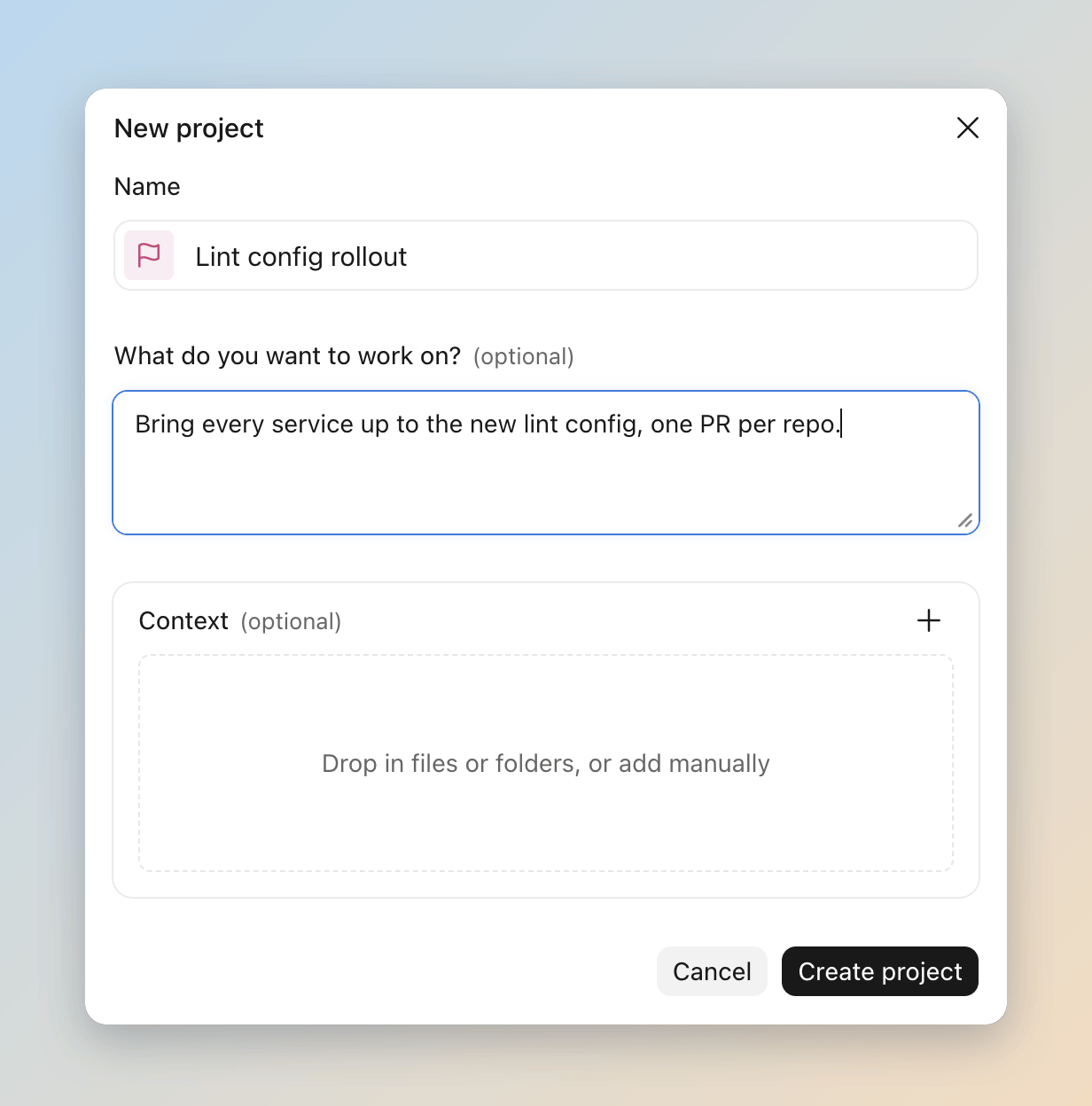
A Project gives each new thread four kinds of standing context:
| Context | What it holds | Limit |
|---|---|---|
| Project instructions | The brief every new thread and the coordinator receive | 16,000 characters |
| Project memory | Files Claude writes itself: decisions, pitfalls, requirements | Read by cloud threads only |
| Repositories | The repos every cloud thread clones | Add the few most tasks need |
| Files and folders | Uploaded files, folders and Drive folders | Up to 10 folders combined |
The part that matters most for a team that already has a tuned setup is what a cloud thread does not load from a repo:
| In the repo | Cloud thread |
|---|---|
| Root CLAUDE.md and .claude/rules/ | Loaded, with .claude/CLAUDE.md |
| Skills under .claude/skills/ | Not loaded; enable them on your claude.ai account |
| MCP servers in .mcp.json | Not loaded; use claude.ai connectors |
| .claude/settings.json | Plugins, permission rules, hooks and env: not loaded or not applied |
| Your global ~/.claude config | Not loaded |
We read this table as a migration list. Anything you enforce through a hook or a permission rule does not exist in a cloud thread. If a guard lives only in a hook (a secret-file block, a branch rule, a format check), a cloud thread will not trip it. The rule has to move into CLAUDE.md as an instruction, or into CI where it is enforced, or the work has to run local.
The + menu has Work locally, which runs a thread in a folder on your own machine through Remote Control. Link folder trusts a folder ahead of time. Each local thread still asks first, with three choices: Deny, Allow once, Always allow. The same switches live in Project settings > Environment: one toggle lets threads use your device at all, a list holds the pre-approved folders, and Use worktrees starts each local thread in its own git worktree. Worktrees are off by default. Turn them on, because the docs warn that two threads in one folder can overwrite each other's changes.
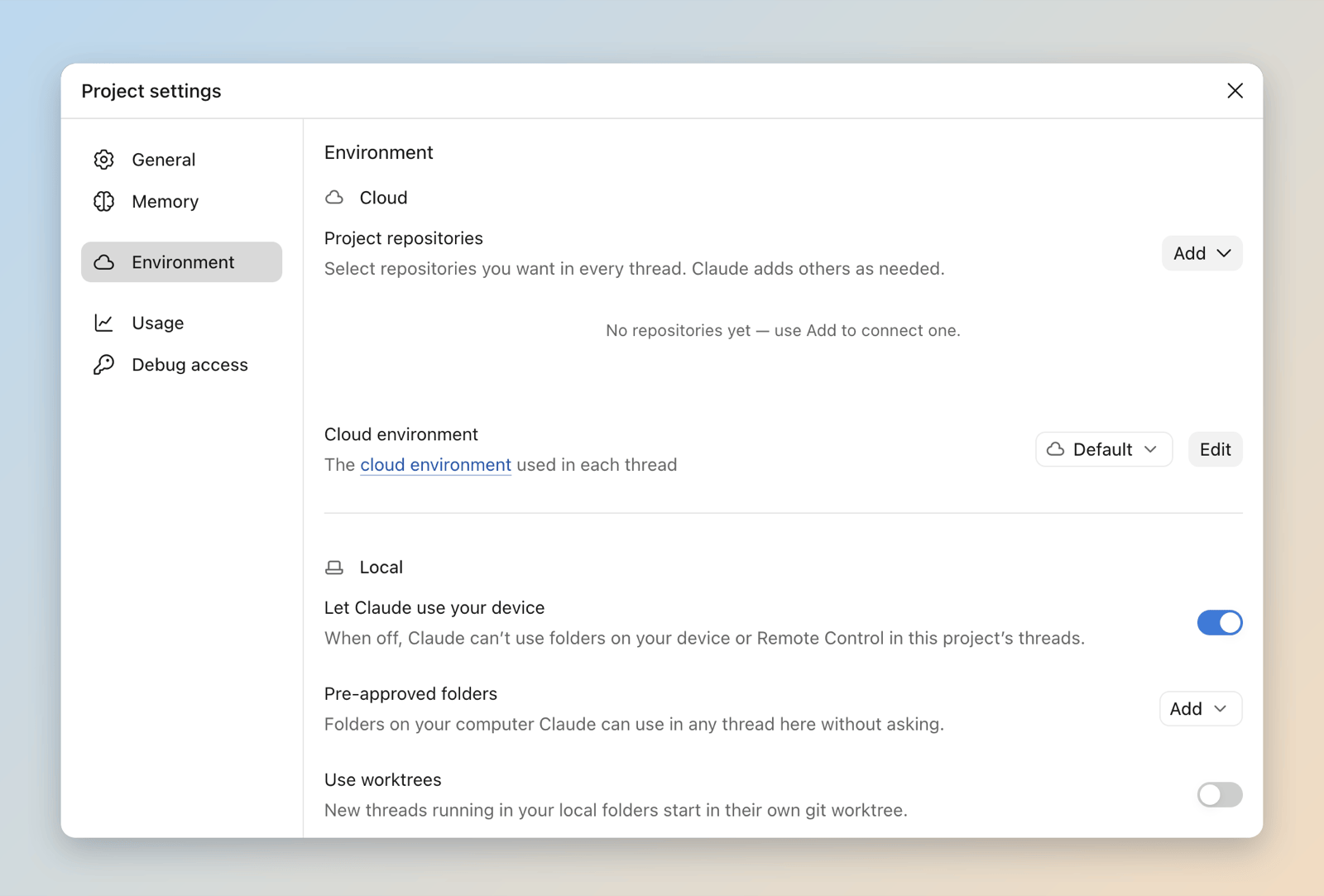
A live test surprised us. The thread's own Claude ran in a cloud VM and reached the local folder through the desktop app. The files, tools, hooks and permission rules on the machine apply, because the commands run there. The model and its reasoning stay in the cloud.
That has two practical effects:
- A local thread runs only while the machine is awake. Close the lid and it stops; cloud threads do not.
- A local thread starts with the Project instructions but skips the Project memory files. A pitfall Claude saved during a cloud thread will not reach it unless you also write it into the instructions or the repo's CLAUDE.md.
For client work under NDA, the first point is the one to remember. A local thread keeps the files on your machine, but the conversation about them still goes through the cloud coordinator. Treat it as a cloud surface for anything you would not paste into a cloud session.
The official guide names four good fits, and they match what we see:
- A goal that outlasts one session: a migration or a spec build that splits into parts.
- One goal across many repos: one thread per repo, one PR each.
- An area you keep feeding: the bugs and review requests for one service, pasted in as they arrive.
- Non-code document work: a folder of contracts or tickets you keep asking new questions about.
It is the wrong tool for a single task (start a cloud session), for work where every task needs your machine (run local sessions), and for one job on a schedule (create a routine). It costs more than a single session, so a weak fit wastes plan budget as well as setup time.
Our estate is a few dozen repos and a team coordinator that already owns tickets. That shaped every rule below.

Projects follow goals. A repo-shaped Project looks tidy and fails on the first cross-repo task, because a thread can only clone the repos its Project knows about. A goal-shaped Project ("move every service to the new auth client") carries the right repos by design. We cap it at three to five open Projects per person. More than that and nobody reads the Waiting on you list.
Add one or two repos, name the rest. Add only the repos that nearly every task touches. Name the others in the instructions, with one line on when each one matters, and let threads add them on demand. This is how a cross-repo goal fits without every thread cloning everything. One catch: a repo a thread adds mid-task arrives after the thread started, so its CLAUDE.md was never loaded. The instruction line for each named repo should tell the thread to read that file before it edits anything there.
Repo rules live in the repo. Build commands, test commands, branch rules and review conventions belong in each repo's CLAUDE.md or AGENTS.md file. Every Project and every normal session then reads the same rules, and nobody keeps a copy in Project instructions that drifts.
Ticket ownership does not move. Our team coordinator still owns the ticket and closes it. A Project is where the coding work for one goal runs. Two coordinators on the same work split the ticket trail: one has the PR links, the other has the status, and neither is the record.
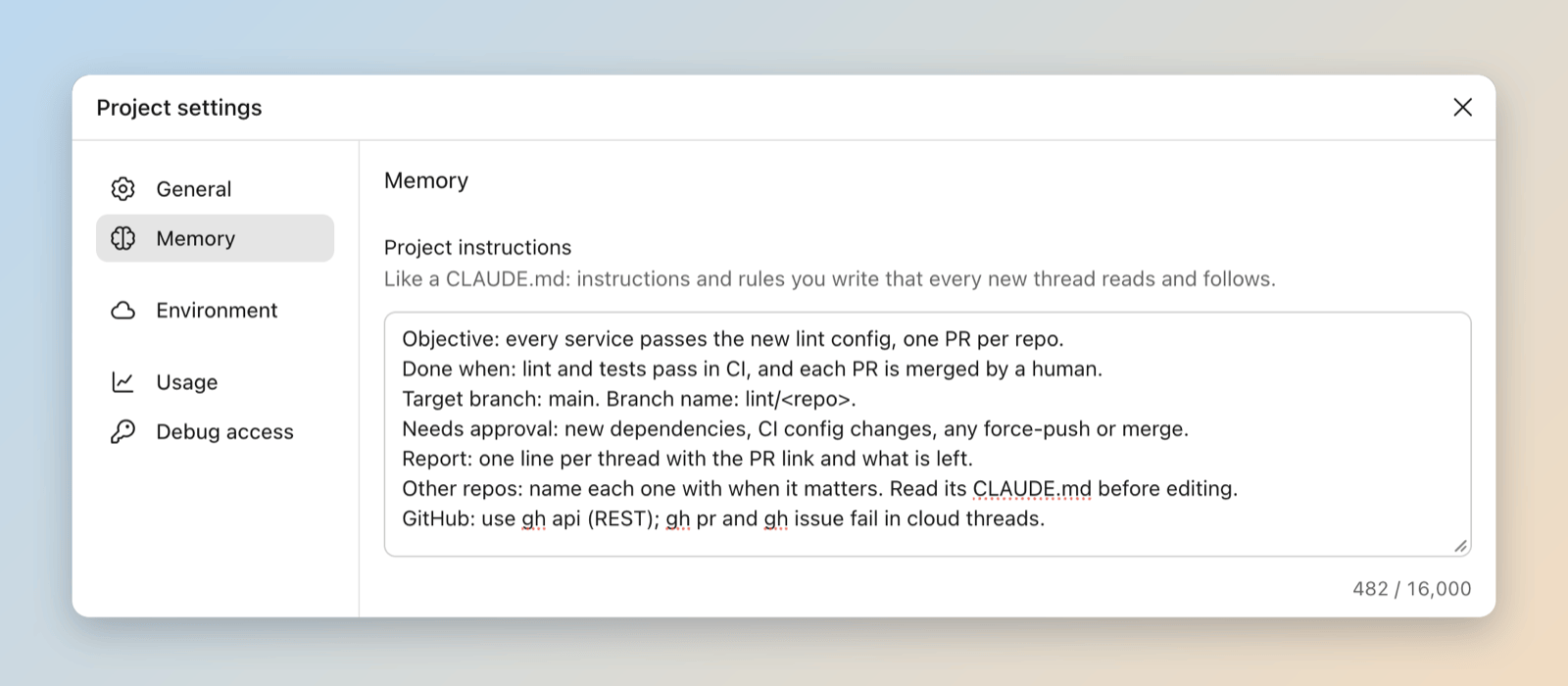
Instructions read like a ticket. Write them the way you would hand the work to a contractor:
Objective: one sentence naming the outcome.
Done when: the checks that prove it (tests, a command, a PR merged).
Target branch: where PRs go, and the branch naming rule.
Needs approval: anything irreversible, any new dependency, any schema change.
Report: one line per thread, PR link, what is left.
Other repos: <name>: when a task touches X. Read its CLAUDE.md first.
GitHub: use gh api (REST) in cloud threads; gh pr and gh issue fail.
The brief goes into Project settings > Memory > Project instructions. Here it is filled in for a demo Project:
Pilot one before opening five. Run one Project for two weeks on a goal you already have. Track tickets closed per week against plan usage. If the ratio does not beat your normal sessions, the coordinator is overhead for that kind of work.
A Project lives or dies on GitHub setup, and the docs spread it over four pages. Here is what they say, plus the calls we made where they are silent.
Install the Claude GitHub App on selected repos. Project threads need the App on every repo they touch; the token from the terminal setup command is not enough. In an organization, only an owner can finish the install. The docs allow "all repositories" or a selection and recommend neither. We pick selected repos, because the App asks for one fixed permission set, and GitHub does not let you accept a subset. That set includes write access to contents, pull requests, workflows, Actions and repository hooks.
Protect the default branch with rulesets nobody on the Project can bypass. A cloud thread pushes through a proxy that blocks branch deletions and tag pushes. It does not limit which branch a push updates. GitHub applies your branch protection and rulesets to the account you connected, and a rule that account can bypass does not stop the push. So an org admin who runs a Project has no guard on main unless the ruleset covers admins too. Some third-party posts say a session can only push to its own branch; the docs say otherwise, so plan for the docs.
Make required reviews and status checks the merge gate. Every thread opens a PR and offers a Merge it button. The docs do not recommend a ruleset shape, so this one is our call: one required review from a human and green checks before merge, plus a line in the instructions that says "do not merge, force-push or change CI config without asking".
Check comment-triggered automation before threads answer reviews. A thread watches its PR with auto-fix on. It pushes fixes when CI fails and replies to review comments under your GitHub username, labeled as Claude Code. A workflow that runs on comment events (an issue_comment Action, Atlantis, Terraform Cloud) will fire on those replies. Audit those workflows first.
Budget CI for many PRs. Each thread runs your CI once per PR and again on every fix push. The docs say nothing about this cost. We add a concurrency group that cancels in-progress runs on the same branch, and we run PR checks on self-hosted runners.
Authorize the App for SAML SSO. If the organization enforces SAML SSO, reconnect GitHub and authorize the Claude app for that organization. Until then its private repos do not appear in the Project dialog.
- Map each Project to one goal or workstream.
- Keep three to five Projects open per person at most.
- Add the one or two core repos; name the rest in the instructions.
- Put repo rules in each repo's CLAUDE.md or AGENTS.md file.
- Write instructions with an objective, done checks, a target branch, an approval list and a result format.
- Move any rule you care about out of hooks and into CLAUDE.md or CI before cloud threads touch that repo.
- Send plain GitHub code work to cloud threads.
- Send work that needs secrets, a specific host or local tools to a local thread or a normal session.
- Turn on Use worktrees before two local threads share a folder.
- Tell the coordinator to stop a thread from watching its PR once you take the PR over.
- Install the Claude GitHub App on selected repos, not the whole organization.
- Protect the default branch with a ruleset that has no bypass for the people who run Projects.
- Require a human review and green checks before any thread PR merges.
- Tell each thread to read an on-demand repo's CLAUDE.md before it edits that repo.
- Pilot one Project for two weeks and measure tickets closed per week against plan usage.
- Don't create one Project per repo.
- Don't add every repo a goal might touch.
- Don't copy repo rules into Project instructions.
- Don't let a Project own or close tickets that a team coordinator already owns.
- Don't put client NDA data, personal data or secrets into a cloud Project, and that includes a local thread's chat.
- Don't assume your skills, MCP servers, hooks or permission rules follow you into a cloud thread.
- Don't rely on Project memory reaching a local thread.
- Don't start a Project for a single task or for one scheduled job.
- Don't leave threads watching merged or abandoned PRs; an idle thread wakes on every CI failure and review comment.
- Don't trust a session to stay on its own branch; only your rulesets limit where it pushes.
- Don't let threads reply to reviews on a repo where comment events trigger deploys.
- Projects are a public beta on Pro, Max and Ultra plans. They are not offered on Team or Enterprise plans yet, so a team adopts them seat by seat.
- A Project draws on the same plan limits as your other sessions and uses them faster. Running threads, the coordinator's own reading and PR-watching threads all count.
- The enforced cap is 500 new threads per day across your Projects. A thread limit you give in chat is only a preference.
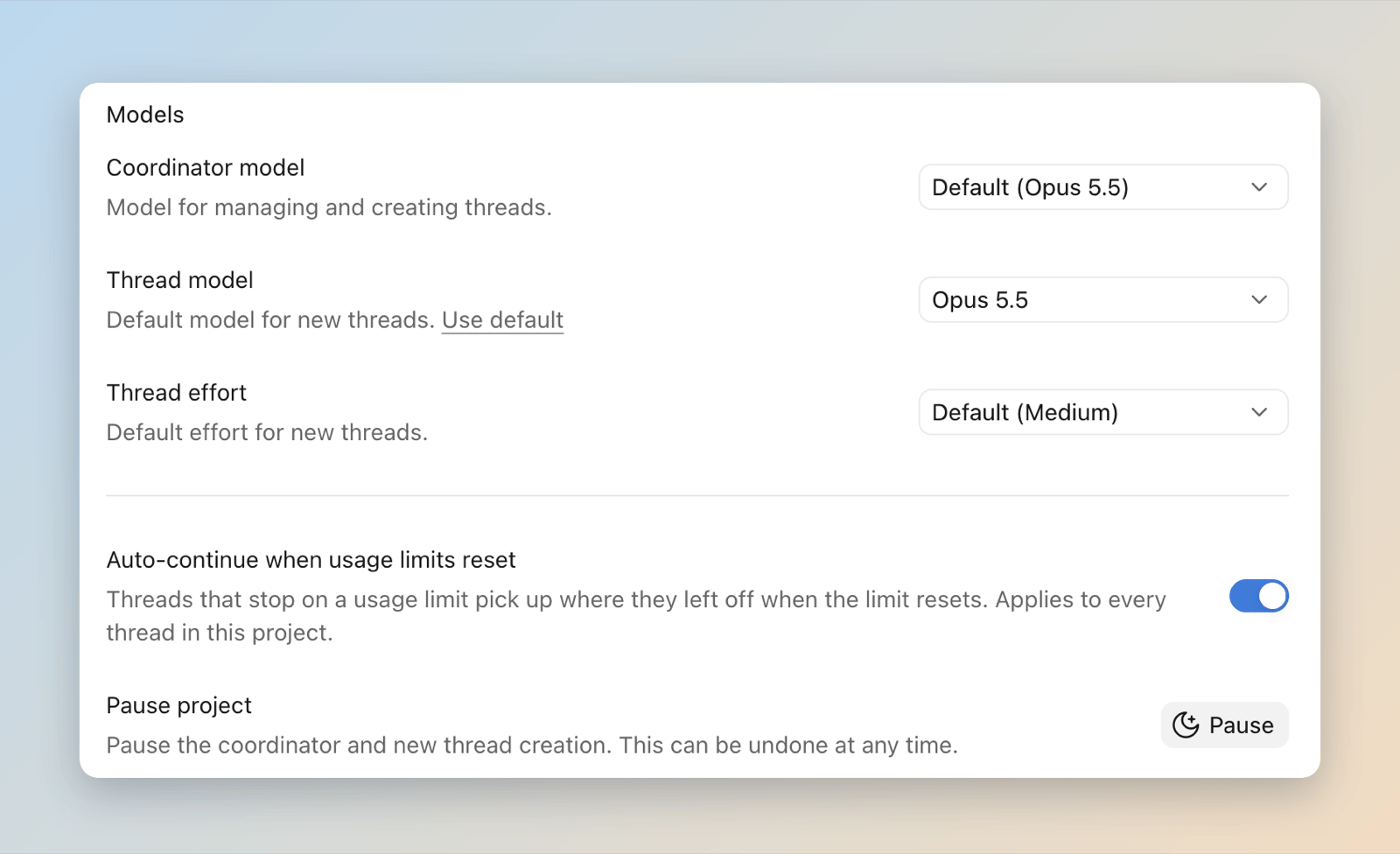
- A thread that stops at a usage limit continues by default when the limit resets, so its work lands in your next window. The toggle sits in Project settings > General.
- The same tab sets the coordinator model, the thread model and the thread effort, which defaults to medium. A cheaper thread model is the first lever on plan usage.
- Cloud session: Claude Code running in a cloud VM against a GitHub repo, independent of your laptop.
- Remote Control: the Claude Code feature that lets a cloud-side session drive a folder on your machine through the desktop app.
- Routine: a cloud scheduled task that runs one prompt on a schedule with no conversation around it.
- Anthropic, Let Claude coordinate ongoing work with Projects (official docs).
- MarkTechPost, Anthropic launches Claude Code Projects in beta.
- Claude Developers on X, launch post.
- Anthropic, Configure cloud environments, the GitHub proxy section.
- Anthropic, Security, push restrictions.
- Anthropic, Claude Code GitHub Actions, GitHub App permissions.
- Anthropic, Claude Code on the web, auto-fix and review replies.
- aaddrick, Claude Code Projects beta: under the hood.