Dwarves runs two tokens. ICY rewards contributions, and you can spend it or cash it out. DFG represents shares of Dwarves Foundation and can be staked for rewards. This page follows the order a contributor meets them: what the tokens are, how to earn and value ICY, what you can do with it, then the step-by-step guides.
| I want to | Go to |
|---|---|
| Understand ICY and DFG | What ICY and DFG are |
| Earn ICY | Earn ICY |
| Know what my ICY is worth | What your ICY is worth |
| Use ICY inside Dwarves | Use your ICY |
| Create the wallets I need | Set up your wallets |
| Convert ICY to Bitcoin | Swap ICY to BTC |
| Cash ICY out to a bank | Withdraw ICY to fiat |
| Stake DFG for rewards | Bridge DFG from Ethereum to Base, then Stake DFG on Base |
1What ICY and DFG are
1.1The idea behind the two tokens
This is the draft internal map (v0) of $icy play, based on the activities of our borderless software firm. It is written in tieubao's own voice.
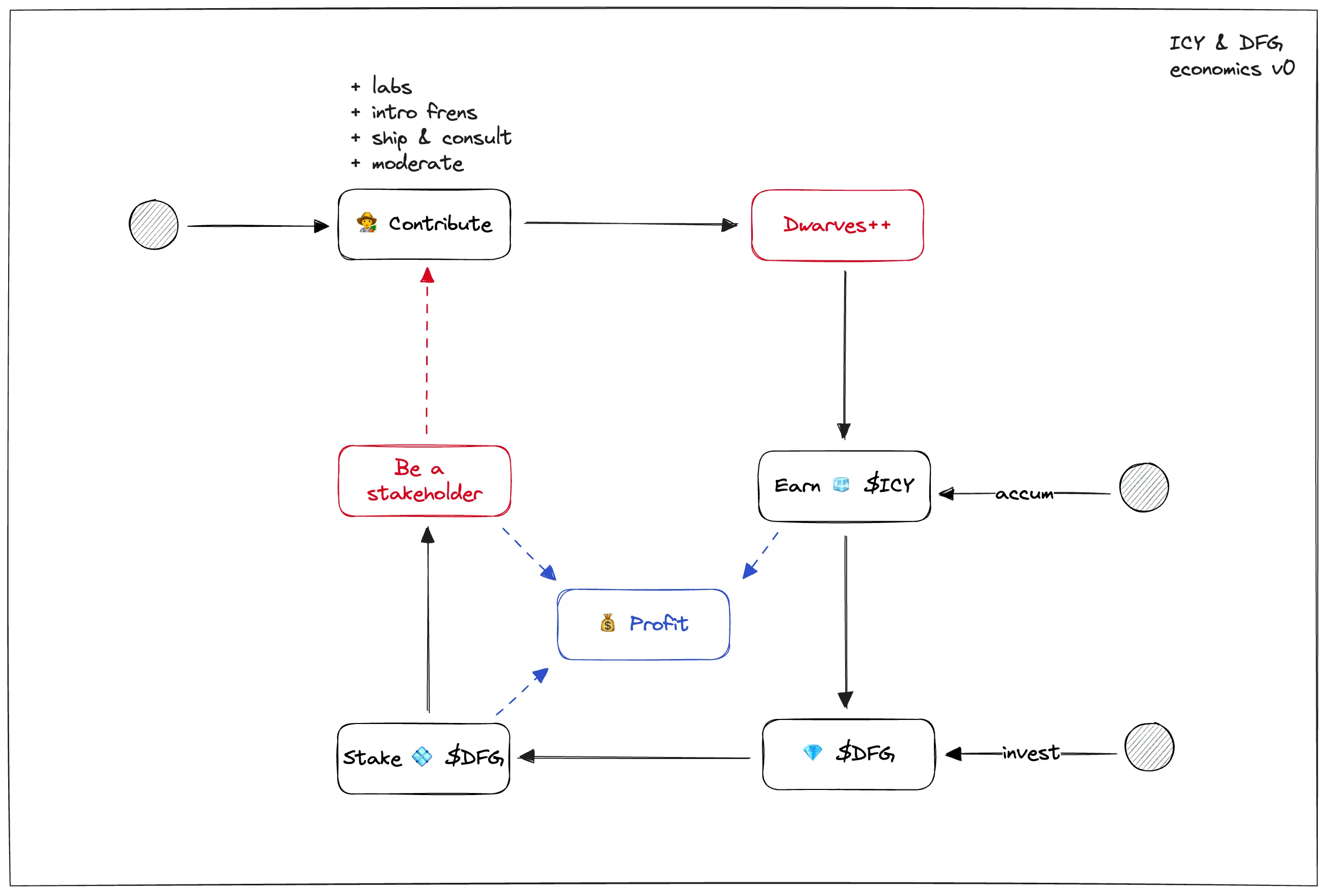
Back in 2018, when I envisioned doing something unconventional with our setup, we introduced 💎 $dfg. It came with a dream that everyone on the team can help build next generation software, stay cool making money and own something. I planned to step down and give more ownership to those who actually implement our projects by gradually distributing $dfg to our grind chads.
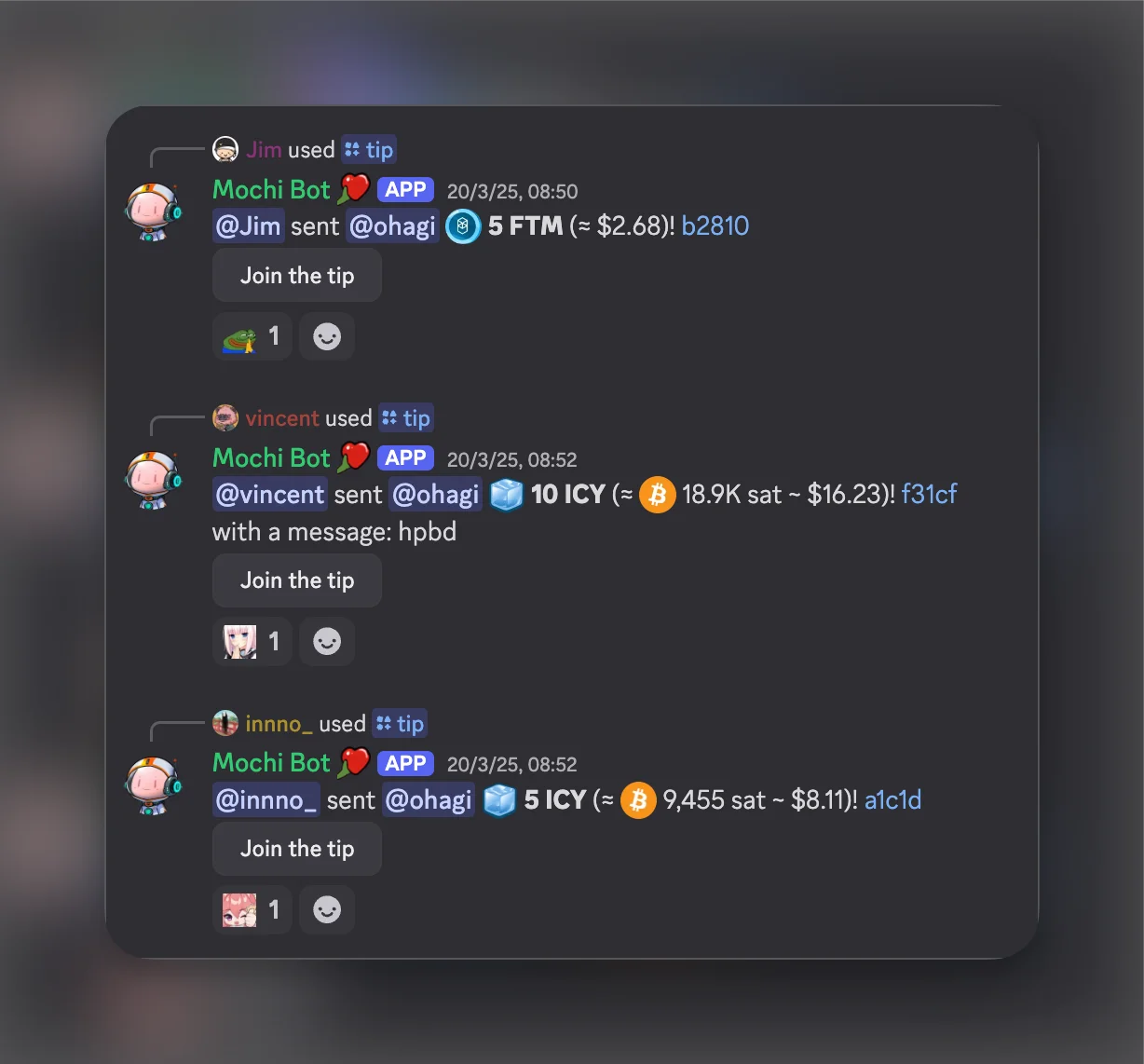
In 2020, we introduced 🧊 $icy as a loyalty point system, so we can use it to tip and recognize others and encourage the culture of appreciation.
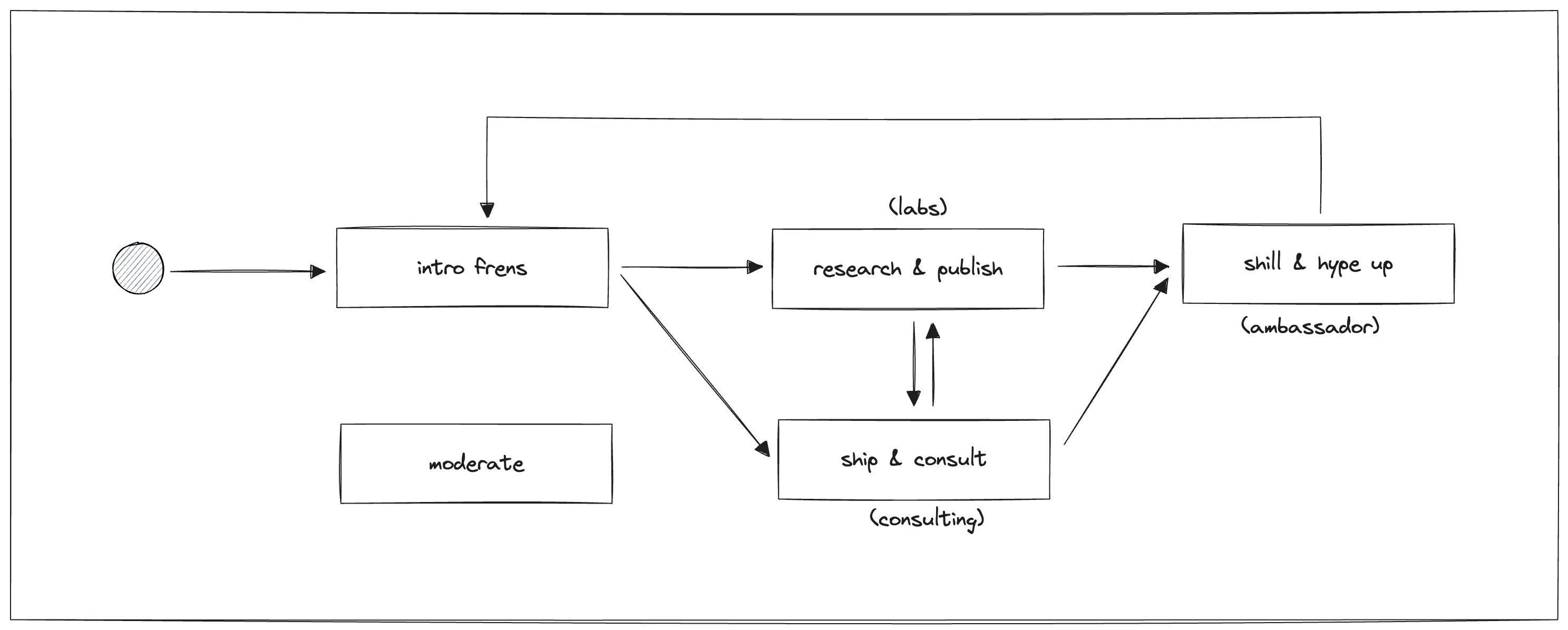
Now in 2023, the thing we are doing is building a protocol with its own economics. More concepts like proposal, voting and automated workflow will be introduced sooner or later. Hopefully the Dwarves brand can continue to thrive and we will all benefit from it. Enjoy the play 💻
1.2ICY
ICY is our way of building a borderless software company through web3 technology. Since 2020, we have used ICY to create a culture where every contribution matters. As a community of software engineers, thinkers and tech enthusiasts, we are constantly exploring and mastering the latest technology together.
Think of ICY as more than a token. It is your stake in the community's growth. The more you contribute, the more you can earn and benefit from our collective success.
ICY connects community activities with tangible rewards. You earn ICY through various activities and use it for benefits, including the opportunity to exchange it for Dwarves stock. This system helps us keep a culture of collaboration and continuous learning.
ICY runs on the Base chain. The contract is 0xf289e3b222dd42b185b7e335fa3c5bd6d132441d, visible on Basescan.
1.3DFG
$DFG is a token that represents the shares of Dwarves Foundation for Dwarves and active contributors of our community. Dwarves plans to give out $DFG tokens in the future. The original $DFG lives on Ethereum. Dwarves made a staking pool on Base, so a holder who wants rewards moves $DFG from Ethereum to Base and stakes it there. The guides are Bridge DFG from Ethereum to Base and Stake DFG on Base.
2Earn ICY
2.1Easy ways to get started
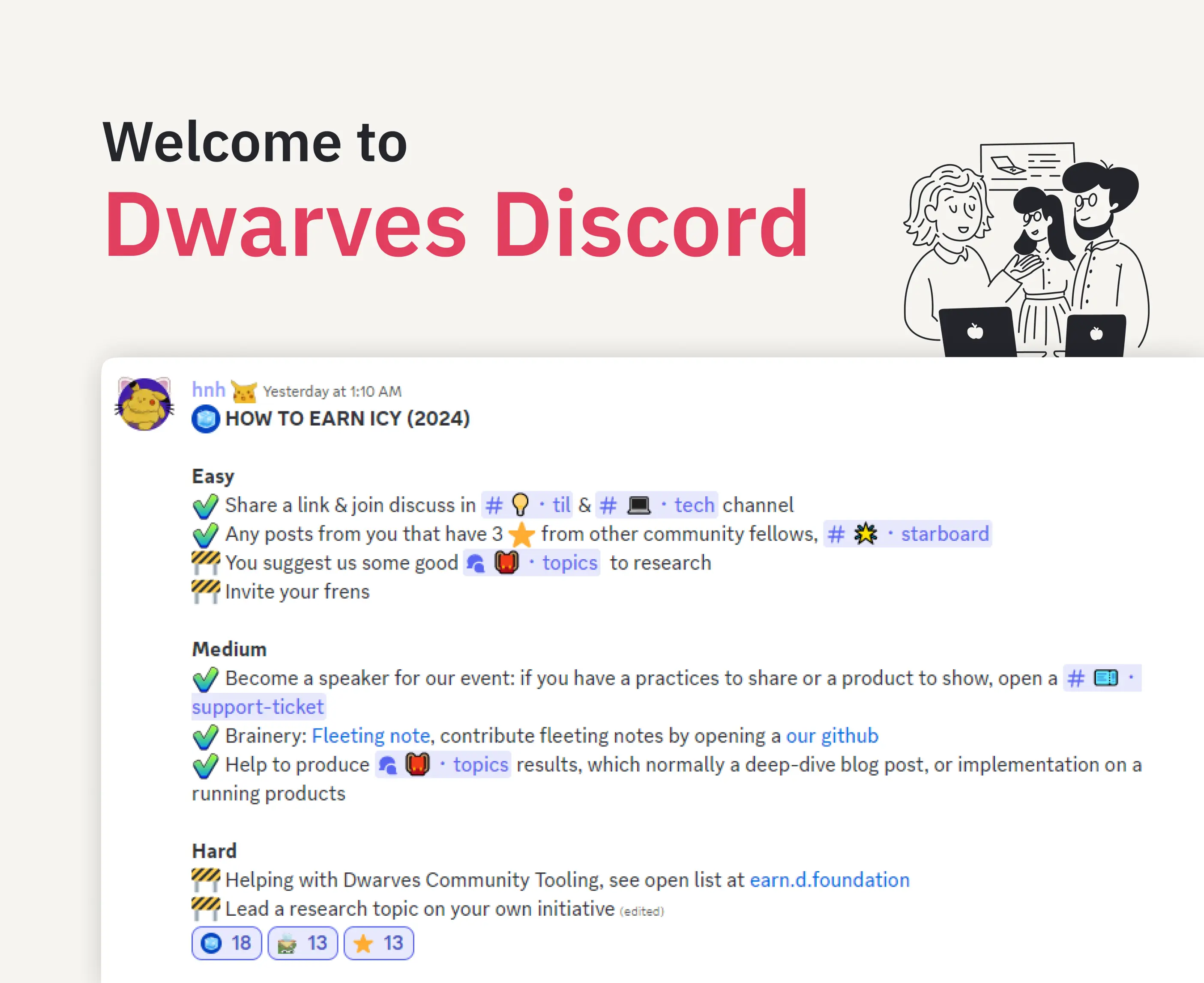
Share your knowledge and engage with the community:
- Share and discuss interesting links in our tech and TIL channels
- Get recognized by community members for your posts
- Suggest research topics
- Invite friends to join our community
2.2Medium-level contributions
Help build our knowledge base and events:
- Give talks or share your expertise
- Contribute to our Brainery with fleeting notes
- Help produce research topics
- Create implementation examples
2.3Advanced contributions
For those ready to take on more responsibility, we offer leadership roles and tool building. You can help develop Dwarves community tooling, creating solutions that improve the experience for everyone. You can also lead research topics on your own initiative, guiding others through complex technical explorations.
2.4Special moments we celebrate
We celebrate life events and achievements within the community: birthdays, welcoming new family members, earning certificates, hosting community events, providing actionable feedback and proposing new initiatives. Each of these milestones represents growth and connection within the ecosystem.
2.5Research and development
You can contribute to the knowledge base by sharing valuable links in tech channels, creating fleeting notes to capture initial ideas, writing permanent notes that solidify concepts, completing full topic research that dives deep into a subject, and joining OGIF sessions where we explore new technologies together.
2.6Reward criteria for Brainery notes
We moved to ICY, a token we use to reward writers in our Discord server. Before ICY, we gave out rewards based on what we felt our writers deserved for their work. These criteria tell writers the value of their content when contributing to our Brainery.
The monthly budget for ICY rewards is around 260-300 ICY per month. This may change in the future, especially if we see greater traction and input to the Brainery. As of December 14, 2022, the criteria to claim ICY for notes are:
Permanent notes
| Range ICY | Criteria |
|---|---|
| 7.5 - 10 | The note is above 200 words and is succinctly composed of proper sentences and paragraphs. The note is relatively coherent and may have some visuals or images to better explain the entry. |
| 5 - 7.5 | The note is around 200 words or less, containing some sentences, but may be mainly composed of bullet points. The entry is somewhat coherent, but may be obscured due to a lack of written words. |
| 0 - 5 | The note is around 200 words or less, containing some or no complete sentences and is mostly composed of bullet points. The entry is mostly in the form of a fleeting note, such that the audience for the summary is more for the writer, rather than the reader. |
Fleeting notes
| Range ICY | Criteria |
|---|---|
| 2.5 - 5 | The note is around 200 words or less, containing has some sentences, but may be mainly composed of bullet points. The entry is contextually coherent. |
| 0 - 2.5 | The note is around 100 words or less, containing no complete sentences and is mostly composed of bullet points. The entry is not apparently coherent, and may contain copied phrases. |
Reward per note. A few people can output many high-quality notes easily. We want to reward their effort without overshadowing others and creating participation inequality. To give equal opportunity, the reward drops off with the number of notes submitted to the Brainery in a month:
| Range ICY% | Note range relative to # of notes submitted this month |
|---|---|
| 100% | 1st - 2nd note |
| 75% | 3rd note |
| 50% | 4th note |
| 25% | 5th note |
| 10% | 6th note and thereafter |
The exception: if the submitted note links to 2 or more unique notes of different authors, and the links are coherent and relevant, you can claim 100% of the ICY in the criteria above regardless of how many notes you have submitted.
Over budget. Any notes above the 260-300 ICY per month go to the next month. This also helps us re-evaluate and update the reward pool when output is high. This is subject to change.
Recognition. The Latest Notes page shows recent notes, major contributors and the newest contributors to the Brainery. We update its format regularly to give active recognition to everyone who participates.
3What your ICY is worth
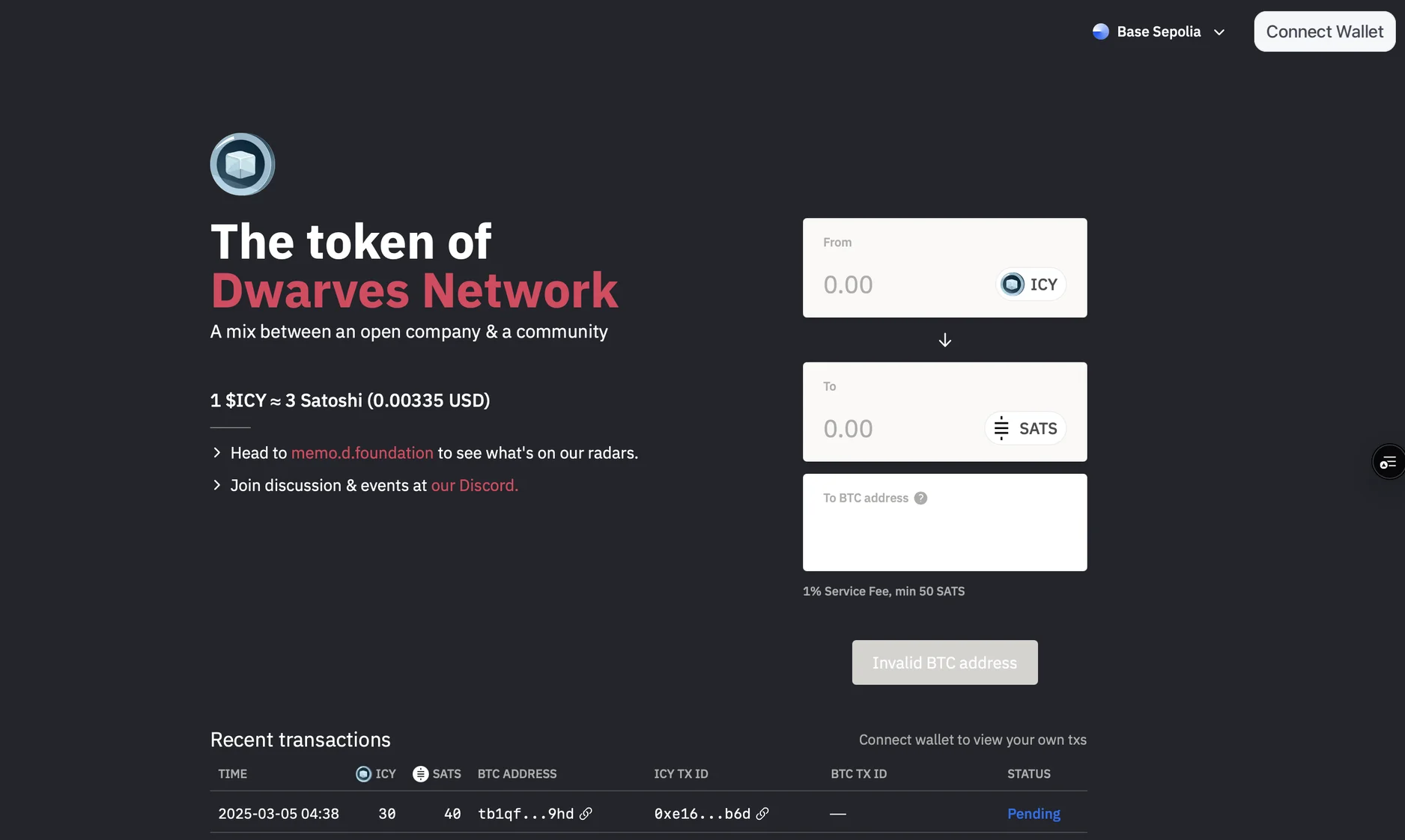
ICY moved from a fixed USDC-backed value to a dynamic Bitcoin-backed one. The change brings new opportunities and considerations for holders.
The old model: simple and stable. Each ICY was worth exactly 1.5 USDC, and the value stayed constant regardless of market conditions. That made it easy to understand and trade, with stability and predictability for the community.
The new model: dynamic and Bitcoin-backed. ICY's value is now tied to Bitcoin (BTC) through our liquidity pools. We manage two separate pools, one for ICY and one for BTC, and the interaction between them sets ICY's value. The initial conversion rate is set at a predetermined ratio, and the value then moves with BTC's price and pool dynamics. Your ICY is backed by the Bitcoin in the Dwarves treasury, so its worth moves with Bitcoin's market value.
Three factors drive the value:
- Bitcoin's current market price
- Liquidity pool conditions, which cover the Bitcoin held in the treasury and the number of ICY in circulation
- Overall market demand for ICY
When we add BTC to the pool, ICY becomes more valuable because each ICY is backed by more Bitcoin. When we add more ICY to the pool, the value drops because each ICY is backed by less Bitcoin.
Worked examples. Start with 1 ICY worth 0.00003 BTC. If Bitcoin trades at $50,000, your ICY is worth $1.50. If Bitcoin rises to $60,000, your ICY rises to $1.80.
Now see how liquidity changes it. Start with the same setup (1 ICY = 0.00003 BTC at $50,000). If we add more BTC to the pool, the ratio might shift to 1 ICY = 0.000035 BTC, which lifts your ICY to $1.75. If we add more ICY to the pool, the ratio might shift to 1 ICY = 0.000025 BTC, which lowers your ICY to $1.25.
How we manage liquidity. We add Bitcoin monthly at market prices, and we mint ICY weekly for company activities and rewards. This regular schedule helps keep things stable while letting the market move the value.
Why we changed. The USDC model was simple and effective, and we want to evolve with the crypto ecosystem. The new model offers growth potential tied to Bitcoin's performance, reduces our dependency on stablecoins, creates a more dynamic and market-driven system, and better reflects real-world trading conditions.
Your ICY will now fluctuate with market conditions. We recommend following Bitcoin's performance and the liquidity pool dynamics before you make decisions about your holdings.
4Use your ICY
Visit icy.so to redeem your ICY. You can:
- Exchange it for USDC or Bitcoin (Swap ICY to BTC)
- Withdraw it to your wallet (Withdraw ICY to fiat)
- Use it in the upcoming ICY store
4.1ICY salary advance
The salary advance is the first feature from the 2024 roadmap. It is a short-term credit benefit for all full-time employees.
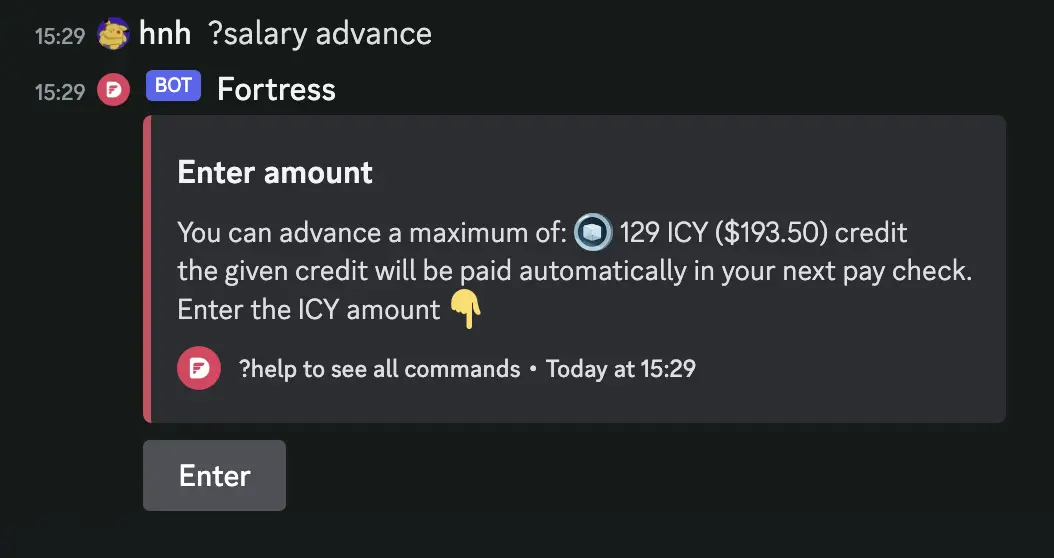
For example, if an employee earns $5000 a month, they can ask for up to 25% ($1250) of their monthly allowance in advance. The credit is paid back automatically on the next pay day, plus a 0.5% service fee.
To use it:
- Open the DMs of the Fortress bot.
- Type ?salary advance.
- Input the credit amount in ICY.
- Done.
4.2Peeps NFT
Peeps NFT is an NFT collection for Dwarves Foundation members. The NFT grants access to internal communication channels and many earning opportunities.
To claim it:
- Join the Dwarves Discord community.
- Be a Dwarves member.
- Connect your wallet here.
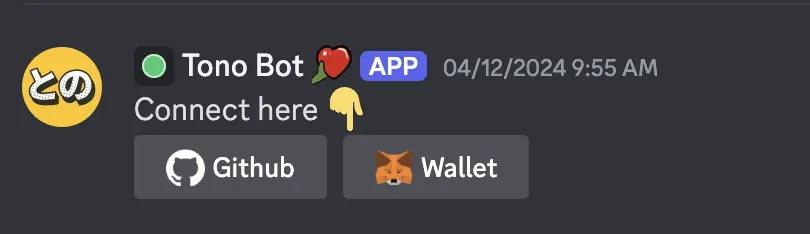
- Open a support ticket and ping @hnh to get the Peeps NFT.
- Get the NFT minted and gain access to the Dwarves internal channel.
4.3What is next for ICY
The roadmap includes salary advances for full-time team members, deeper Discord integration, direct bank withdrawals to simplify the conversion process, ICY staking to reward long-term holders, and NFT integration to widen the ecosystem's utility.
To continue through the handbook, read Discord next.
5Step-by-step guides
5.1Set up your wallets
To withdraw ICY to a bank or other fiat, set up two types of wallet first.
- An on-chain wallet (a non-custodial wallet such as Coinbase or Metamask). It receives ICY and swaps ICY to USDT.
- A custodial wallet (such as Binance). It converts USDT to VND.
After you set up both, follow Withdraw ICY to fiat.
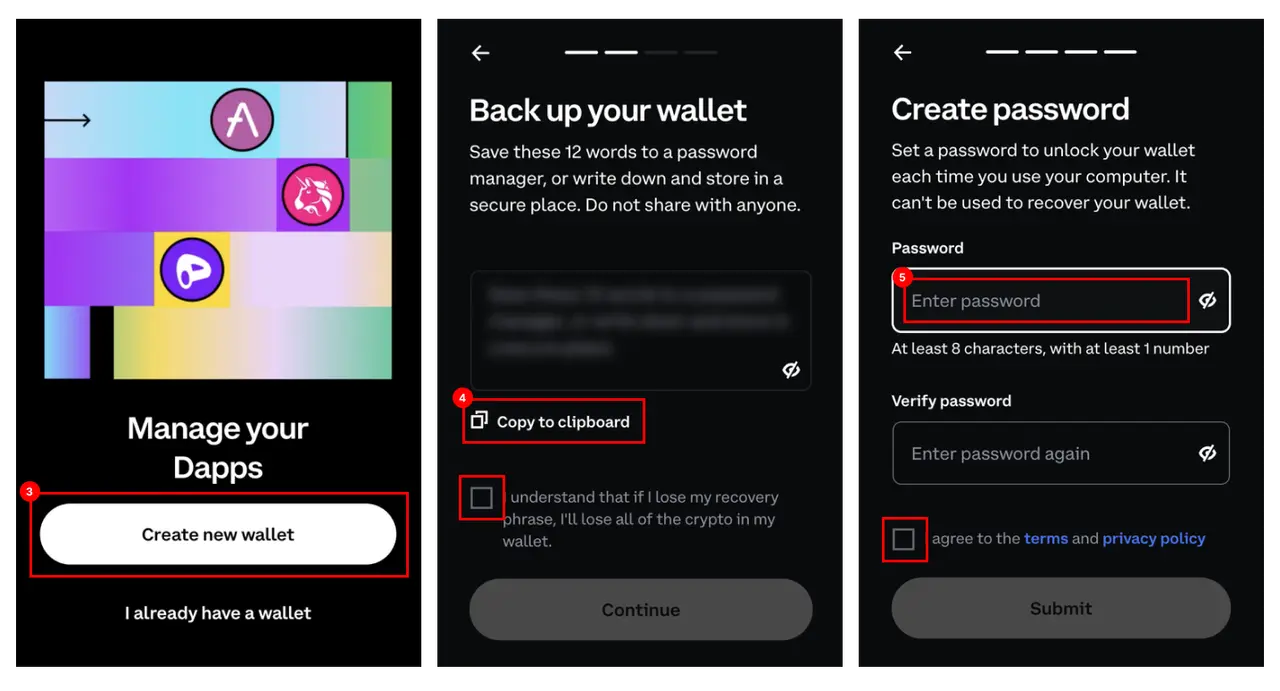
Set up Coinbase Wallet
- Install the extension. Download Coinbase Wallet from this site and add the extension to Chrome or Firefox. Do not use Safari.
- Open the wallet. Click the Coinbase icon on the extension bar.
- Create the wallet. If you have no wallet yet, click "Create a new wallet".
- Secure your wallet. Reveal and copy the seed phrase, then save it in a safe place. You need it to log in or import the wallet when you forget the password, lose data on your computer, or reinstall the wallet on a different platform or browser. Do not share the seed phrase with anyone. In the next step you re-enter the phrase to confirm it.
- Set up a password. Enter a password for the wallet.
Create a Binance account
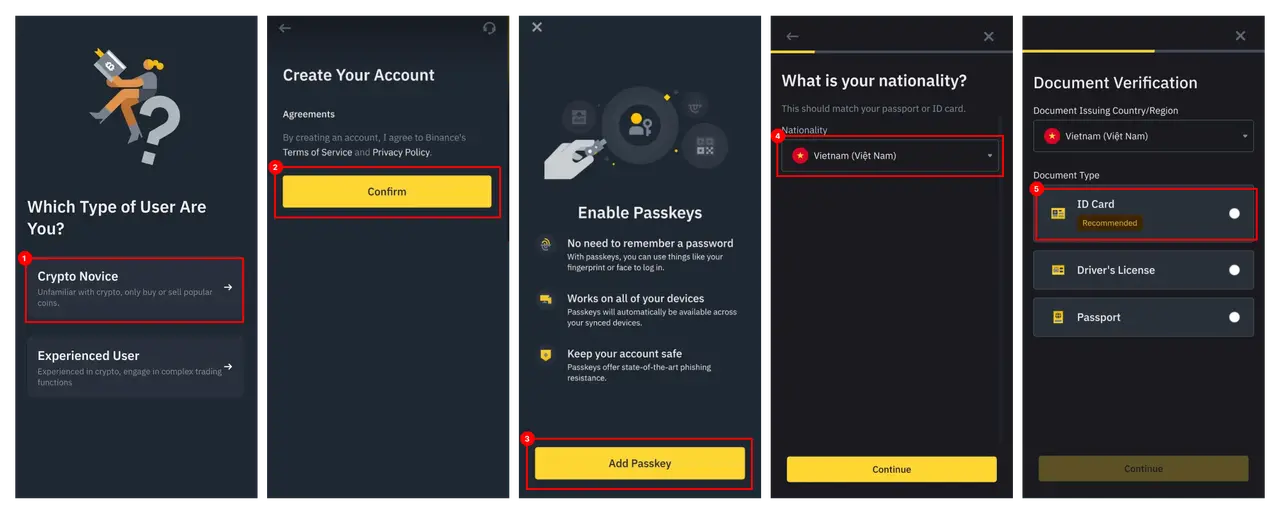
Install Binance on your mobile from the download page.
- Select the user type. After installing, follow the "Crypto Novice" mode.
- Create the account. Confirm to create your account.
- Secure your account. Add a passkey to log in without a password.
- Fill in your information. Enter the basic information used for verification.
- Verify your identity. Choose the document you want to use for verification and take a photo of it.
5.2Swap ICY to BTC
You need two things before you begin: a Bitcoin wallet to receive your funds, and some ETH on the Base network for gas fees. If you have no BTC wallet, set one up with a trusted provider such as Electrum, Trust Wallet or UniSat. If you need ETH for gas fees, ask the team on the Dwarves Foundation Discord.
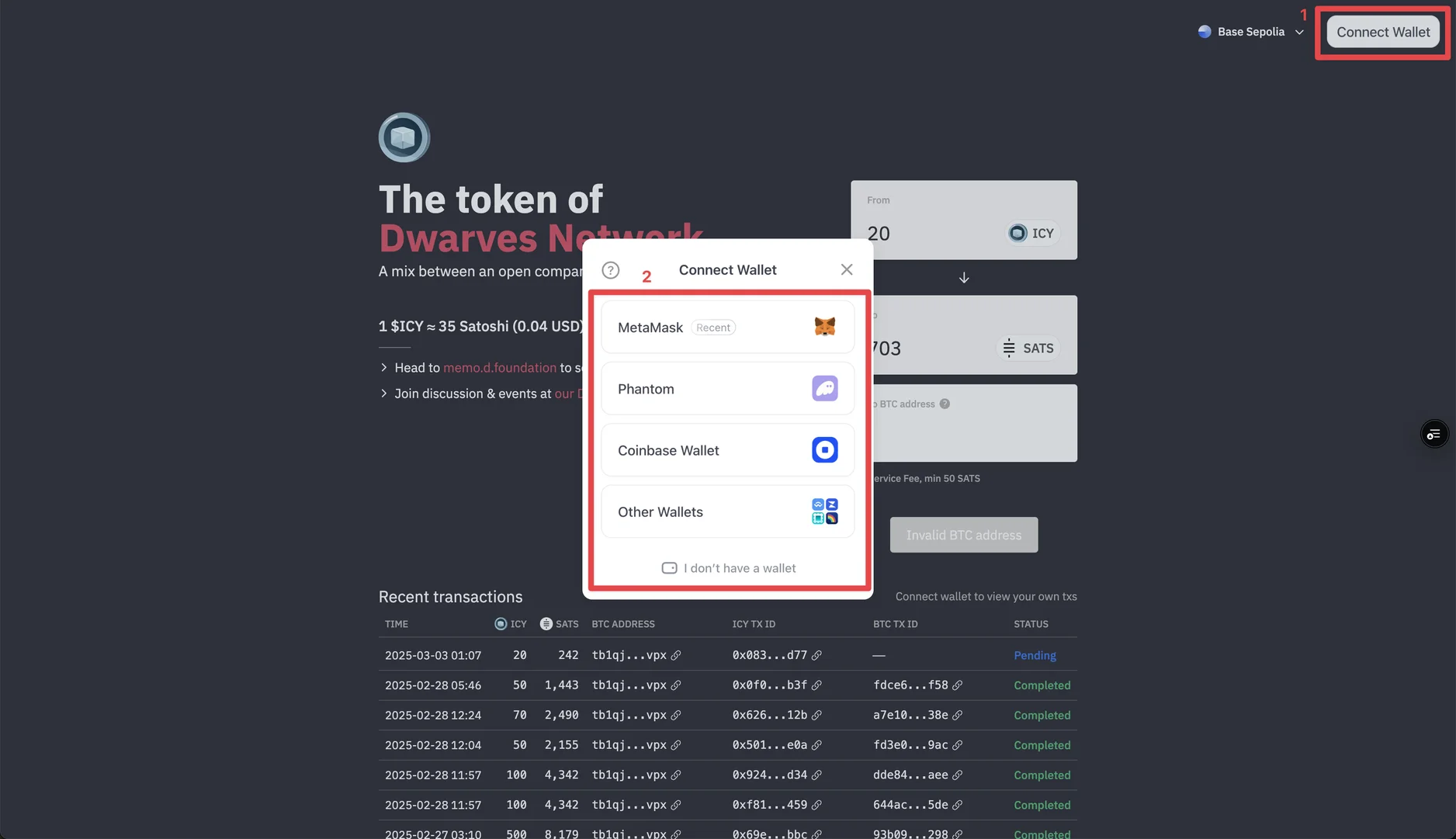
Step 1: connect to icy.so. Visit icy.so and click "Connect Wallet". Select your wallet (MetaMask, Coinbase Wallet, etc.), follow the prompts, and make sure you are on the Base network.
Step 2: make the swap. Select ICY as the source token and BTC as the destination token. Enter the amount (the minimum is 20 ICY), input your BTC wallet address, and click "Swap". Confirm the transaction in your wallet.
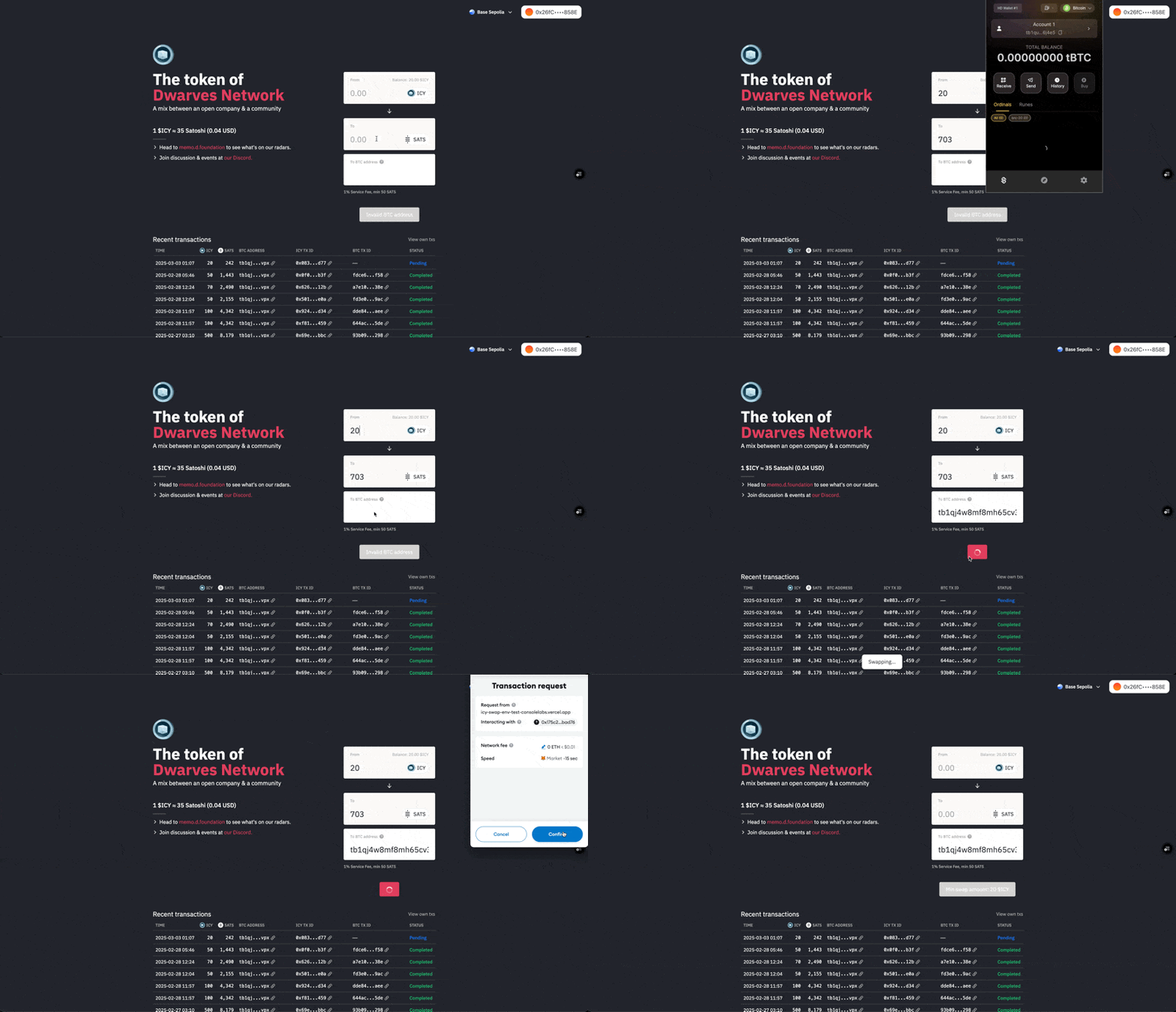
Step 3: track your transaction. After you confirm, watch the transaction in the "Recent Transactions" section. Hover over it to see details, including the service fee. Wait for the "Pending" status to complete.
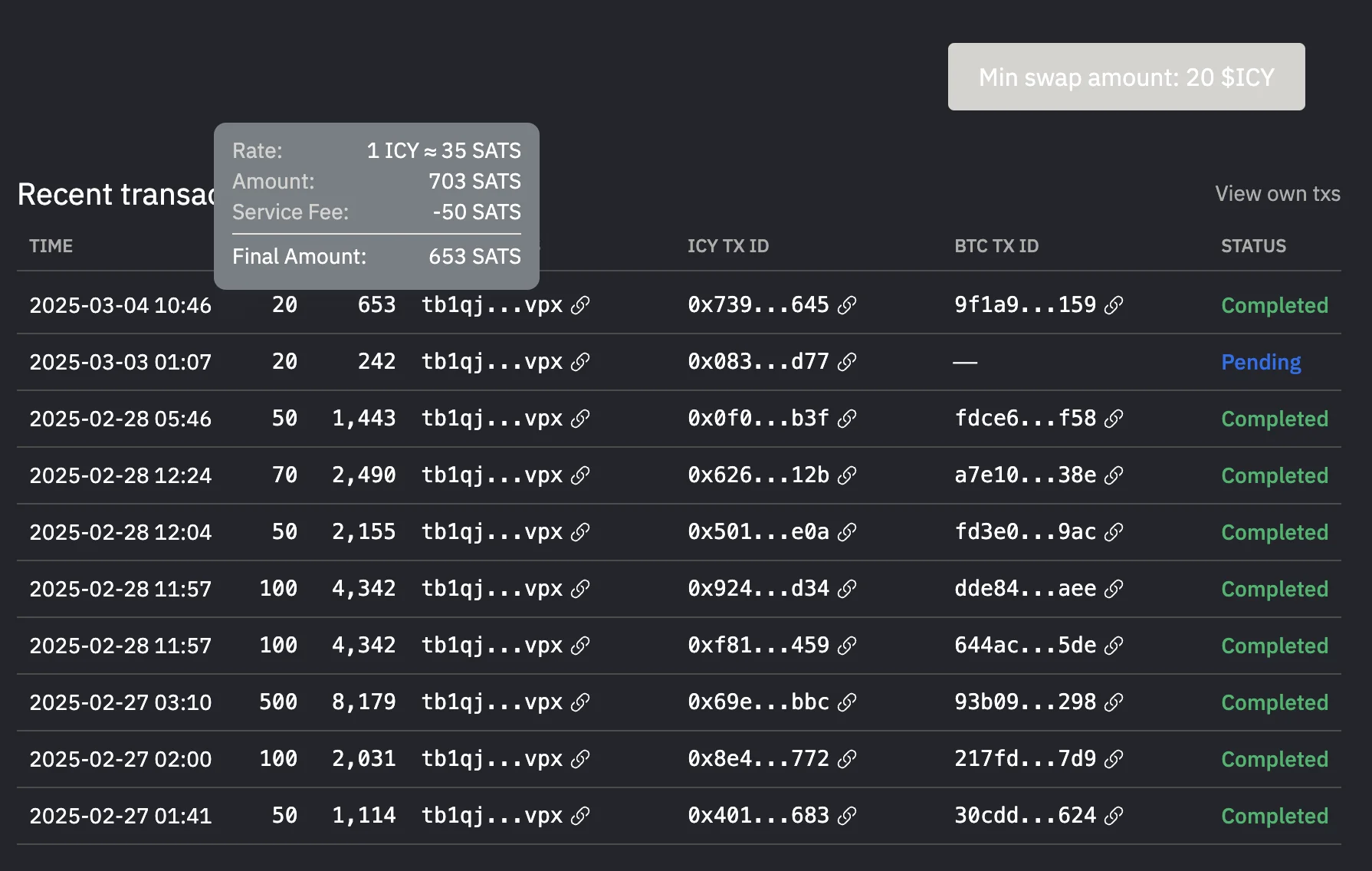
Processing time depends on network conditions, the gas fees you paid and system load. A delay is normal, and we ensure 100% of transactions are processed.
Keep these points in mind:
- The minimum swap amount is 20 ICY
- Each transaction has a service fee of 3,000 units
- Gas fees are paid in ETH on the Base network
- Processing may be delayed during high network activity
If you need help, ask the team on the Dwarves Foundation Discord.
5.3Withdraw ICY to fiat
Before you withdraw ICY, make sure you already have a crypto wallet and a Binance wallet. If you have neither, follow Set up your wallets.
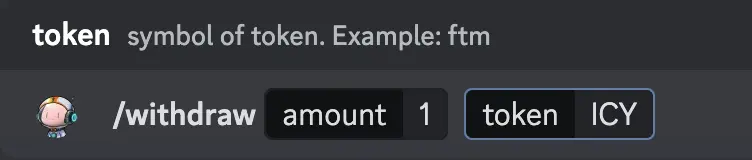
1. Withdraw the token from Mochi. Use the command to withdraw tokens from Mochi to your crypto wallet.
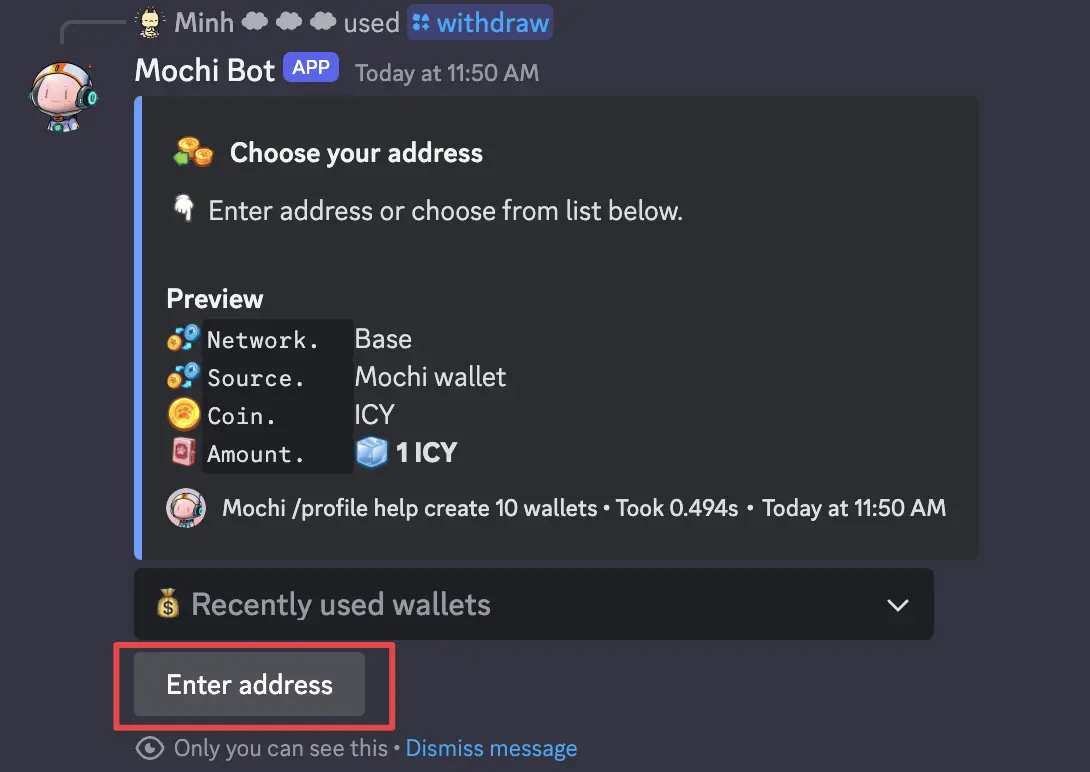
Click the "Enter address" button and paste the address of the crypto wallet you created.
To swap ICY to USDT in the next step, you need some Ethereum on the Base network. Buy some Ethereum or withdraw it from your balance. If you need a faucet of Ethereum for the gas fee, open a ticket in the Dwarves Foundation Discord.
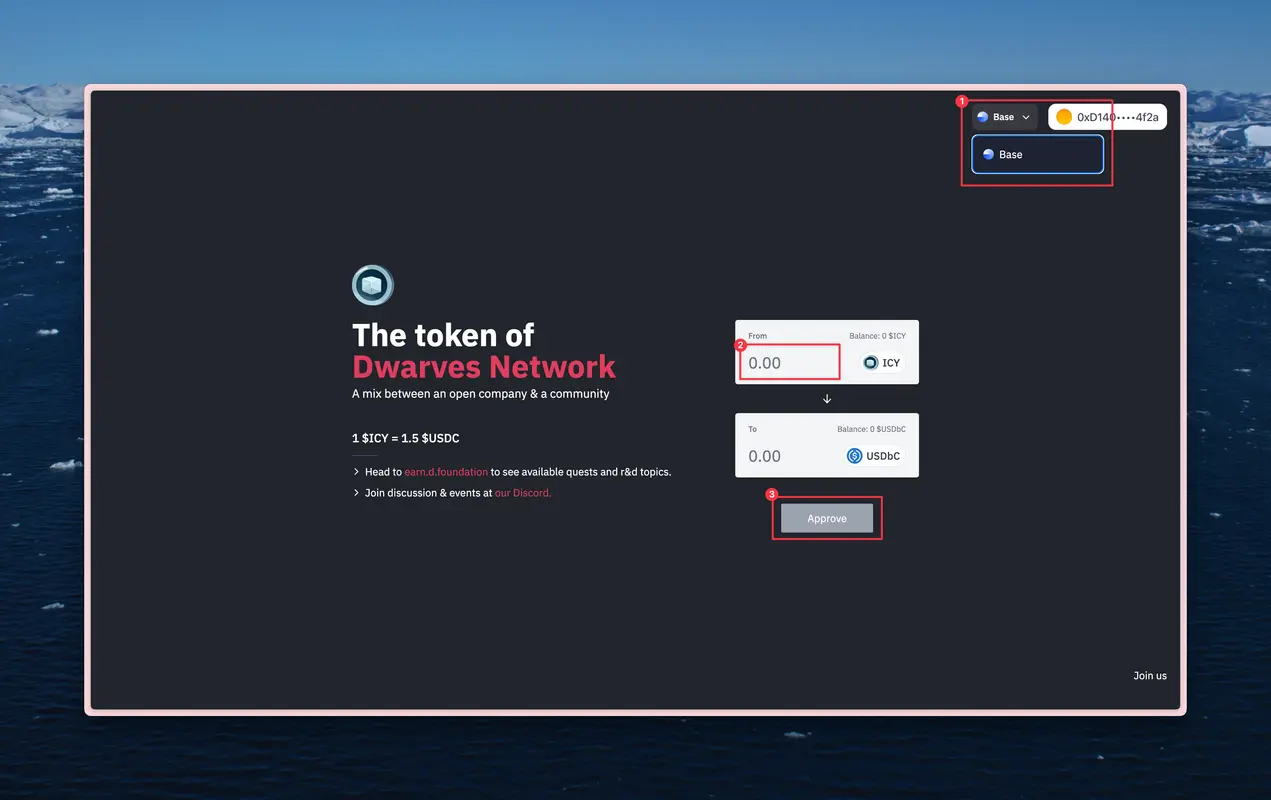
2. Convert ICY to USDT. Go to icy.so to swap ICY to USDT.
- Connect with the wallet you created.
- Select the supported network Base and approve the request from Metamask to change.
- Input the ICY amount you want to swap.
- Click Approve and Swap, and sign all transaction requests in Metamask.
3. Bridge USDC from Base to another network. Go to Stargate Finance, choose the "Transfer" tab and connect your wallet. Then:
- Choose Base in "From network" and Binance Network (BNB) in the other field.
- Enter the amount of USD you want to bridge.
- Click the Transfer button and confirm all requests.
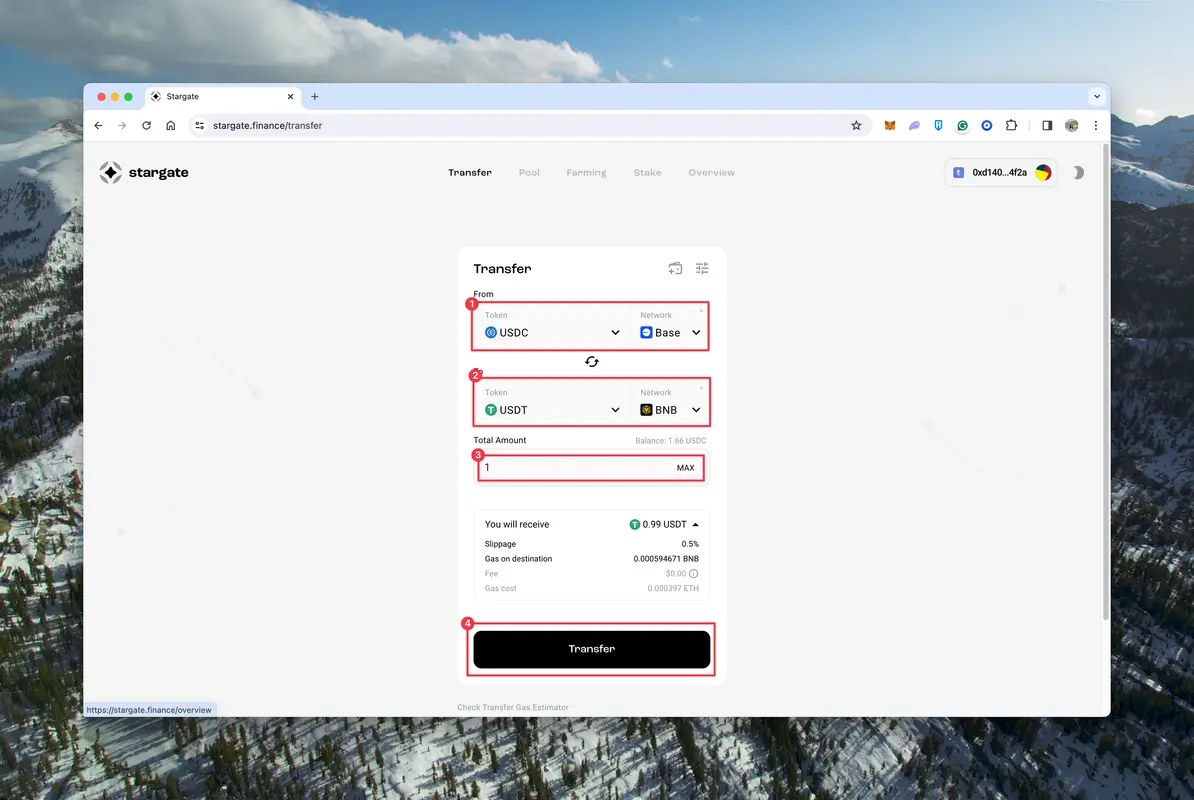
4. Take the deposit address of your Binance account. After the bridge, the token is still in the Coinbase wallet, where withdrawing to a Vietnam bank or a Visa card costs a high fee. We suggest moving it to your Binance account to save the withdrawal cost. First, take the deposit address of your Binance account:
- Go to the Wallet tab.
- Choose the "Funding" tab.
- Choose "Deposit".
- Search for the token USDT.
- Select the network BNB.
- Copy the deposit address.
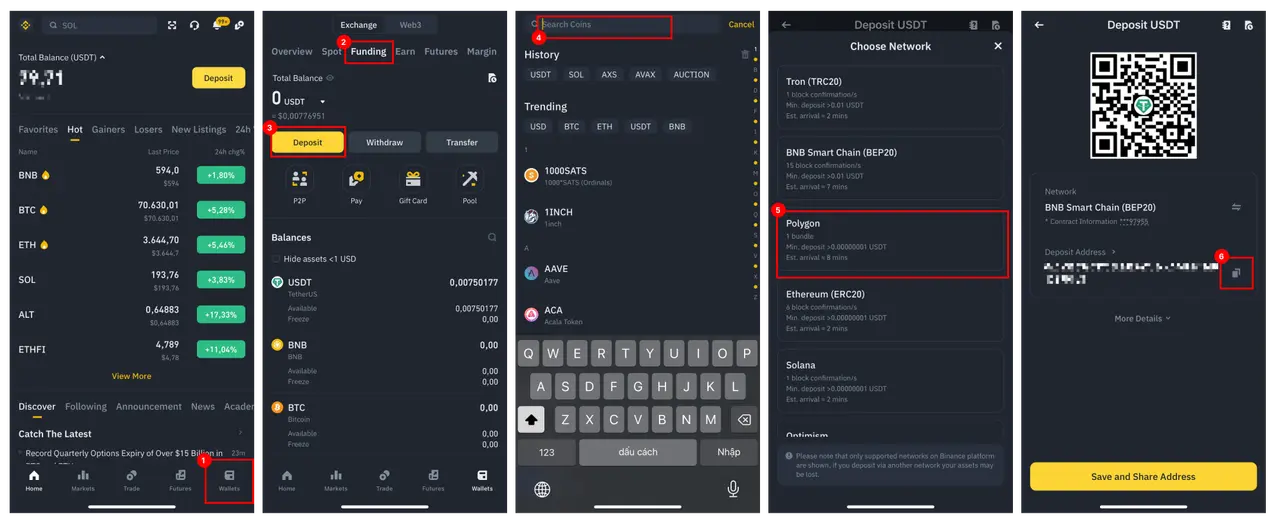
5. Transfer the token from the crypto wallet to Binance.
- Open Coinbase Wallet and click "Send".
- Choose the token and the amount.
- Paste the deposit address you copied from Binance.
- Review the transaction and send.
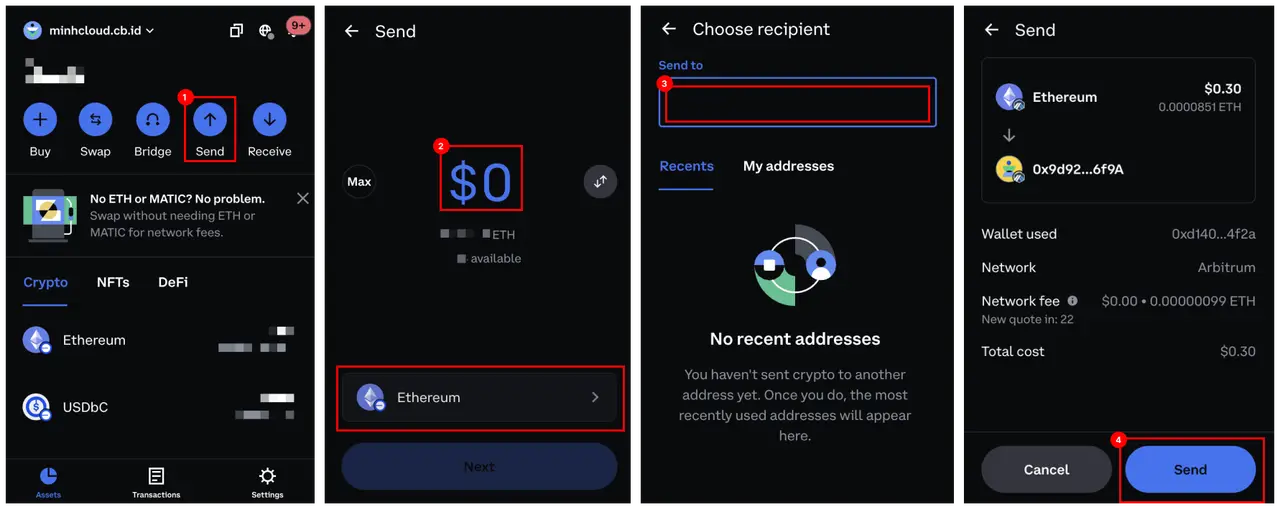
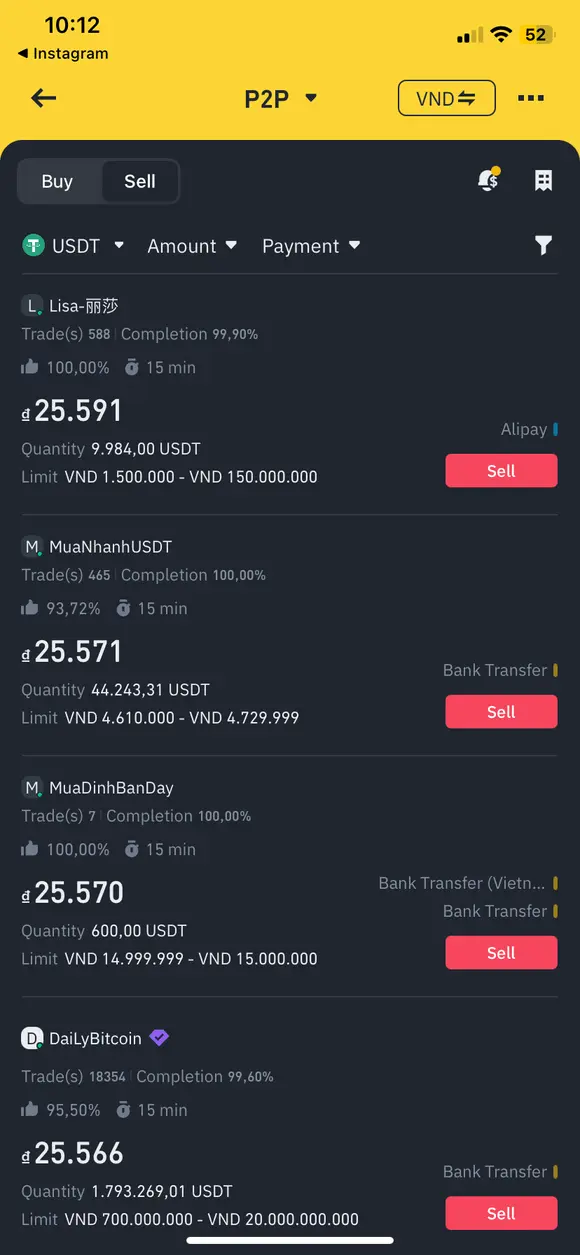
6. Withdraw to the bank. Go to P2P trading and choose a suitable service to withdraw to your bank account.
5.4Bridge DFG from Ethereum to Base
Dwarves introduced a program to help $DFG holders earn $USDC by staking $DFG on Base (see Stake DFG on Base). The original $DFG is on the Ethereum network, so a holder who wants to stake and earn rewards must first move $DFG from Ethereum to Base using a bridge.
Before you bridge, complete these steps:
- Use a Coinbase wallet to store your tokens.
- Get ETH to transfer $DFG from Ethereum to Base, with Binance P2P.
- Withdraw ETH from Binance to your Coinbase wallet.
With Coinbase Wallet ready and some ETH for gas fees, bridge your $DFG to Base:
- Open the DFG Bridge, built by Jack, one of our community members. Connect your wallet.
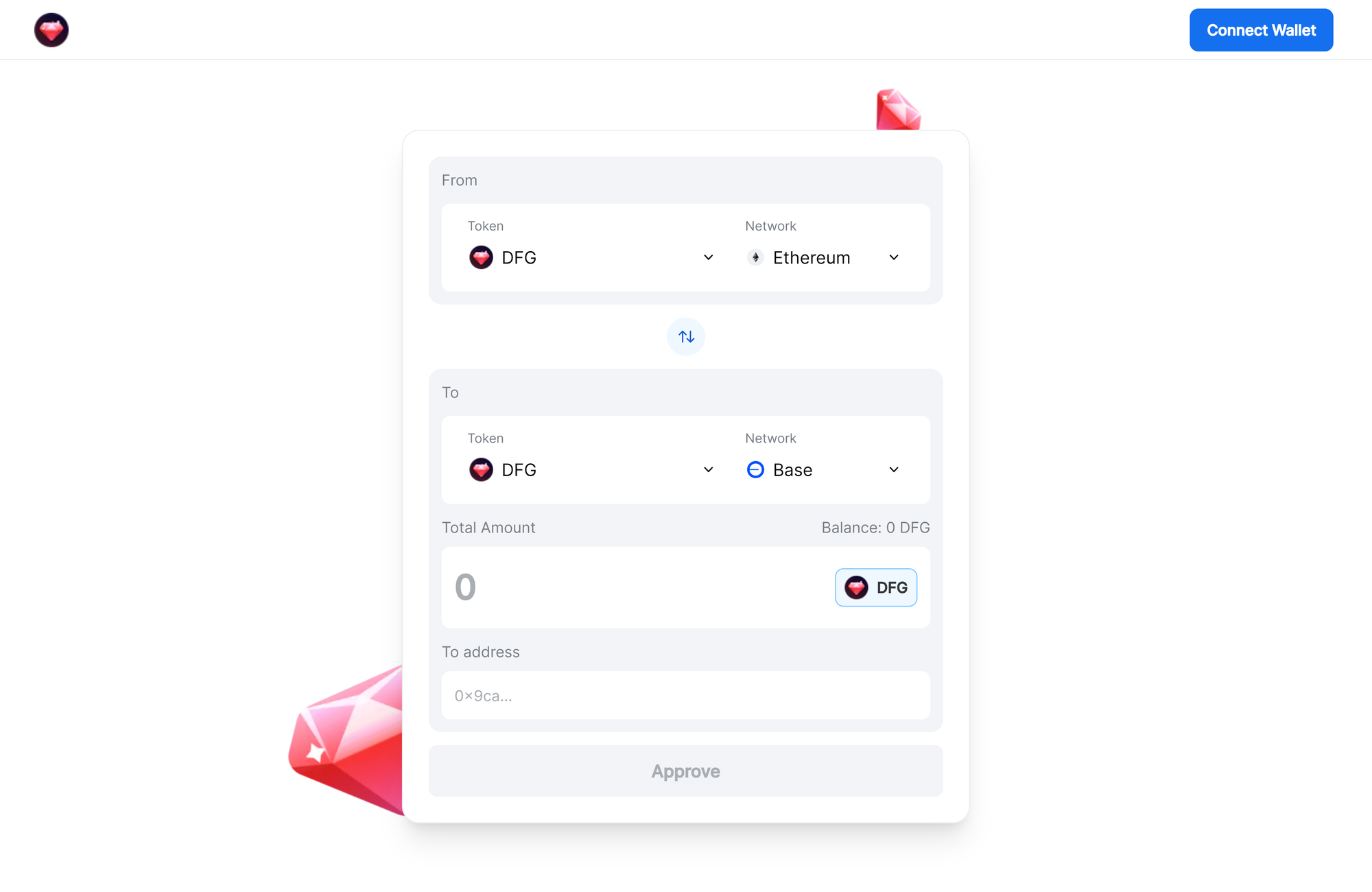
- After the wallet connects, your address shows in the blue box. Fill in:
- In the "From" tab, select "DFG" for Token and "Ethereum" for Network.
- In the "To" tab, choose "DFG" for Token and "Base" for Network.
- Enter the amount you want to send.
- The address on the Base network defaults to your connected wallet.
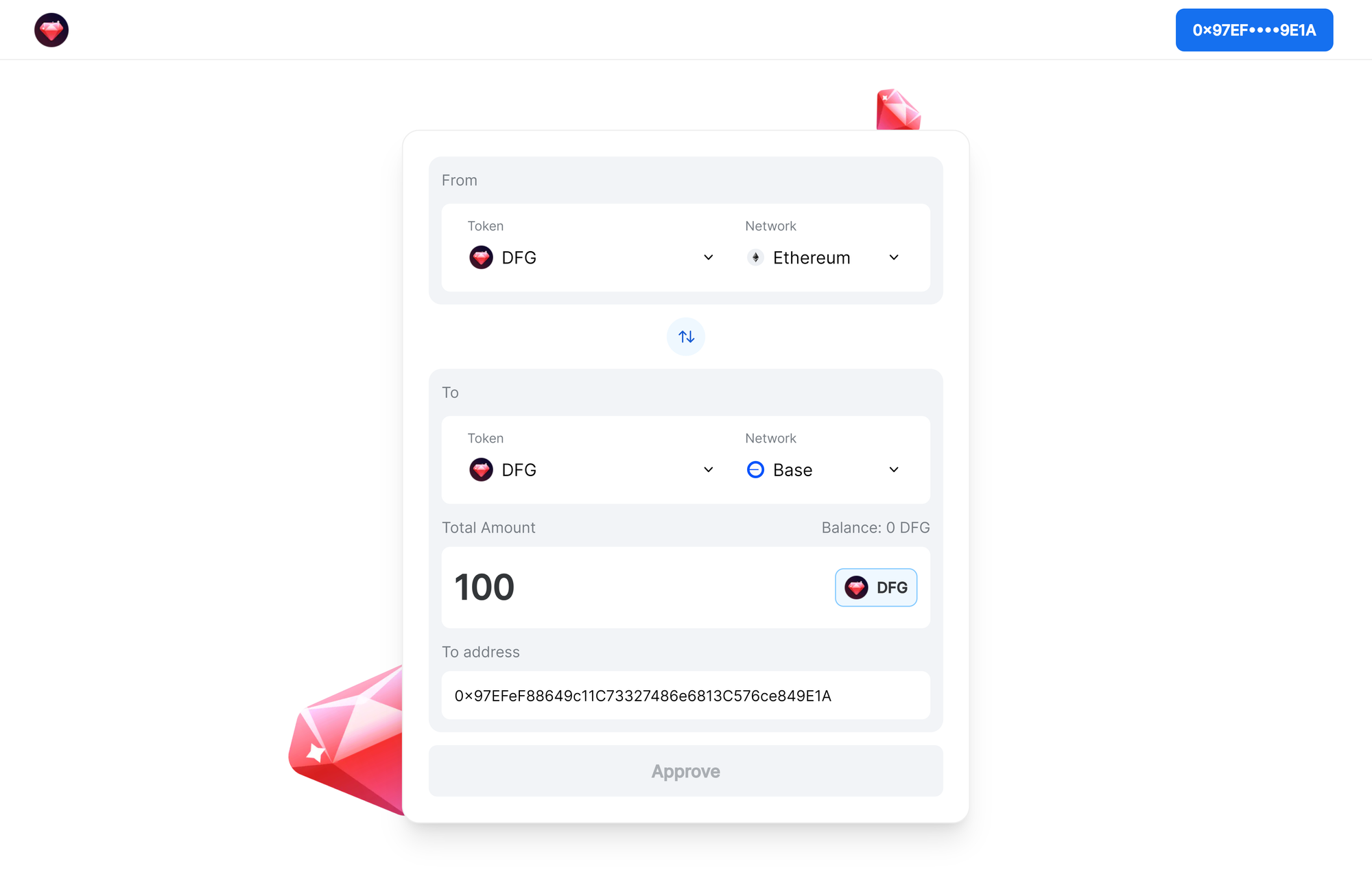
- Click Approve and confirm a couple of transactions in Coinbase Wallet.
- Spending cap: the spending cap limits how much cryptocurrency you can spend at once or over time.
- Approval: each transaction must be approved to ensure awareness and consent, which improves security and prevents unauthorized or accidental transactions.
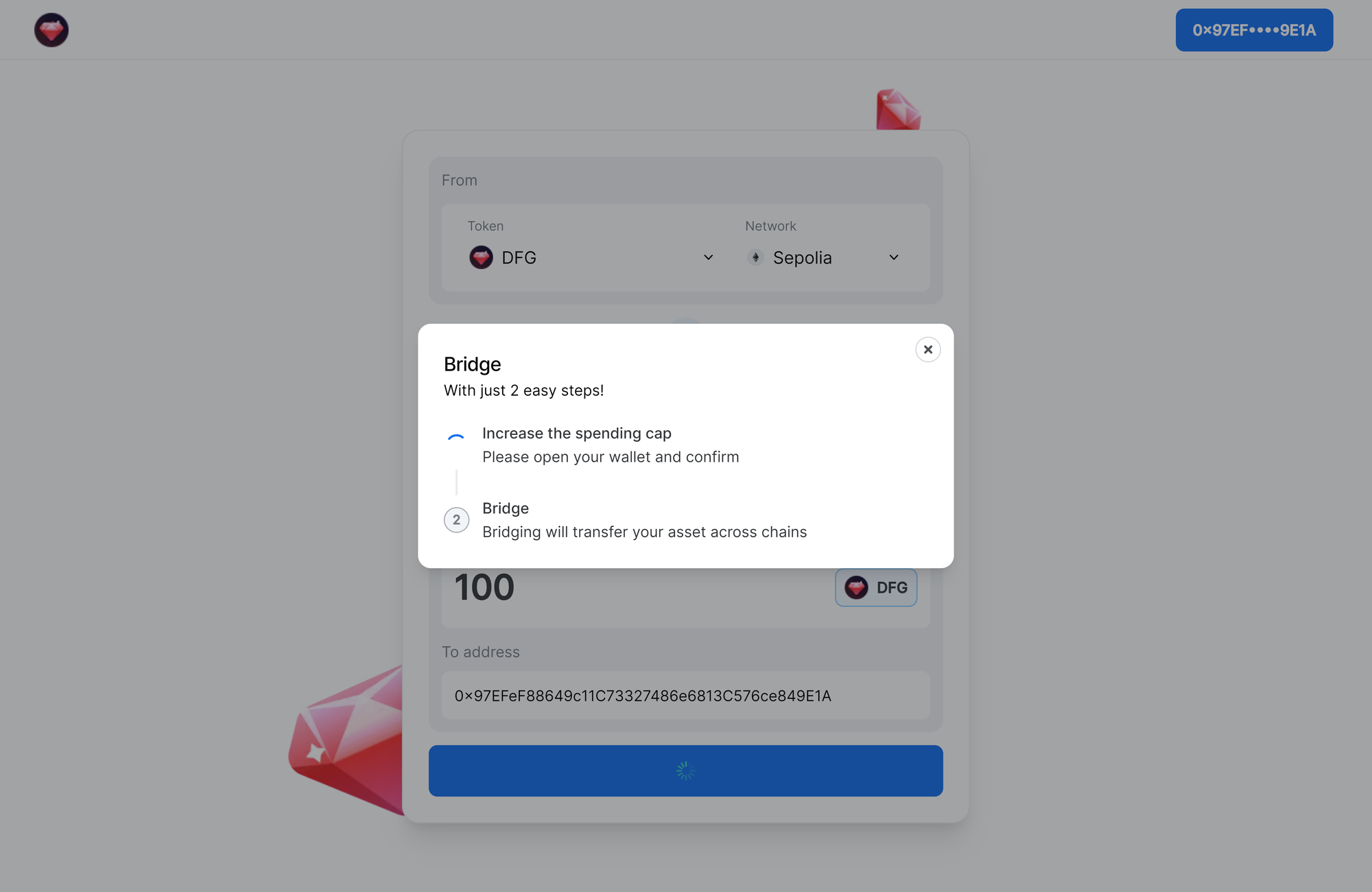
- Wait for your DFG to arrive in your Base wallet.
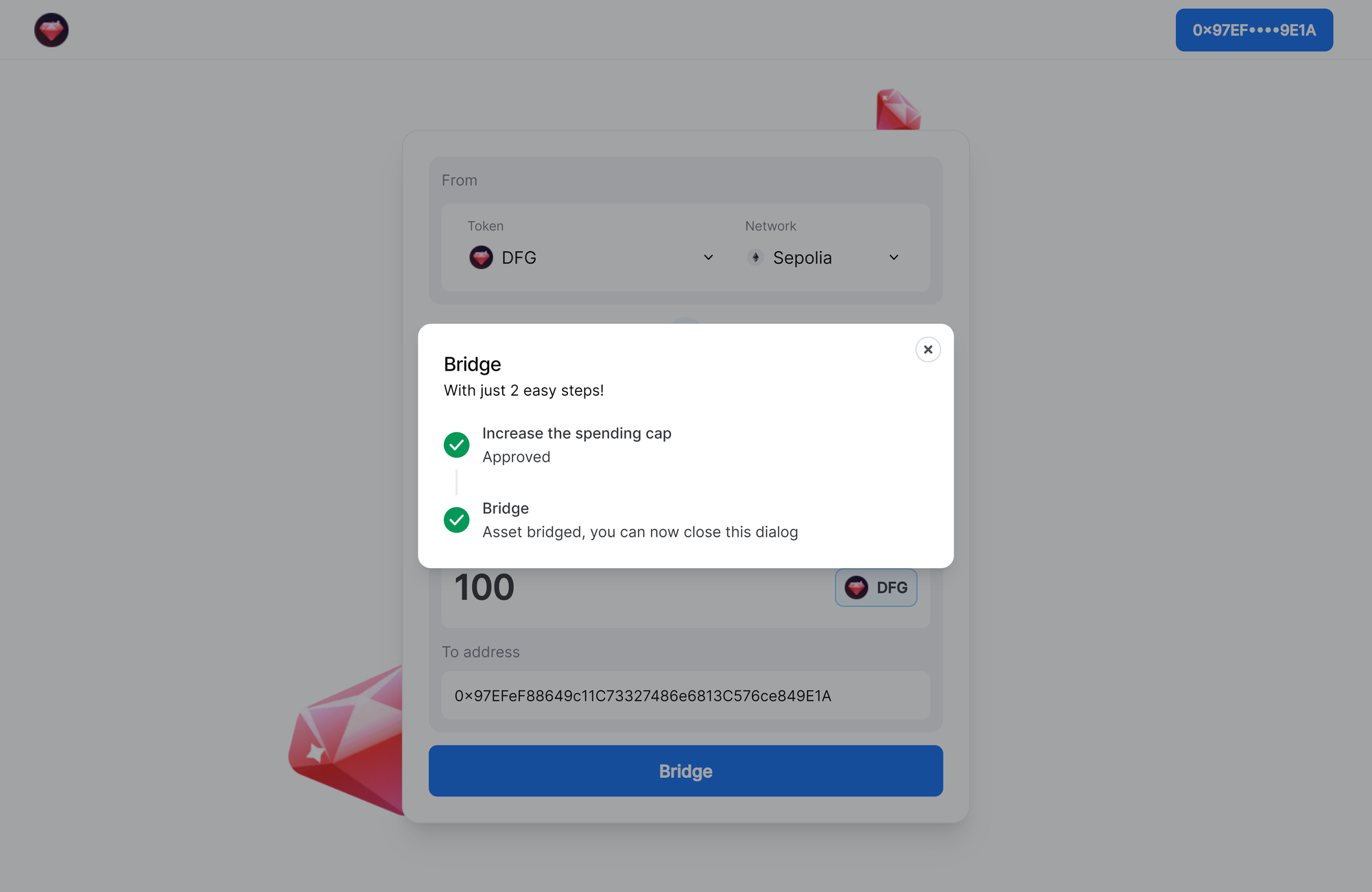
5.5Stake DFG on Base
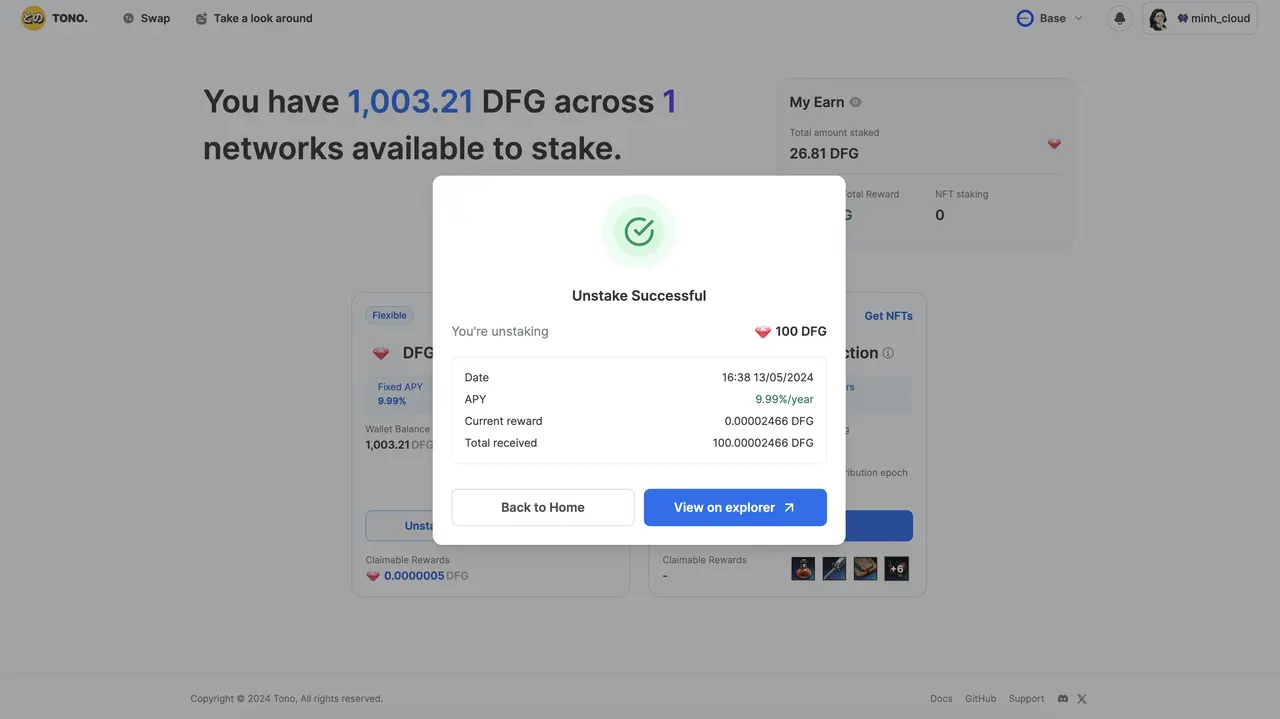
Staking $DFG earns $USDC, merch and more. You need a computer with a browser. The reward is calculated at an APY of 9.99% per year. Before you stake, complete these steps:
- Use Coinbase Wallet to store your tokens (see Set up your wallets).
- Get ETH to transfer $DFG from Ethereum to Base, with Binance P2P.
- Withdraw ETH from Binance to your Coinbase Wallet (guide).
- Move $DFG from Ethereum to the Base network (Bridge DFG from Ethereum to Base).
Stake
- Go to Dwarves Foundation Earning and log in with your Coinbase wallet.
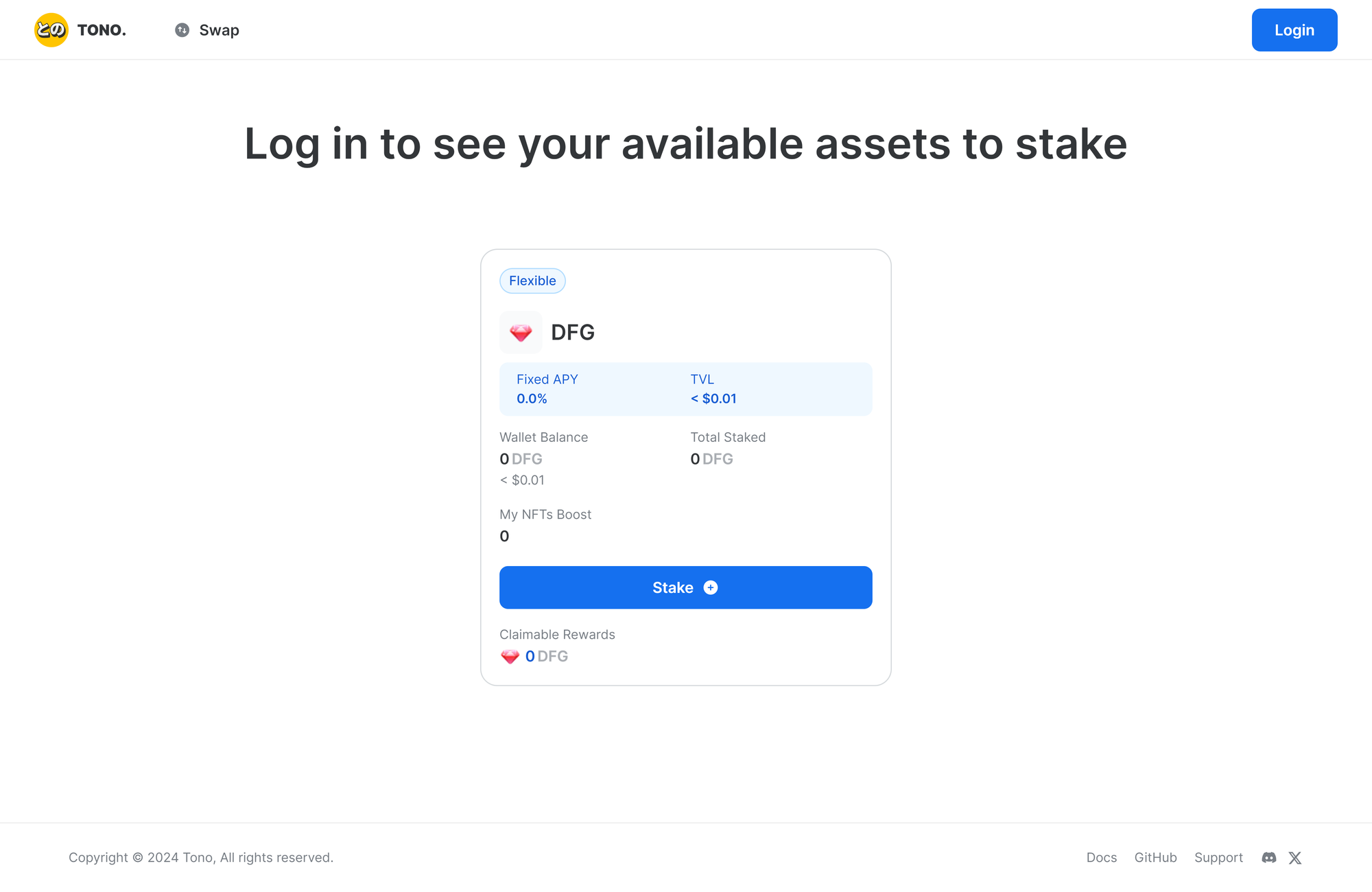
- After login, if your DFG is already bridged from Ethereum, you see your balance.
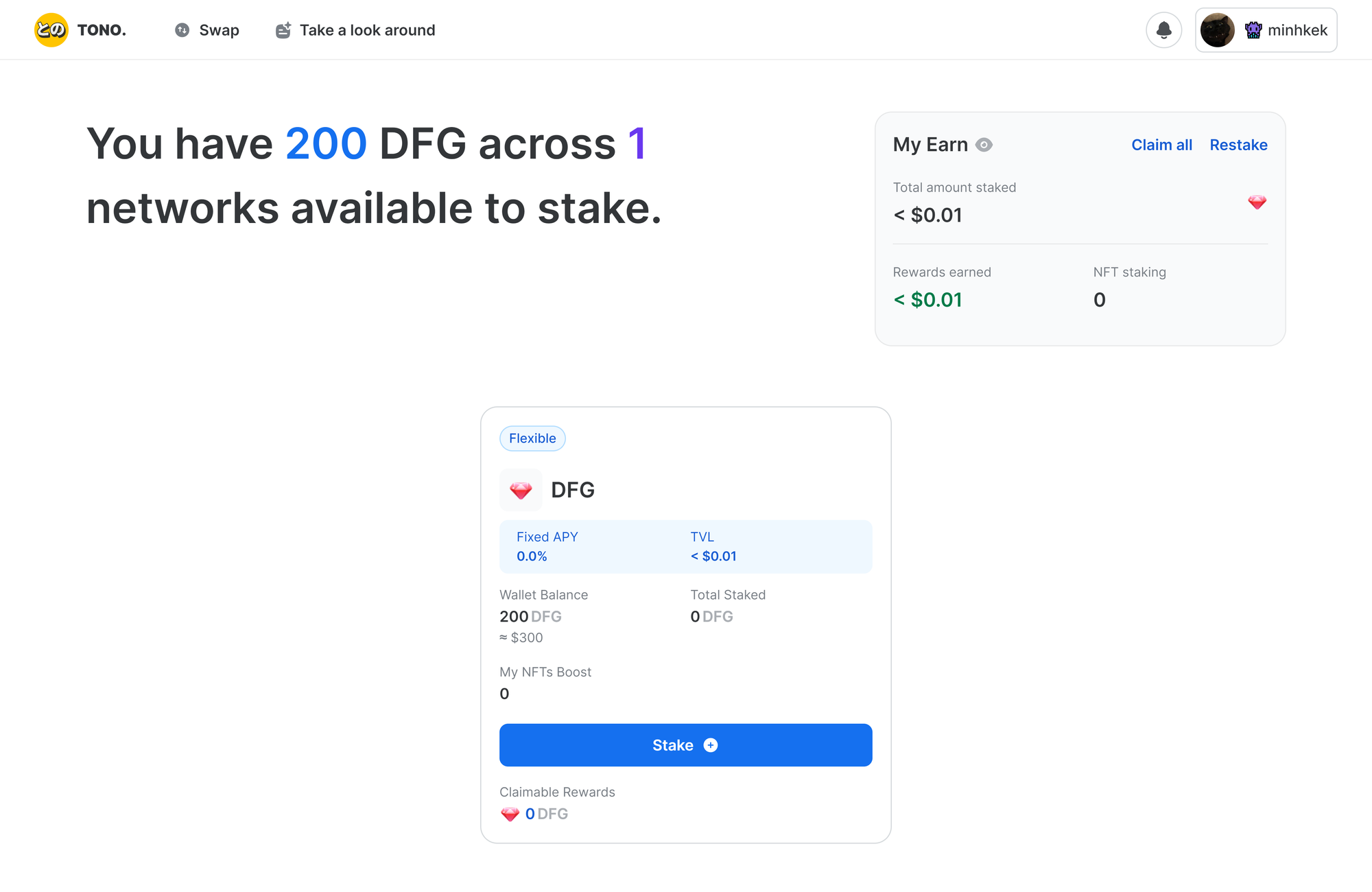
- Click "Stake" and choose the amount to stake.
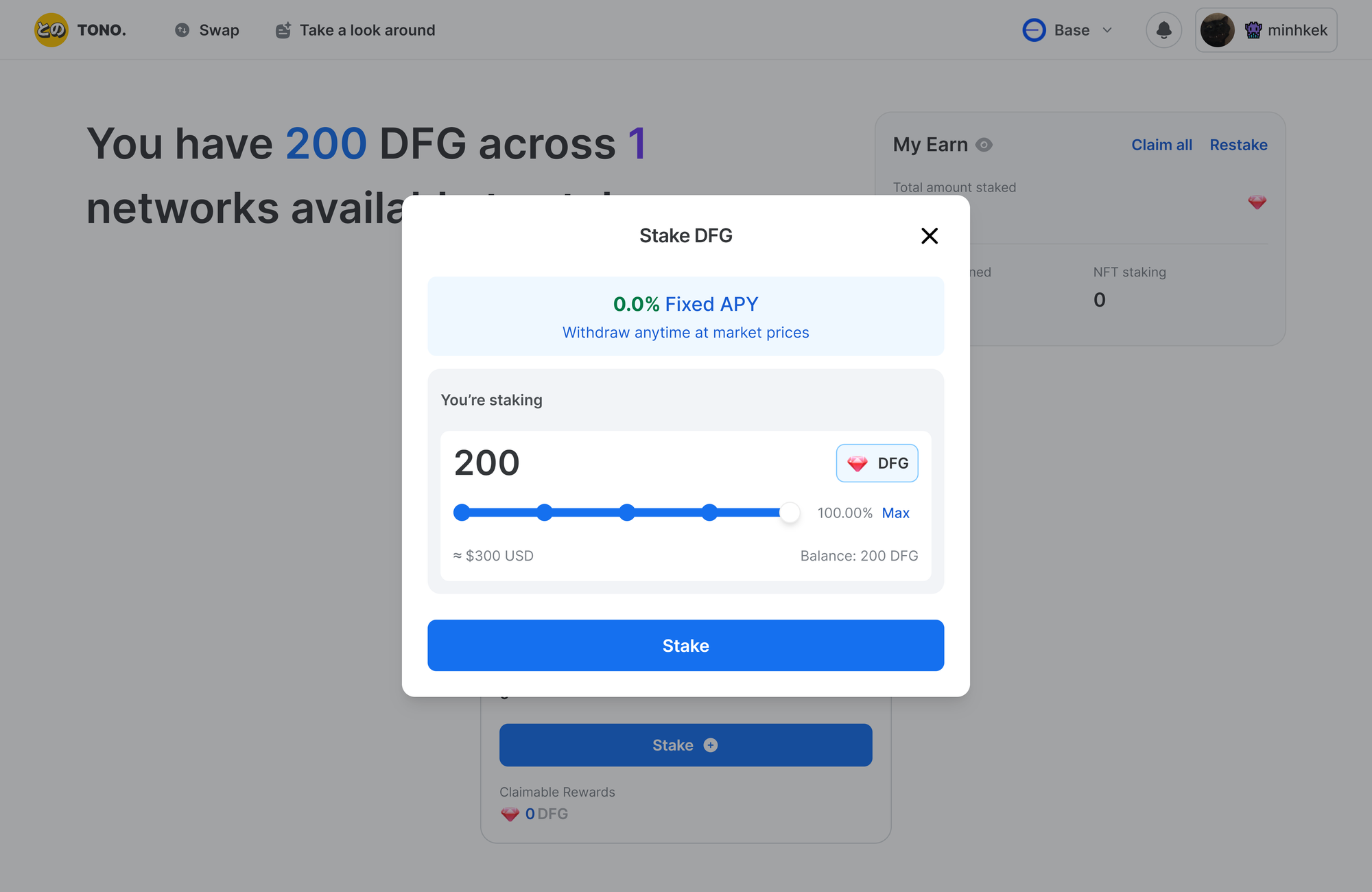
- Click "Stake" again and confirm the 2 transactions in your Coinbase Wallet.
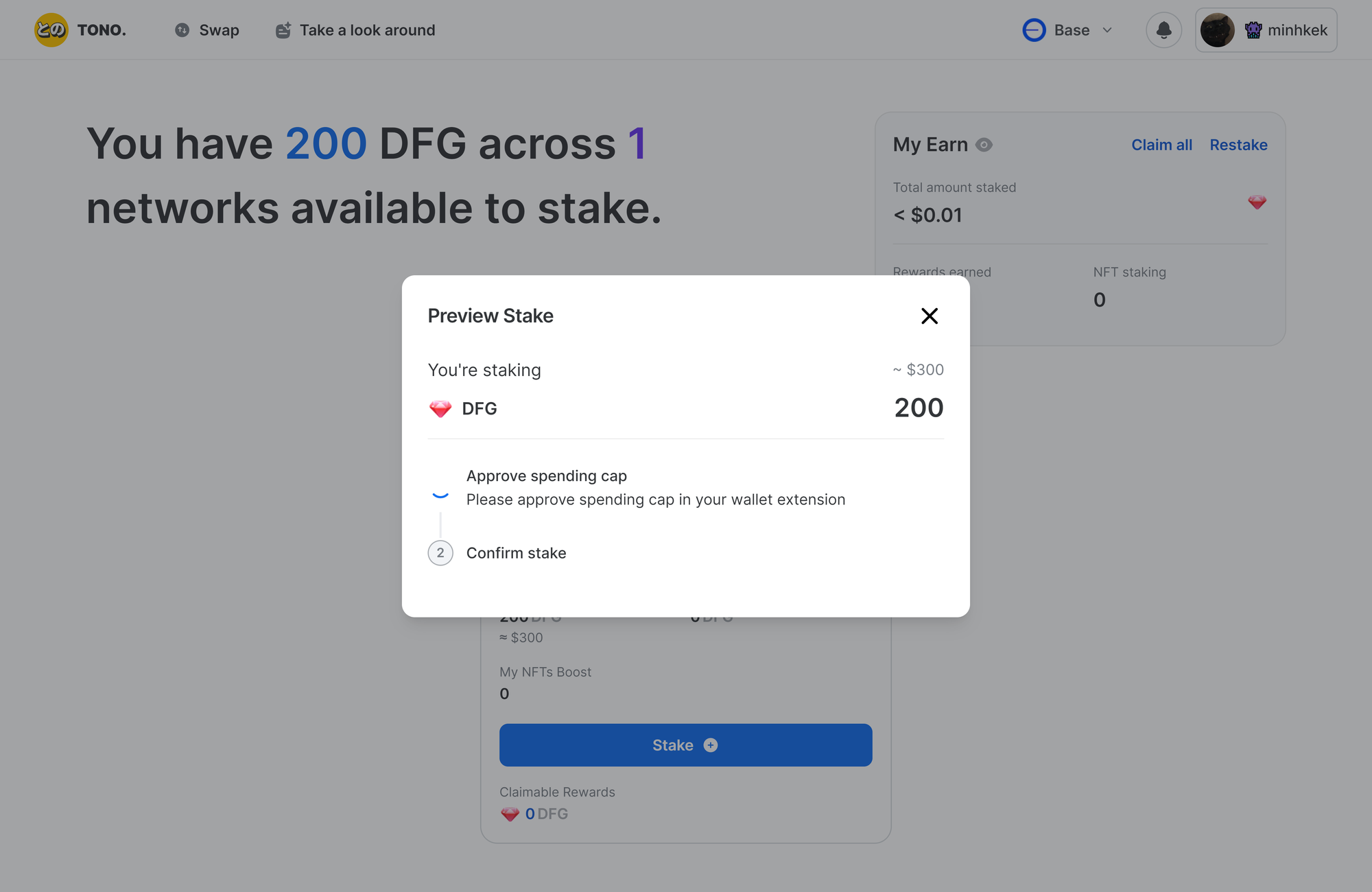
- Your DFG is staked and earns passive rewards.
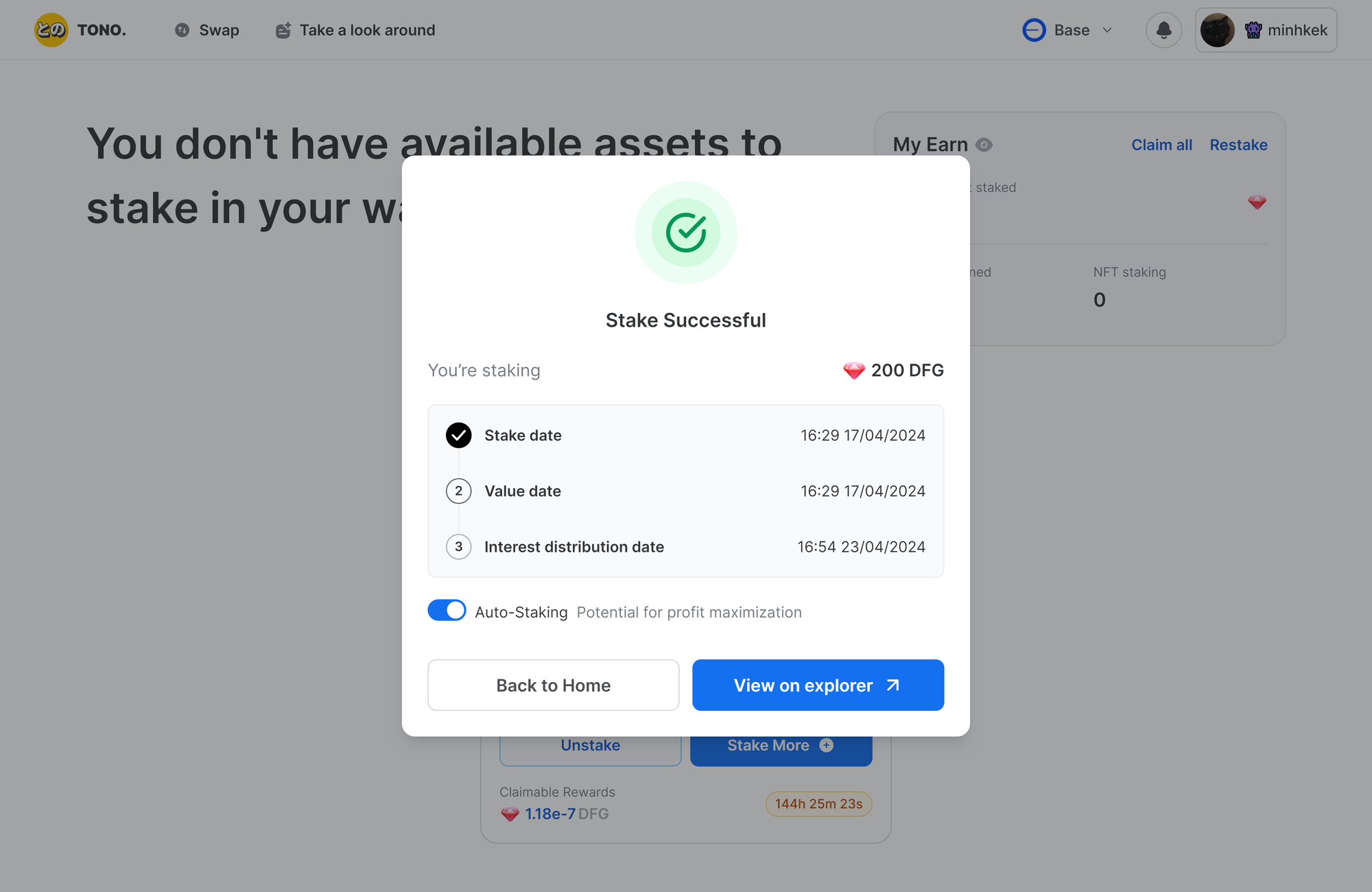
- Track your earnings in the "My Earn" dashboard.
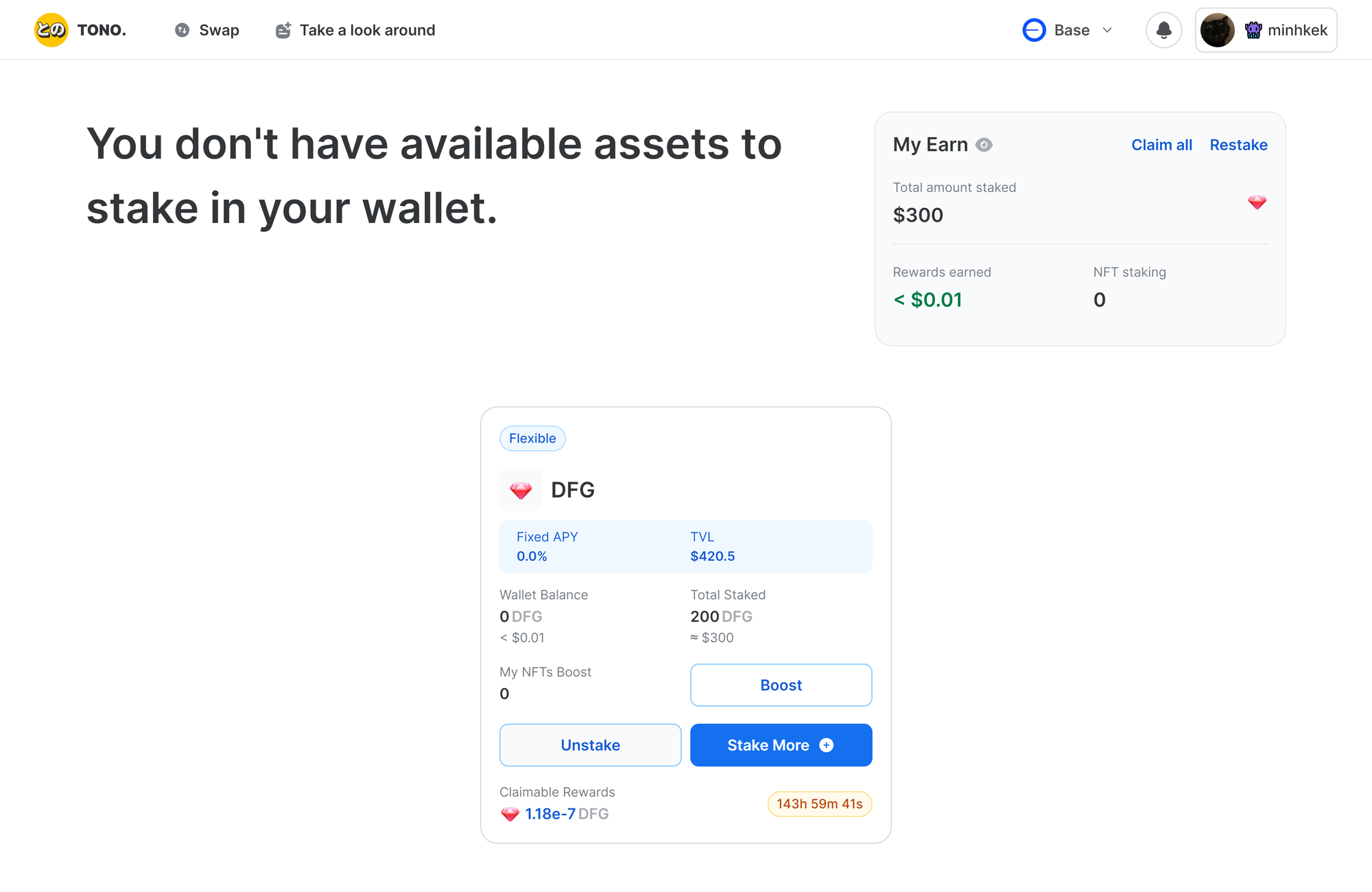
Withdraw DFG and claim the reward
After you lock your DFG for a while and have a decent claimable reward, withdraw your $DFG and the reward from the staking pool.
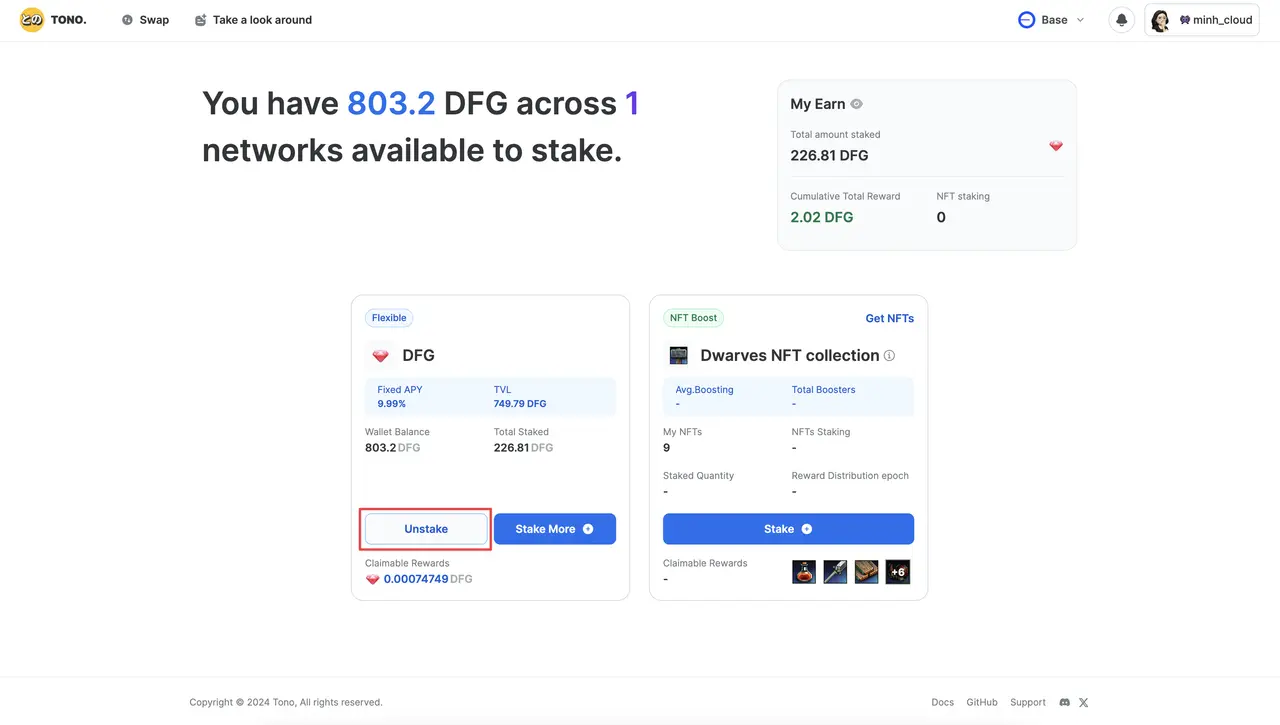
- Go to Dwarves Foundation Earning and log in. If you have staked $DFG, you see the staked amount in the Total Staked section.
- Click "Unstake", choose the amount to withdraw and click "Unstake" again.
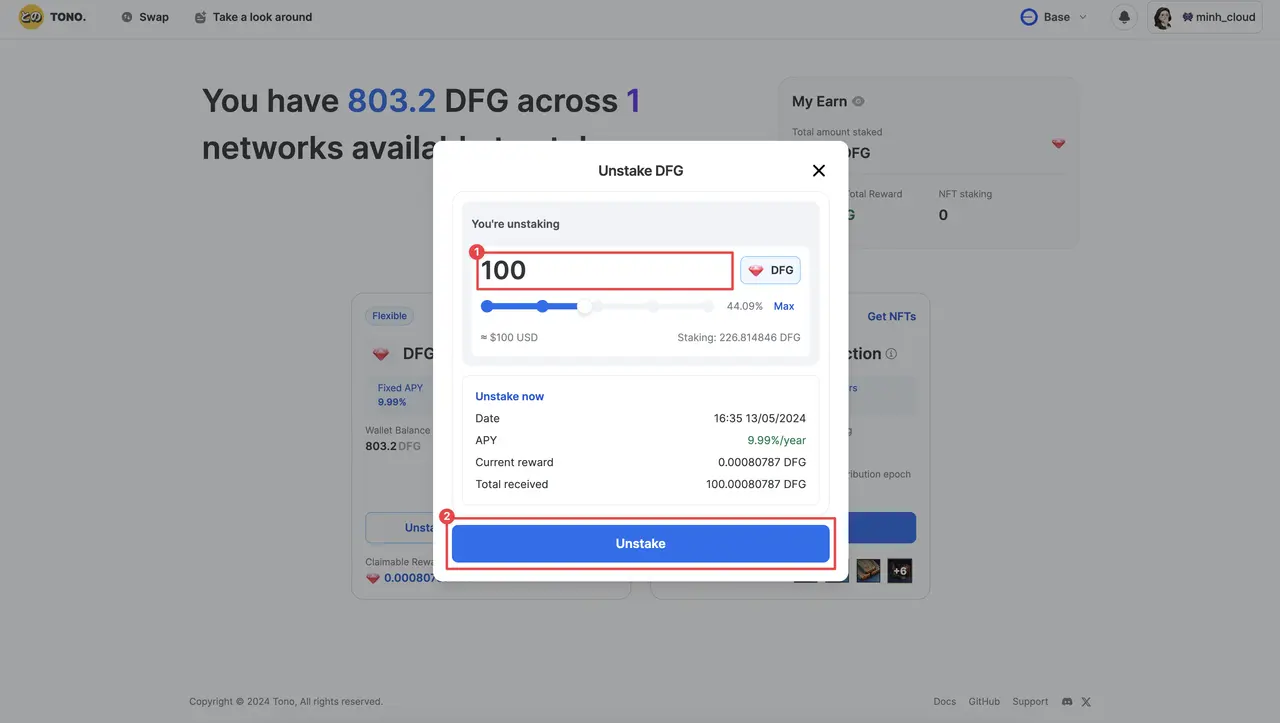
- Confirm the 2 transactions in your Coinbase wallet.
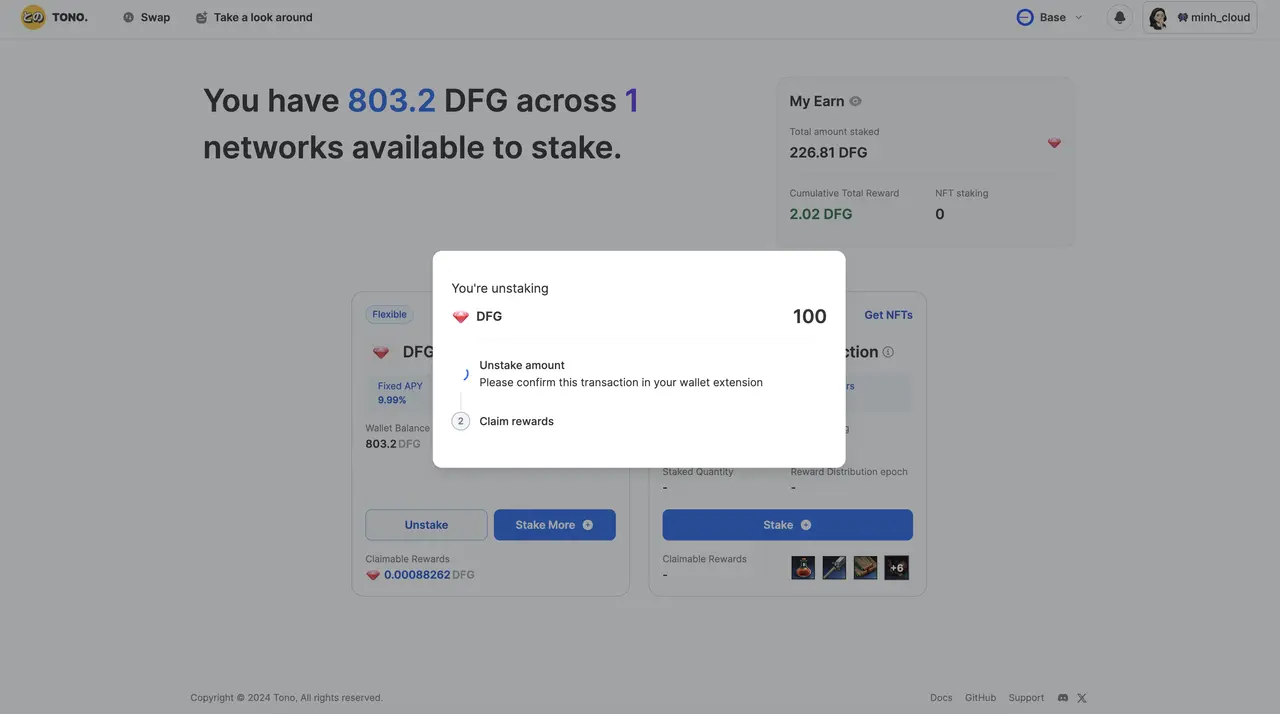
- Your $DFG and all of the recent reward are now in your wallet.